Take a delivery order at the till
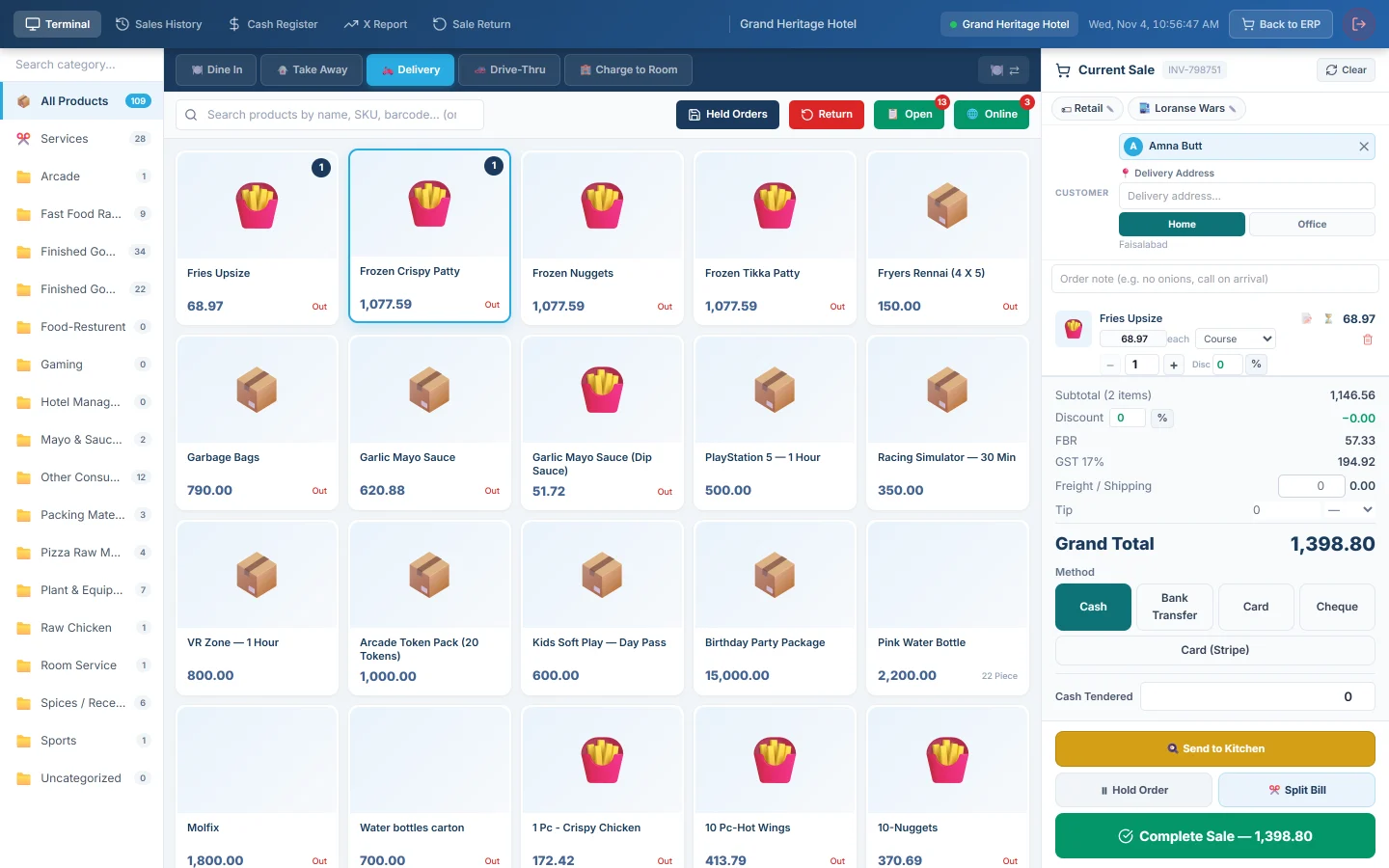
Ring up a home delivery on the restaurant till with the customer's address, send it to the kitchen, give it to a rider and collect the cash on delivery.
A delivery order needs the customer and their address, so the rider knows where to go. You either take the money now, or send the order unpaid and let the rider collect the cash.
Before you begin
- Home Delivery is ticked in Features & Add-ons, so the till shows 🛵 Delivery.
- For the rider and cash-on-delivery steps, your service provider has turned on Delivery & riders, and your riders have the Rider role. See Users & Roles.
- Phone orders taken by a call-centre desk use Call Center instead. See Run a delivery from phone call to cash.
Where to find it
Open Restaurant → Quick Links → POS Terminal.
Enter the order
- Click 🛵 Delivery.
- Click Select Customer and search by name or phone. Click + to add a new customer.
- Under 📍 Delivery Address, pick one of the customer's saved addresses, or + New address….
- For a new address, type it, choose Home or Office, and for an office fill in Landmark, Apartment / Floor and Office Number.
- Click Save to address book to keep the address for next time. A new address is also saved when you send the order.
- Add the dishes.
- Type the delivery charge in Freight / Shipping, if you charge one.
The 🌐 Online button opens Online / Phone Orders. + Create Phone Order there switches to Delivery and opens the customer search for you.
Cash on delivery
- Click 🍳 Send to Kitchen. The order goes to the kitchen and waits under 📋 Open, unpaid.
- To give it a rider, click 📋 Open and pick the rider in 🏍️ Assign Rider on the order. You can also do this on the Dispatch Board.
- When the food is ready, the order shows on the Dispatch Board. Mark it out for delivery, then delivered, there.
- When the rider is back, take their cash on COD Reconciliation.
Marking it delivered posts the sale. Do not also settle the same order on the till, or the sale is counted twice.
Without Delivery & riders, there is no Dispatch Board. Settle the order on the till with Complete Sale when the rider brings the cash back.
Paid now
- Pick the Method and take the payment.
- Click Complete Sale.
The receipt prints with the Deliver-To address and a token number, and the kitchen gets its tickets. The delivery is marked prepaid: there is nothing for the rider to collect. It waits in Ready to Dispatch on the Dispatch Board as Prepaid until you assign a rider, or click No rider needed if the customer collects it.
What happens in the books
A delivery paid at the till posts like any till sale. Freight / Shipping is credited to Shipping Income.
A cash-on-delivery order posts when it is marked delivered: Rider COD Clearing is debited with the bill, and is cleared when you post the rider's cash. See Run a delivery from phone call to cash.
Common questions
The Delivery button is missing. Tick Home Delivery in Features & Add-ons.
The Assign Rider list shows every user. It shows users whose role name contains Rider. With no such role, every user is listed. Give your riders the Rider role.
Does the till add the zone delivery fee? No. Type the charge in Freight / Shipping. Zone fees from Delivery Zones are added on the Call Center.
Merci. Si vous avez encore besoin d’aide, écrivez à info@eloerp.net.