Take a takeaway order
Ring up a takeaway or drive-thru order on the restaurant till, give the customer a token number and call it when the food is ready.
A takeaway order is paid at the counter and collected when it is ready. The customer gets a token number, and the kitchen gets its tickets as soon as the sale is paid.
Before you begin
- The branch or outlet is in restaurant mode and Take Away is switched on. See Set up a branch in restaurant mode.
- The dishes the kitchen prepares are marked Kitchen Item. See Menu Items.
- If your user has Enable Cash Register, open your shift first. See Open and close a shift.
Where to find it
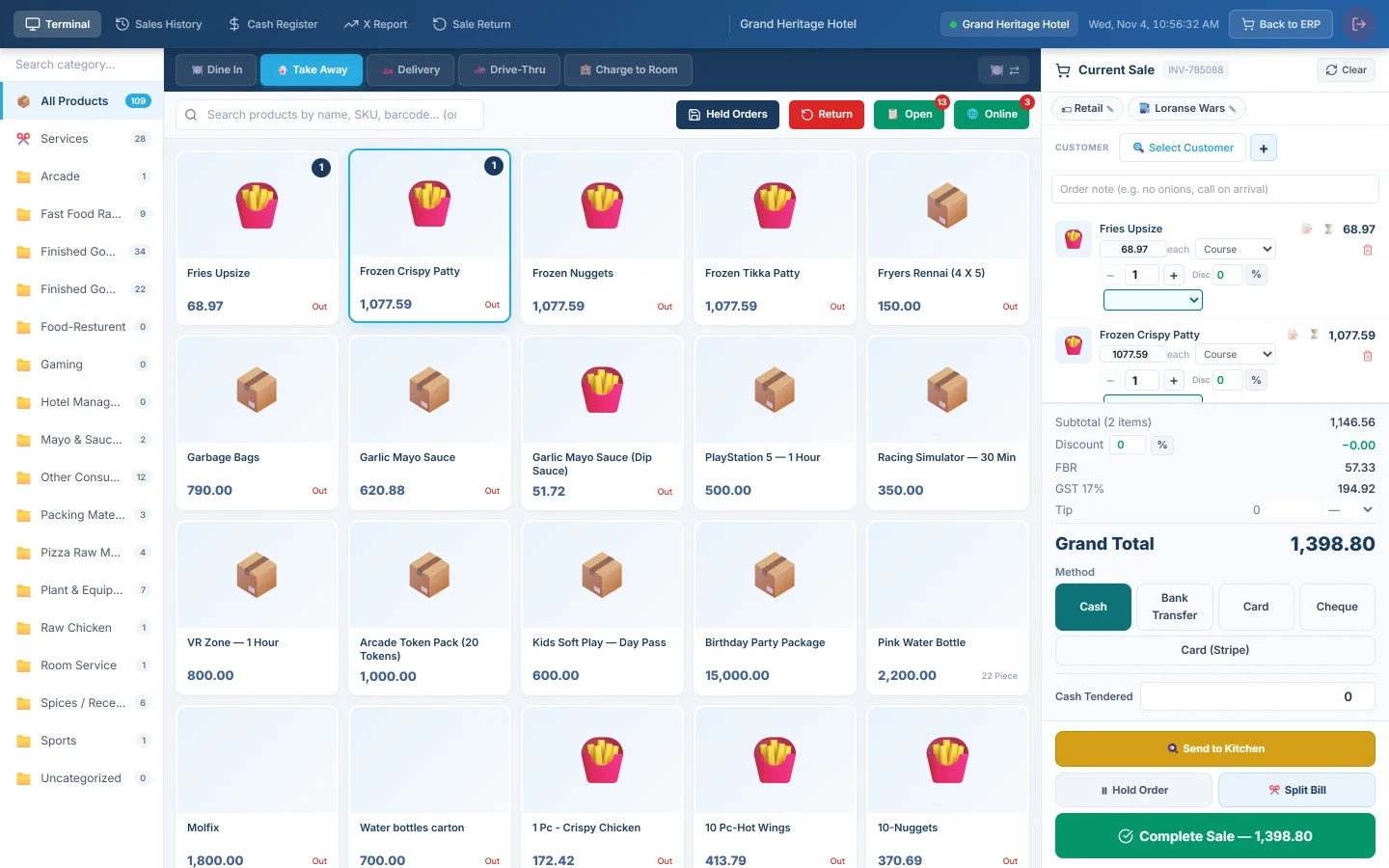
Open Restaurant → Quick Links → POS Terminal. 🥡 Take Away is the order type the till starts on.
Ring up and pay at once
- Check 🥡 Take Away is selected.
- Add the items. Pick options or add a note with 📝 as needed.
- Optionally click Select Customer to put the customer's name on the order.
- Pick the Method and type Cash Tendered for cash.
- Click Complete Sale.
The Sale Complete ✓ window shows the TOKEN NUMBER, such as T-007, and the receipt prints. Give the token to the customer. The kitchen gets tickets for every Kitchen Item on the bill.
Send first, pay on collection
Use this when the customer pays when they pick up.
- Add the items with 🥡 Take Away selected.
- Click 🍳 Send to Kitchen. The order goes to the kitchen and waits under 📋 Open.
- When the customer comes back, click 📋 Open and filter by Take Away.
- Click Open on the order, take the payment and click Complete Sale.
The token number is given out when the sale is paid.
Call the token
When the food is ready, call the token on the Token Display screen over the pickup counter. The kitchen marks the ticket ready on the Kitchen Display System.
Drive-thru orders
- Click 🚗 Drive-Thru.
- Type the car's Vehicle No. and pick the Lane.
- Add the items and send or pay as for takeaway.
The Drive-Thru Queue above the products lists today's drive-thru orders with the vehicle, lane, item count and minutes waiting.
What happens in the books
The same as any till sale: the payment method's account is debited, Sales Revenue and the tax account are credited, and stock leaves at cost. See POS Terminal. Dishes with a recipe use up their ingredients, see Set up recipes and food cost.
Common questions
No token number appeared. Tokens are given only for Take Away, Delivery and Drive-Thru sales. A Dine In sale gets none.
The kitchen did not get a drink. Only items marked Kitchen Item get a ticket when a sale is paid straight away. See Send and reprint a KOT.
Where do the token numbers restart? At T-001 each day.
Merci. Si vous avez encore besoin d’aide, écrivez à info@eloerp.net.