Invoice numbers from the offline till
Why a sale from the offline till prints one number (such as OFF-00012) and is filed under another in Sales Invoices, why those numbers sit out of order with online sales, and how to find the sale.
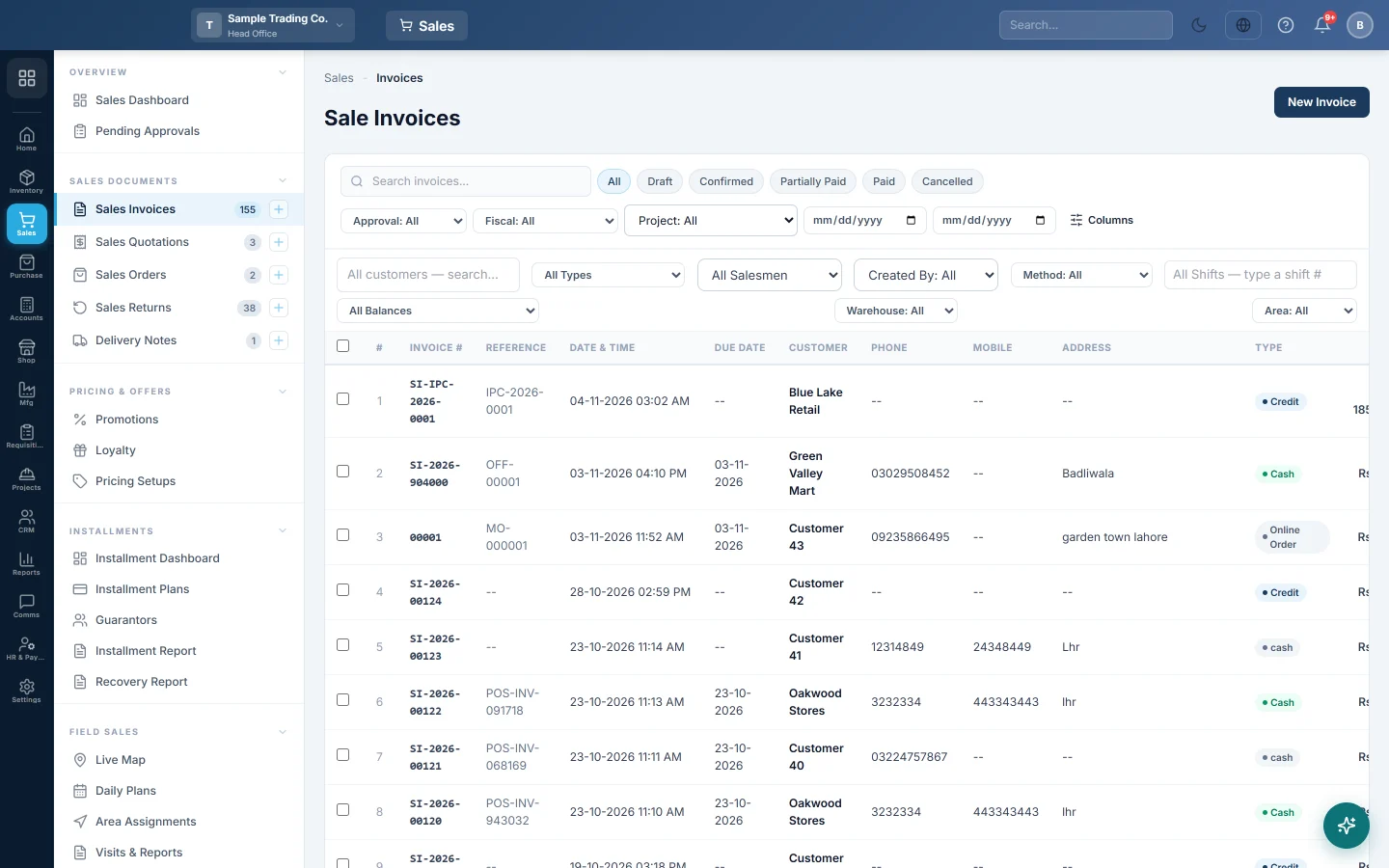
A sale from the offline till has two numbers. The receipt shows the till's own number, and the sales invoice in EloERP gets a number of its own when the sale uploads.
Before you begin
- The sale has synced. See How offline sales sync, and what to do with sync problems.
- You can open Sales Invoices. See Sales invoices.
Where to find it
Open Sales → Sales Documents → Sales Invoices. The Invoice # column has the invoice number and the Reference column has the till's receipt number.
The two numbers
| Number | Example | Where you see it |
|---|---|---|
| The till's receipt number | OFF-00012 | On the printed receipt, in the till's Sales History, and as the invoice's Reference |
| The invoice number | SI-2026-900012 | In Sales Invoices, the ledgers and the reports |
Returns rung on the till work the same way. The till prints a number such as OFF-SR-0003, and the return gets its own number when it uploads.
The paper receipt never changes. The invoice keeps the receipt number as its reference, so you can always match the two.
Why the offline numbers are so high
Each till gets its own block of 1,000 invoice numbers, starting at 900000 and above any number already used. When a block runs out, the till gets the next free one.
This way two tills, or a till and the online POS, never use the same number, even when they cannot reach each other. A branch list can therefore show online sales such as SI-2026-00041 next to till sales such as SI-2026-900215. That is normal.
Gaps in the numbers
Both numbers can skip. The till's OFF counter also counts shift opens, cash movements and other records it uploads. A sale whose upload was retried can also use up an extra invoice number.
A gap alone does not mean a sale is missing. Check the till's Manager Console: when Waiting to sync is 0, every sale it rang has arrived.
Find an offline sale online
- Open Sales Invoices.
- Filter on the date of the sale, and the customer if you know it.
- Read the Reference column for the OFF number on the customer's receipt.
Common questions
A customer brings an OFF receipt for a return. Where is the invoice? Find it by date and the Reference column, then take the return online. The till itself can return only its own sales still in its history.
Two tills printed the same OFF number. Each till counts its own receipts, so this can happen. Their invoice numbers in EloERP are always different.
Will the receipt show the PRA or FBR number? Once the sale is filed. A sale rung offline is filed when it uploads, so reprint it from Sales History to get the QR code.
Can I make offline numbers follow the online ones? No. The separate blocks are what keep numbers from clashing while a till is offline.
شكرًا لك. إذا كنت لا تزال بحاجة إلى مساعدة، راسلنا على info@eloerp.net.