Offline till troubleshooting
What to do when the offline till shows the pairing screen, will not start, will not sync, refuses a sign-in or a sale, or when its numbers or totals look wrong.
Most offline till problems show a clear message on the PC. Find the message or the symptom below and follow the fix.
Before you begin
- Have the Manager PIN for the till. See The Manager Console on the offline till.
- Have a browser open on EloERP with Settings → Configuration → POS Devices.
Where to find it
- Messages on the PC: the Connect this register screen, the start-up screen and the till itself.
- The till's own view: the Manager Console, pages Overview and Sync Queue.
- The office view: POS Devices and Offline POS under Settings → Configuration.
The till shows Connect this register with a message
| Message starts with | What it means | What to do |
|---|---|---|
| "This device was revoked by your administrator." | Someone revoked the till in POS Devices. | If it should keep selling, generate a new pairing code and pair it. |
| "This device was unpaired from the Manager Console." | A manager unpaired it on the PC. | Pair it with a code from POS Devices; use Re-pair on the device to keep its history. |
| "This PC’s secure storage was reset" | Windows was reset, or the Windows user changed. Synced sales are safe. | Click Re-pair on the device and type the new code. |
| "Stop — call support before pairing." | The till's saved pairing or storage could not be read. Unsynced bills may still be on the PC. | Do not pair. Call your service provider first, so they can recover the bills. |
The app does not open
- Starting your point of sale… stays on screen: wait. The first start after a power cut can take up to half a minute.
- "The POS engine is taking too long to start." Close the window and open POS Hub again. If it keeps happening, restart the PC.
- "The POS app hit a problem while starting" Take a photo of the screen and send it to your service provider.
Sales are not reaching EloERP
- Check that the PC has internet.
- In the Manager Console, click Sync now and watch Waiting to sync.
- Open Sync Queue and read Server says on the first row.
- In POS Devices, check Last seen. If it is old, the till is not reaching EloERP at all.
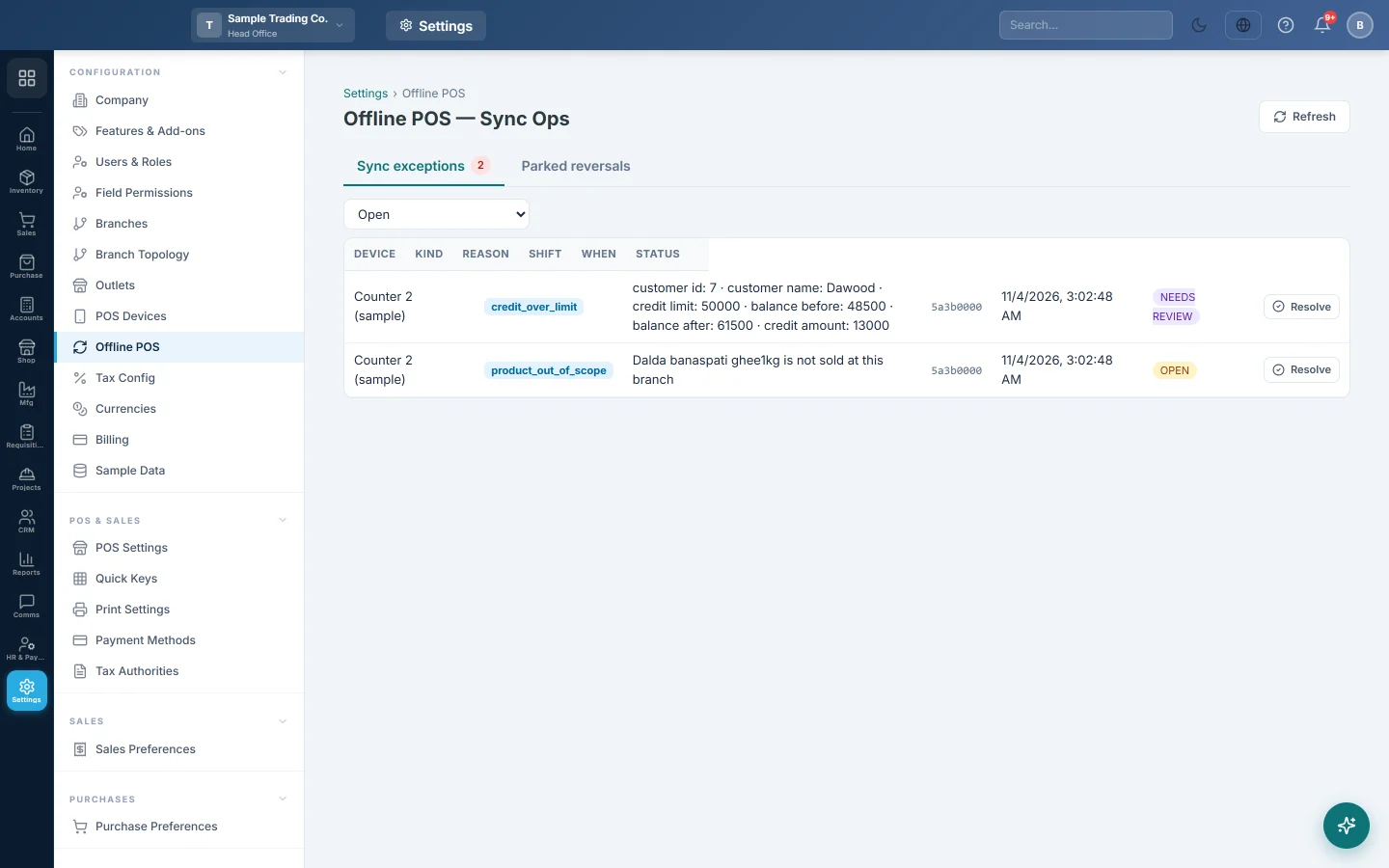
- Check Settings → Configuration → Offline POS for held-back sales.
The details are in How offline sales sync, and what to do with sync problems.
Sales land in the wrong branch
The till files everything in the branch its pairing code was made in. Sync it, unpair it, and pair it again with a code made while you are in the right branch. See Move, unpair or remove the offline till.
A cashier cannot sign in
Read the message under the password box. The fixes are in Sign in on the offline till.
The till refuses a sale
The message says what is not possible offline, for example "Installment sales need the internet." The sale is not recorded. See Sell on the offline till when the internet is down.
Numbers or totals look wrong
- The receipt number differs from the invoice number online. That is normal; see Invoice numbers from the offline till.
- "This till's figures differ from the server." on the X-Report: some sales are still uploading. Wait for Waiting to sync to reach 0.
- The Z-Report will not finalize: the shift has not fully uploaded. See Shifts, X and Z reports on the offline till.
Help from your service provider
While the till is online, your service provider can send it repair actions. Examples are sync now, fetch the catalogue again, or collect its log files. You keep billing while they do.
For a live session, the till shows Remote support wants to connect with the Reason given. Click Allow support to let them in, or Not now.
Common questions
Can I fix it by uninstalling and installing again? Usually not. A plain uninstall keeps the old pairing. Sync first, then use the uninstaller. See Move, unpair or remove the offline till.
Which version of the POS app does the till run? See the Platform column in POS Devices. See Keep the offline till up to date.
The till is fine but the office cannot see today's sales. They are still on the till. Check Waiting to sync in its Manager Console and the PC's internet.
Should I use Force reset to clear an error? No. Force reset this till deletes unsynced sales. Use it only when your service provider asks.
Obrigado. Se ainda precisar de ajuda, escreva para info@eloerp.net.