Keep the offline till up to date
How the offline till's screens update themselves from EloERP, when you need a newer version of the POS app, and how to install it over the old one without losing the pairing or unsynced sales.
The offline till has two parts that update in different ways. Its screens update themselves from EloERP. The POS app around them, which syncs, prints and runs the Manager Console, updates when you install a newer version.
Before you begin
- A newer POS app installer comes from your service provider.
- Your role can open Settings → Configuration → POS Devices to check versions.
Where to find it
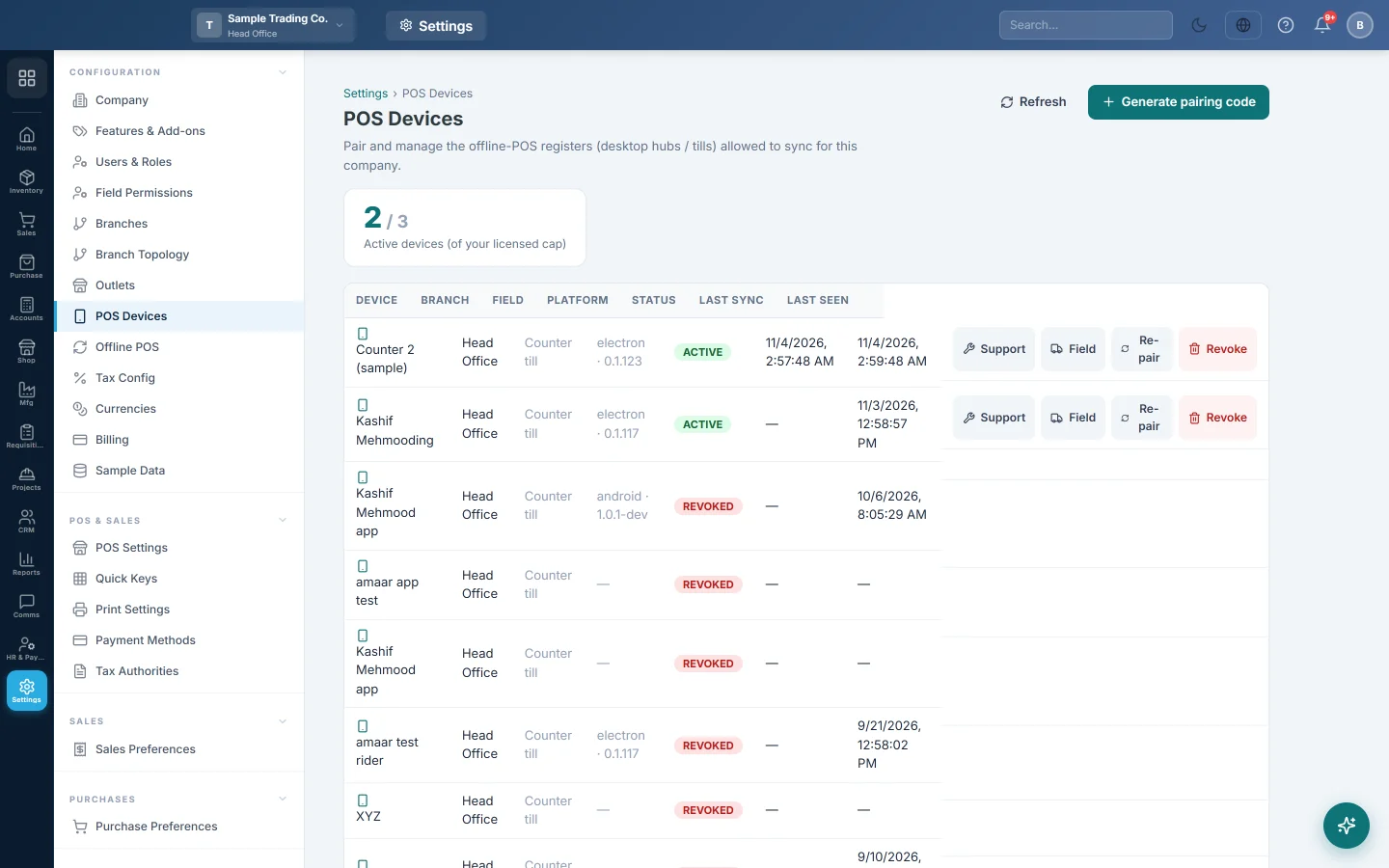
The version of each till is in Settings → Configuration → POS Devices, in the Platform column, after the kind of device.
The screens update themselves
The selling screen, Sales History, Cash Register, X Report and Sale Return are the same screens as online. When EloERP gets new screens, the tills pick them up:
- The POS app checks for new screens when it starts and every 6 hours while online.
- An open till switches to the new screens only when the bill is empty and nobody has touched it for 2 minutes. A sale in progress is never interrupted.
You do not need to do anything.
Install a newer POS app
- On the till, open the Manager Console and check that Waiting to sync is 0. Click Sync now if not.
- Close the shift if you are changing the app at the end of the day.
- Restart the PC, so the old app is not running.
- Run the new POS app installer. It installs over the old version and opens the till.
- Sign in and ring a test sale.
- In POS Devices, click Refresh. The Platform column shows the new version once the till has been online for a minute.
The pairing, unsynced sales, the Manager PIN and the printer settings are kept. You do not pair the till again.
Common questions
When do I need a new POS app? When your service provider tells you a version fixes something you use, such as printing or offline credit sales. Fixes to the screens alone reach you without it.
The till still shows old screens after an update online. Older versions of the POS app could not update their screens for a Windows user without administrator rights. Install the latest POS app.
Will an update delete my sales? No. The till's data is kept apart from the app and survives an update.
The Platform column shows no version. The till has not reported since its last start, or it runs a very old version. Bring it online, or install the latest POS app.
Does every till in the branch need the update? Yes. Each PC runs its own copy of the POS app. Install the new version on each one.
Terima kasih. Jika masih butuh bantuan, kirim email ke info@eloerp.net.