Reports
Restaurant reports for a date range: sales by table and section, menu engineering, waiter performance, channels and dayparts, and recipe food cost.
Restaurant Reports gathers the restaurant's numbers for a date range in five tabs: what each table and section sold, which dishes earn their place, how each waiter did, where and when orders come from, and what your recipes cost.
Before you begin
- Your role needs View Restaurant Reports. See Users & Roles.
- The reports read orders taken in restaurant mode: on the till, the waiter app, QR codes and the call centre.
- Margin and food cost need cost prices on your items and ingredients. See Menu Items.
Where to find it
Open Restaurant → Analytics → Reports.
Run a report
- Click a tab.
- Set From and To. The range starts on the first of this month.
- Click Apply. Every tab reloads for the new dates.
Print prints the page. Excel downloads the tab you are on as a spreadsheet.
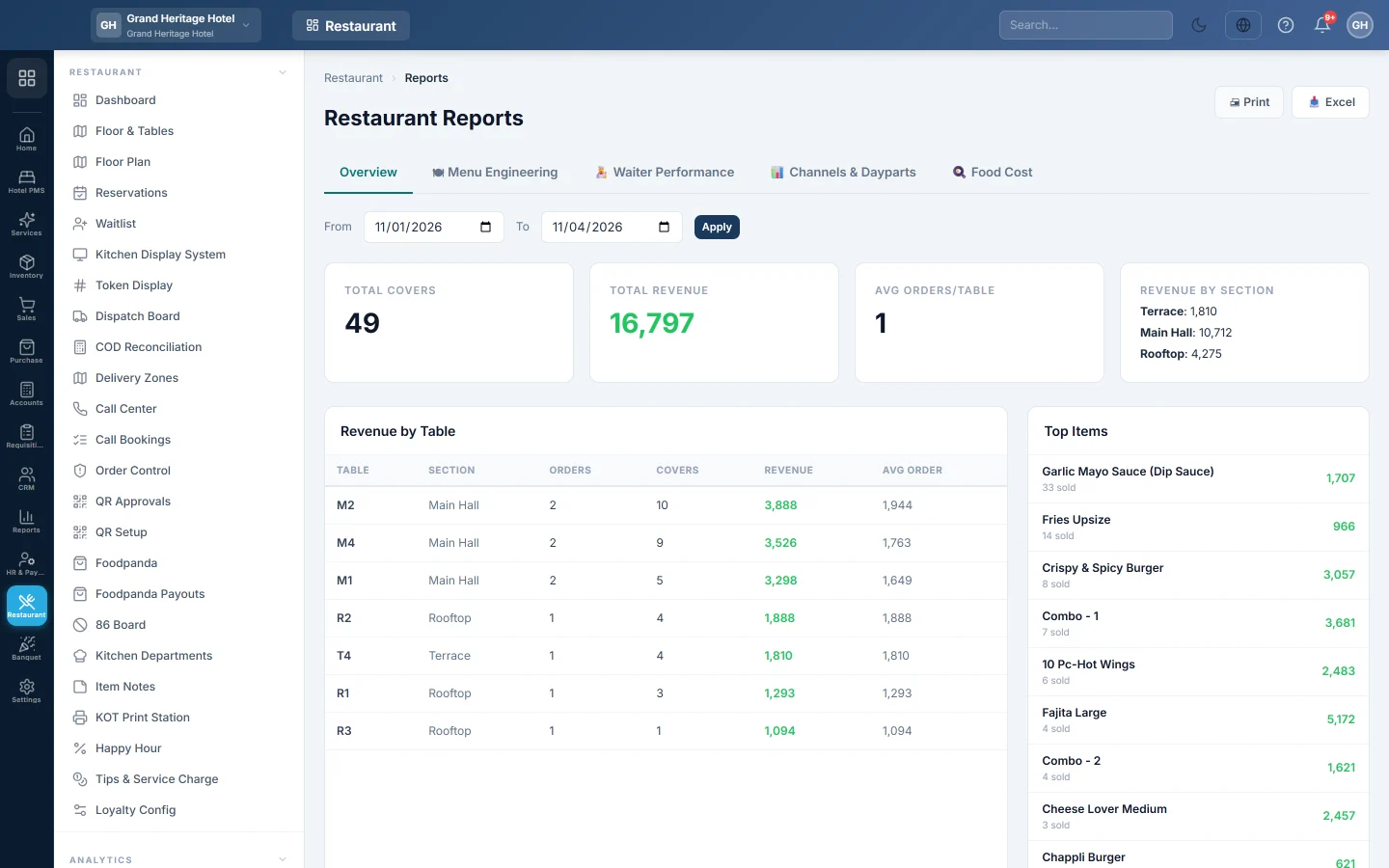
Overview
For the branch selected in the top bar:
- Total Covers: the guests seated, from the guest count on each order.
- Total Revenue: the order totals of tables in the range.
- Avg Orders/Table: orders per table.
- Revenue by Section: revenue per floor section, such as Hall or Terrace.
- Revenue by Table: each table's Orders, Covers, Revenue and Avg Order.
- Top Items: the ten items sold most, by quantity.
- Peak Hours: orders by hour of the day.
The Overview counts orders by the day they were opened, including orders not yet paid. Cancelled and voided orders are left out.
Menu Engineering
Each dish sold on a confirmed restaurant bill is placed in one of four groups, by how many sold and its margin per plate:
| Group | Means | What to do |
|---|---|---|
| ⭐ Star | Popular and profitable | Protect and promote it. |
| 🐴 Plowhorse | Popular, low margin | Re-cost or re-price it. |
| 🧩 Puzzle | Profitable, sells slowly | Reposition or feature it. |
| 🐢 Dog | Slow and low margin | Consider removing it. |
A dish is popular when it sells at least 70% of an equal share of all plates. It is profitable when its margin per plate is at or above the average. Tick Dine-in only to leave out takeaway and delivery.
The table lists each item's Category, Class, Units, Revenue, Margin and Margin %.
Waiter Performance
One row per waiter on orders in the range: Orders, Covers, Net Sales, Avg Check, Tips, Voids, Comps and Avg Turn. Avg Turn is the average minutes from opening to closing a dine-in order. Cancelled bills add nothing to Net Sales.
Channels & Dayparts
From confirmed restaurant bills:
- By Channel: orders, revenue, average check and share for each source, such as the till, the waiter app, QR and the call centre.
- By Daypart: Breakfast (5 to 10 am), Lunch (11 am to 3 pm), Tea (4 to 5 pm), Dinner (6 to 10 pm) and Late Night.
- Hourly Sales: a bar for each hour. Point at a bar to see its revenue and orders.
Food Cost
- Theoretical Plate Cost: each dish that has a recipe, with its Sale Price, Food Cost, Margin and Food Cost %. The percentage is green up to 30%, amber up to 40% and red above.
- Ingredient Consumption (period): the ingredients taken out of stock by dishes sold in the range, with quantity and cost.
- Actual Food Cost (period) at the top is the total of that consumption.
Only made-to-order dishes are listed: a dish whose Stockable box is off on its product, with its ingredients on the product. A dish made by a manufacturing bill of materials is not listed here. See Menu Items.
Common questions
Menu Engineering is empty. It reads confirmed bills only. Bills still open, or sales not taken in restaurant mode, are not counted.
Why do the Overview and Channels totals differ? The Overview adds up order totals by the day the order was opened, whether paid or still open. Channels and Menu Engineering read confirmed bills only. Neither counts cancelled or voided orders.
Do the other tabs follow the branch in the top bar? The Overview does. Menu Engineering, Waiter Performance and Channels & Dayparts cover all branches.
A dish shows no food cost. It has no recipe, or its ingredients have no cost price. Add the ingredients on the product. See Menu Items.
Where is the day's summary? The Dashboard shows today's sales, open orders and the kitchen at a glance.
谢谢。 如果仍需帮助,请发邮件至 info@eloerp.net。