Take a payment and pay a supplier
Record money a customer pays you with a receipt voucher, and money you pay a supplier with a payment voucher, settling their invoices.
Money a customer pays you later goes on a Receipt Voucher (RV). Money you pay a supplier goes on a Payment Voucher (PV). Both can settle a particular invoice, so its balance goes down and it shows as paid.
Before you begin
- Customers and suppliers with a ledger. Only they can owe or be owed money. See All Customers and All Suppliers.
- Payment methods for cash, bank and card, each linked to its account. See Payment Methods.
- Your role needs permission to create vouchers.
Where to find it
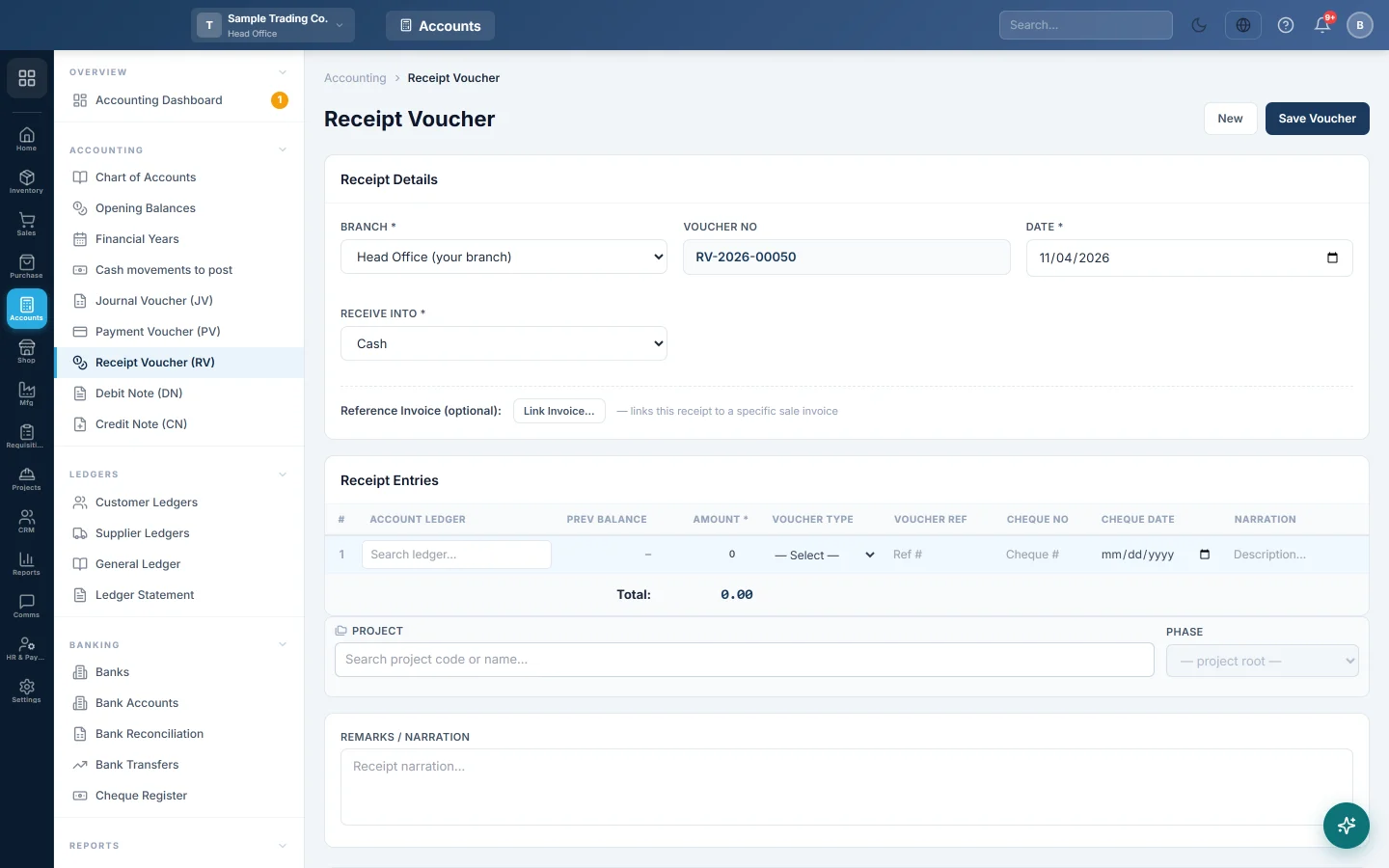
- Receipts: Accounts → Accounting → Receipt Voucher (RV), or the New RV quick action.
- Payments: Accounts → Accounting → Payment Voucher (PV), or the New PV quick action.
Take a payment from a customer
- Open Accounts → Accounting → Receipt Voucher (RV).
- Check the Date. The Voucher No fills in by itself.
- In Receive Into, choose where the money goes, for example Cash or your bank.
- In Receipt Entries, pick the customer in Account Ledger. Prev Balance shows what they owe now.
- Enter the Amount received.
- To settle a particular invoice, set Voucher Type to Sale Invoice. Then pick the invoice in Voucher Ref; the list shows each unpaid invoice with its balance.
- For a cheque, fill in Cheque No and Cheque Date.
- Add a note in Remarks / Narration if you like.
- Click Save Voucher. It appears in Receipt Vouchers below, where you can print it.
Pay a supplier
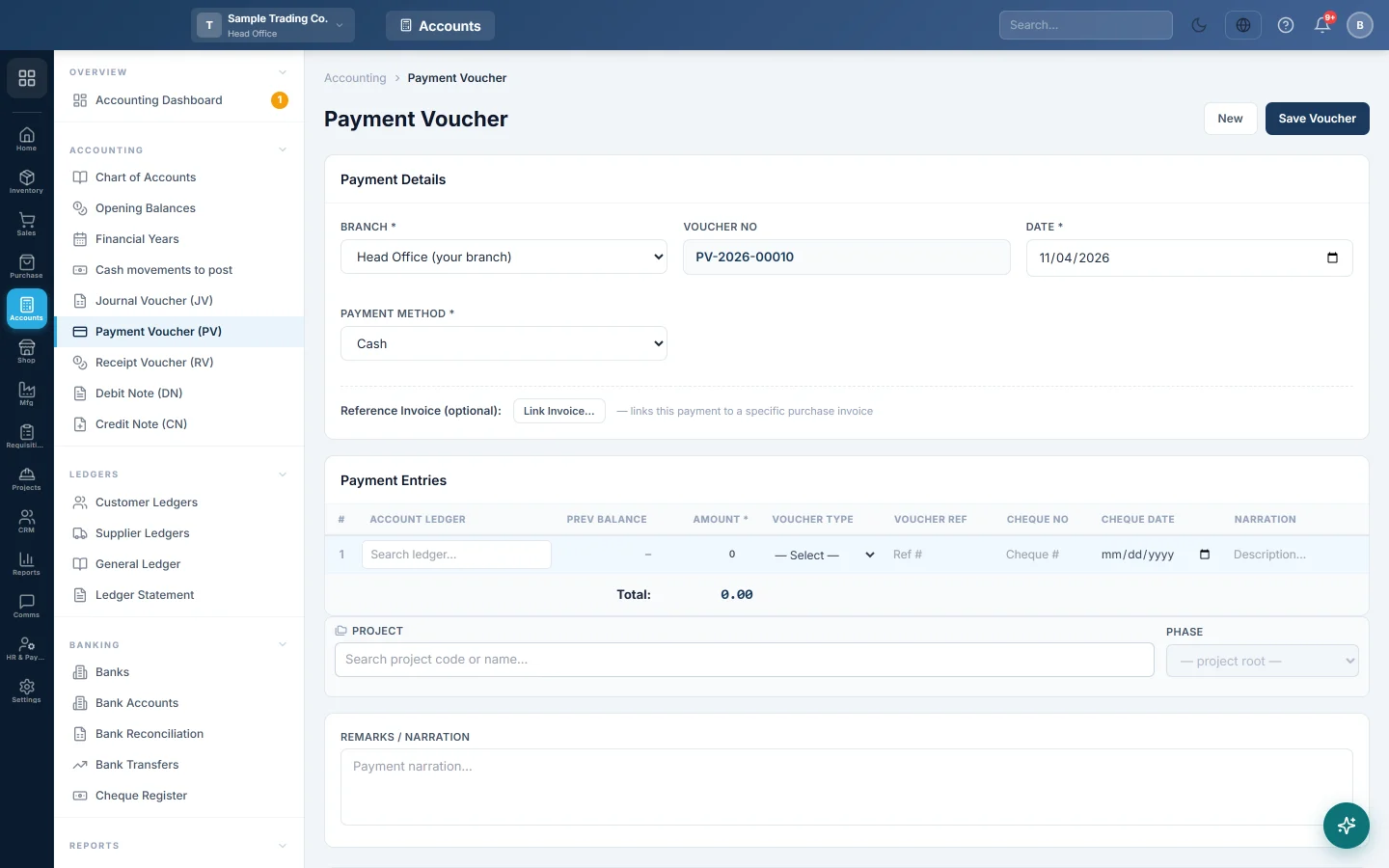
- Open Accounts → Accounting → Payment Voucher (PV).
- In Payment Method, choose the account the money leaves from.
- In Payment Entries, pick the supplier in Account Ledger and enter the Amount.
- To settle a bill, set Voucher Type to Purchase Invoice and pick the bill in Voucher Ref.
- For a cheque, fill in Cheque No and Cheque Date.
- Click Save Voucher.
Take a payment from the invoice itself
You can also record a payment from a confirmed credit invoice:
- Open the sales invoice or purchase invoice.
- Click Add Payment.
- In Record Payment, enter the Payment Date, the Amount and the Payment Method.
- Click Record Payment.
The button shows only while the invoice has a balance and has no unsaved changes.
What happens in the books
- A receipt voucher debits the cash or bank account of the method in Receive Into, and credits each line's ledger, usually the customer.
- A payment voucher debits each line's ledger, usually the supplier, and credits the account of the Payment Method.
- A line set to Sale Invoice or Purchase Invoice also lowers that invoice's balance. When nothing is left, the invoice shows as paid.
Common questions
The Voucher Ref list says "No unpaid invoices". That customer or supplier has no open invoice in this branch. Save the line without an invoice; it still lowers their balance.
It says "Not a party ledger". The ledger on that line is not a customer or supplier. Only their lines can settle an invoice.
The voucher saved but did not post. Vouchers at or above the threshold in Settings → Accounting → Accounting Preferences wait for approval. They post once approved.
Where do I see what a customer still owes? Open Customer Ledgers for customers and Supplier Ledgers for suppliers.
The amount is more than the invoice balance. The line shows over in amber. The extra stays on the party's ledger as an advance.
See Receipt Voucher (RV) and Payment Voucher (PV) for every option.
Obrigado. Se ainda precisar de ajuda, escreva para info@eloerp.net.