Foodpanda
Key in or import the orders you receive on the Foodpanda tablet so they are cooked from the same kitchen, posted as sales owed by Foodpanda, and ready to match against the payout.
The Foodpanda screen is where you record orders that arrive on Foodpanda. EloERP does not connect to Foodpanda itself: you type each order in, or import Foodpanda's order export, and EloERP sends it to the kitchen and posts the sale.
Before you begin
- The Foodpanda channel must be switched on for your company. Your service provider turns on Foodpanda channel and sets up its three ledgers: Foodpanda Clearing, Foodpanda Commission Expense and Aggregator Settlement Variance.
- Your role needs Enter Foodpanda Orders, and Import Foodpanda Orders / Statements for CSV files. The ready-made Foodpanda Desk role has all the Foodpanda permissions. See Users & Roles.
- The dishes exist as menu items with their tax set, see Menu Items. Foodpanda prices are usually higher than your dine-in prices; you type the Foodpanda price on each order.
- Switch to the branch that cooks the order in the top bar.
Where to find it
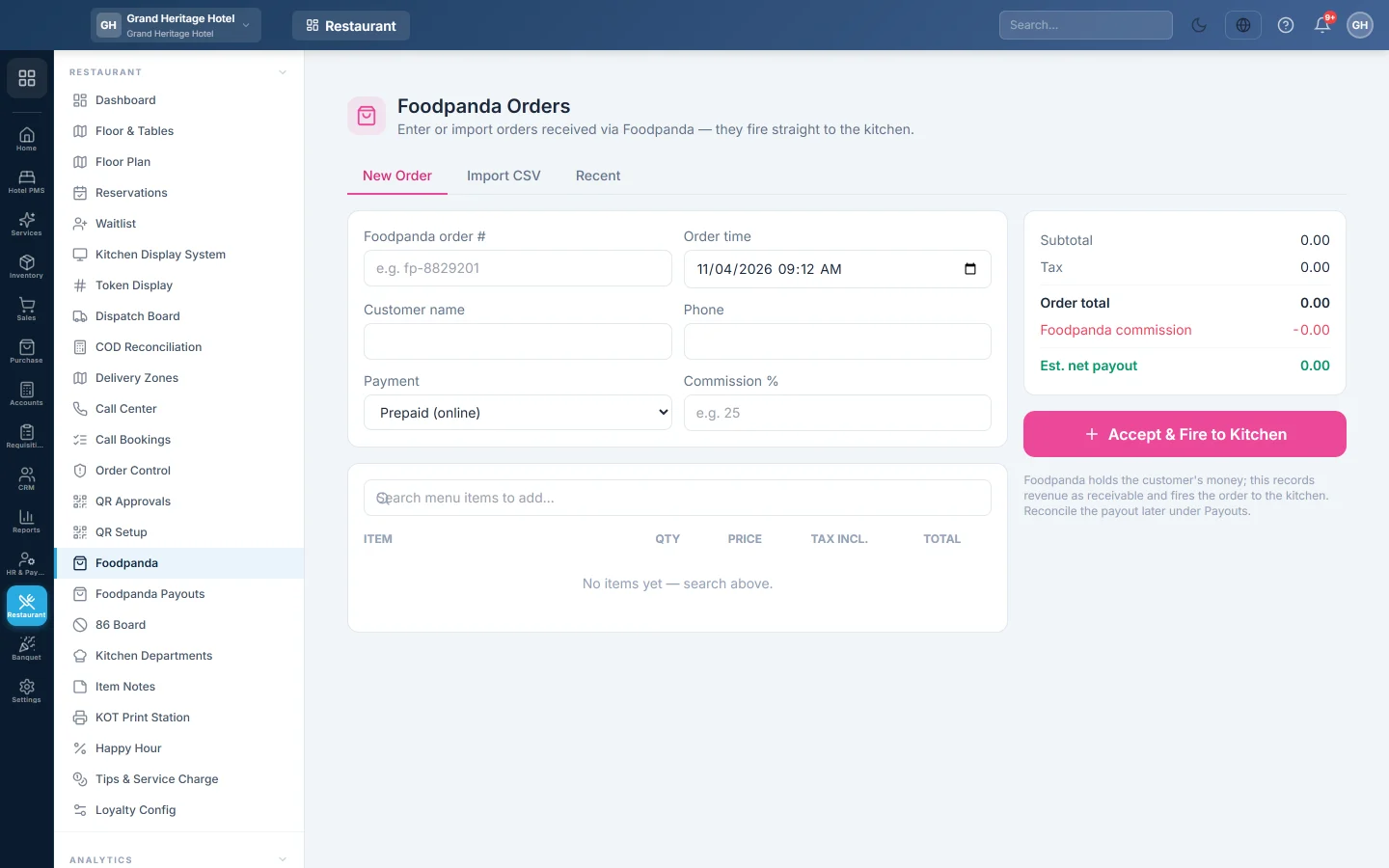
Open Restaurant → Restaurant → Foodpanda. The screen has three tabs: New Order, Import CSV and Recent.
Enter an order
- On New Order, type the Foodpanda order # from the tablet, for example fp-8829201. It is required, and each number can be entered only once. The exception is a stuck order (see the warning below): entering its number again takes that order over and replaces its lines.
- Check the Order time. Change it to when Foodpanda received the order if you are entering it later.
- Type the Customer name and Phone if you want them on the ticket.
- Choose the Payment: Prepaid (online) or Foodpanda COD. Both are recorded the same way, because Foodpanda collects the money either way.
- Type your Commission %, for example 25, to see the estimated payout.
- In Search menu items to add…, find each dish and click it. Change the Qty and the Price to match the Foodpanda order.
- Check the totals. Tax incl. shows the tax inside each price, then Subtotal, Tax, Order total, Foodpanda commission and Est. net payout.
- Click Accept & Fire to Kitchen.
The message says the order was accepted and fired to the kitchen. The KOT goes to your kitchen like any other order, and the order shows on Call Bookings as channel Foodpanda.
Import orders from a CSV file
- Download the order export from Foodpanda as a CSV file, one row per dish.
- On Import CSV, choose the file. EloERP recognises columns such as order_ref, ordered_at, customer_name, phone, sku, item_name, qty, price and commission_rate.
- Check the preview: Orders:, Matched lines:, Unmatched: and Duplicates:. Dishes are matched to your menu by SKU, then by name.
- Lines marked unmatched (will be dropped) are left out; orders already entered are skipped.
- Click Import {n} order(s).
Each imported order is posted and sent to the kitchen. The message says how many were imported and how many skipped.
Find, refund or return an order
- Open Recent. Search by Foodpanda reference or customer, and choose All, Unsettled or Settled.
- Each row shows the Total, the estimated Commission, the Net and whether it is Settled in a payout.
- To reverse an order that was cancelled or returned (RTO), click the round arrow (Refund / RTO) on its row, type a reason if you want, and click OK.
The sale and its stock are reversed and the order is cancelled. A settled order cannot be refunded here: void its payout on Foodpanda Payouts first.
What happens in the books
When you accept an order, EloERP posts a sale on credit with the Foodpanda reference as the invoice number (FP-…):
- Foodpanda Clearing is debited with the order total. This is what Foodpanda owes you.
- Sales Revenue is credited with the price without tax, and the tax account with the tax.
- The dishes' stock and recipe ingredients are used as for any sale.
No delivery fee is posted, because Foodpanda keeps it. The order is not paid at the till, so it is not in the cashier's drawer. Commission is posted later, when you post the payout on Foodpanda Payouts.
Common questions
Does EloERP receive Foodpanda orders by itself? No. There is no live link to Foodpanda. Enter each order here, or import Foodpanda's export file.
It says the order is already entered. Each Foodpanda order number can be entered once, so a re-import cannot double the sale. Find the order on Recent. Only an order that was saved but never posted can be entered again; that replaces it instead of adding a second one.
Does a Foodpanda order go to the Dispatch Board? No. Foodpanda's own rider delivers it, so it never appears on the Dispatch Board or in rider cash.
Why is the commission an estimate? The real commission comes from Foodpanda's statement. You enter it on Foodpanda Payouts.
谢谢。 如果仍需帮助,请发邮件至 info@eloerp.net。