Call Bookings
One list of every off-premise order of the last two days, from the call centre, Foodpanda, QR and online, to send held bookings to the kitchen, reprint KOTs, print a temporary bill or cancel.
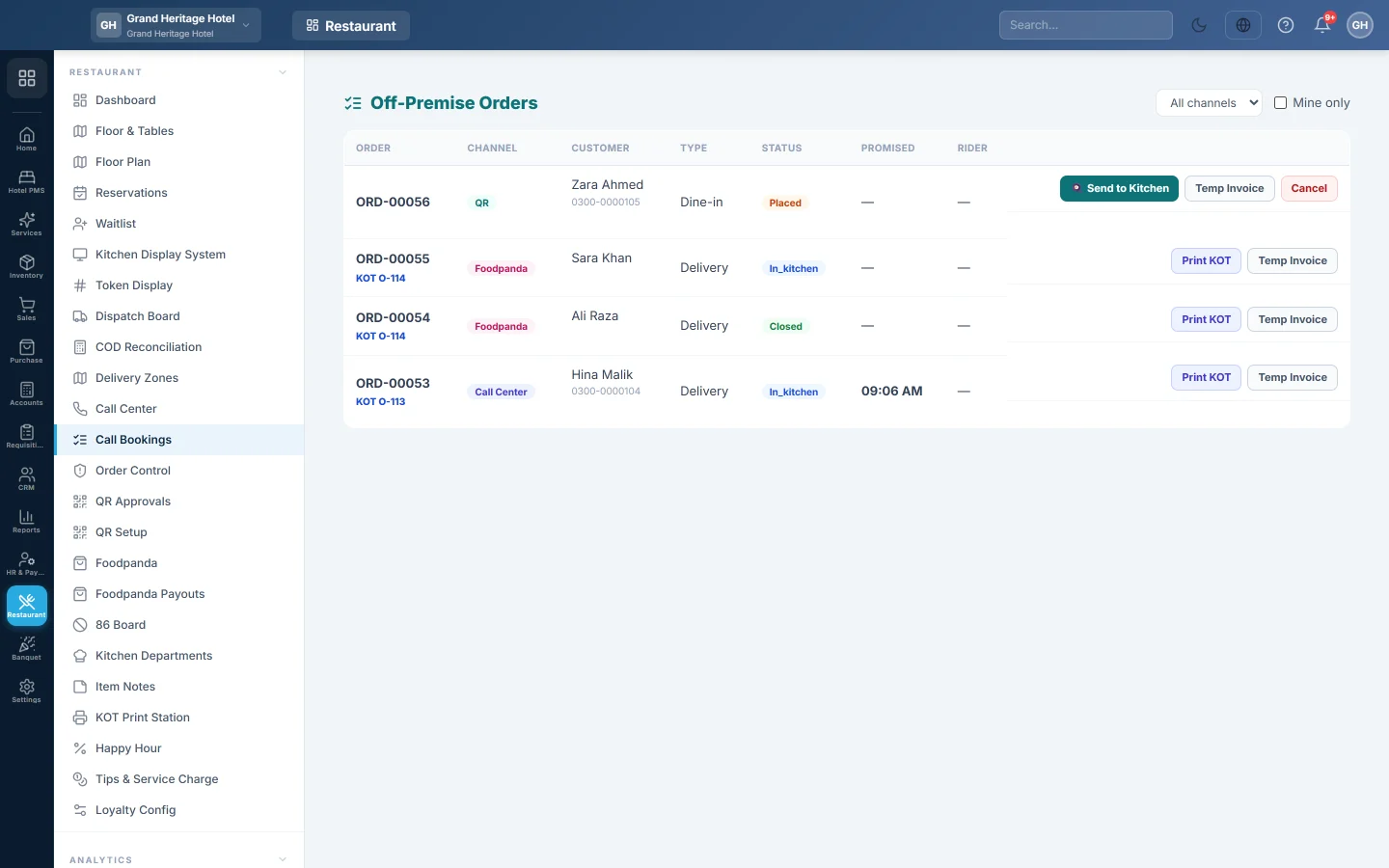
Call Bookings, titled Off-Premise Orders on screen, lists every order that did not start at a table or the counter: phone bookings, Foodpanda, QR and online orders. Staff watch it to see what is still owed and what is running late.
Before you begin
- The call centre must be switched on for your company (Call centre, turned on by your service provider).
- Your role needs Access Call Center. Send to Kitchen needs Call-Center Confirm Order and Cancel needs Call-Center Cancel Order. See Users & Roles.
Where to find it
Open Restaurant → Restaurant → Call Bookings. The list refreshes by itself every few seconds and shows orders from the last two days.
Read the list
| Column | What it shows |
|---|---|
| Order | The order number, and the KOT number the kitchen holds for it. |
| Channel | Call Center, Foodpanda, QR or Online. |
| Customer | Name and phone. |
| Type | Delivery, Takeaway or Dine-in. |
| Status | Where the order is, for example placed, confirmed, ready or out for delivery. |
| Promised | The promised time. It turns red when the time has passed and the order is still open. |
| Rider | The rider, once one is assigned. |
Use All channels to show one channel only. Tick Mine only to see just the bookings you took; Foodpanda and QR orders have no agent, so they disappear when it is ticked.
Send a held booking to the kitchen
- Find the booking with the 🍳 Send to Kitchen button. Held bookings have not been cooked yet.
- Click 🍳 Send to Kitchen and confirm.
The kitchen gets the KOT. A delivery order then reaches the Dispatch Board when it is ready.
Print from a booking
- Print KOT reprints the whole order as one kitchen ticket. It appears once the order has been sent to the kitchen.
- Temp Invoice prints a draft bill with the items and the total, marked as a draft, to tell the customer what they owe. It is not a sale and posts nothing.
Cancel a booking
- Click Cancel on the row. It shows only while the order is still placed, confirmed or held.
- Confirm.
An order that already has an invoice cannot be cancelled here. Cancel the invoice first.
See the agents' performance
The Agent Performance report shows, for a date range, each agent's bookings, how many were confirmed or cancelled, delivery and takeaway counts, invoiced revenue and average order value. It has no menu entry yet: open /restaurant/call-center/report in the address bar, choose the dates and click Run. Your role needs Call-Center View Report.
Common questions
A Foodpanda order is in this list. Should I settle it here? No. This list is for watching the work. Foodpanda orders are entered on Foodpanda and settled on Foodpanda Payouts.
An older booking is missing. The list shows the last two days. Use Order Control or the till's order history for older orders.
Why is there no Send to Kitchen button on an order? It has been sent already, or it is finished or cancelled. Use Print KOT to reprint its ticket.
Where does the cashier take the payment? At the till. A held booking is in the till's Held Orders, see Hold and recall a sale.
Teşekkür ederiz. Hâlâ yardıma ihtiyacınız varsa info@eloerp.net adresine yazın.