Dashboard
The restaurant's live command centre for owners and managers, with sales, open tables, kitchen timing, delivery, staff, food cost and guest scores for a chosen period and branch.
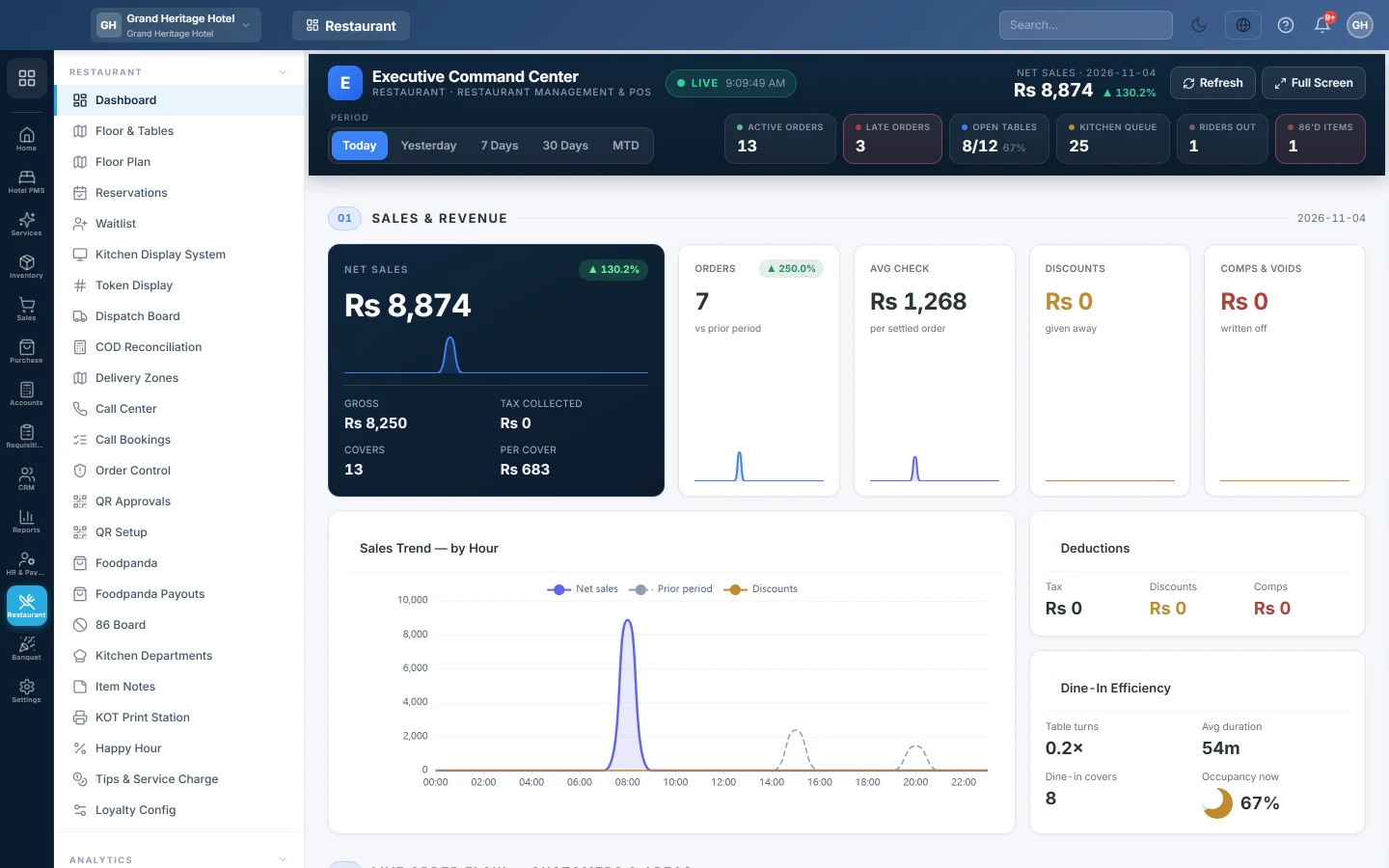
The restaurant Dashboard is the Executive Command Center: one live page with the day's sales, what is happening on the floor and in the kitchen, and how delivery, staff and guests are doing. It refreshes itself every minute.
Before you begin
- The Restaurant module must be switched on for your company. Your service provider does this.
- Your role needs View Restaurant Dashboard. See Users & Roles.
- The figures come from real orders and sales. Until the tills have taken restaurant orders, the cards stay empty.
Where to find it
Open Restaurant → Restaurant → Dashboard. It is also the first page you see when you open the Restaurant module.
Choose the period and branch
- Under PERIOD, click Today, Yesterday, 7 Days, 30 Days or MTD (month to date).
- If you have more than one branch, pick one under BRANCH, or All for the whole company.
Every card reloads for your choice. Net sales at the top right compares the period with the one before it. Click Refresh to reload now, or Full Screen to show the page on a wall screen.
The live counters
The row of counters on the right of the header shows the floor right now, whatever period you picked:
| Counter | What it counts |
|---|---|
| Active Orders | Orders that are open and not yet settled. |
| Late Orders | Open orders placed more than 30 minutes ago that are not ready yet. |
| Open Tables | Tables in use out of all your tables, with the occupancy %. |
| Kitchen Queue | Kitchen tickets still waiting or cooking. Shown when the Kitchen Display System is in use. |
| Riders Out | Riders out on a delivery. Shown when delivery is in use. |
| 86'd Items | Menu items marked unavailable. See 86 Board. |
The sections
The page is split into numbered sections. A card that has nothing to show says so, for example Not tracked on this tenant. when that feature is not in use.
| Section | What you see |
|---|---|
| 01 SALES & REVENUE | NET SALES, gross, tax, covers and sales per cover; Orders, Avg Check, Discounts and Comps & Voids; the sales trend; Deductions; and Dine-In Efficiency with table turns, average duration and occupancy now. |
| FISCAL — TAX AUTHORITY SUBMISSIONS | Invoices sent to each tax authority and their amounts. Shown when fiscal reporting is in use. |
| 02 LIVE ORDER FLOW | New against returning customers by hour, Customer Mix, the Live Order Feed and orders per delivery zone. |
| 03 CHANNEL MIX & DAYPARTS | Revenue by Channel (dine-in, takeaway, delivery and so on), the channel trend, Sales by Daypart and a Peak Hours — Hour × Day heatmap. |
| 04 MENU ENGINEERING | Top Sellers — by Qty, the Menu Matrix (Star, Plowhorse, Puzzle, Dog), Category Revenue Mix, and how often modifiers, combos and happy-hour prices are used. |
| 05 KITCHEN, ORDER TIMING & OPERATIONS | Average prep time per kitchen station against its target time, late kitchen tickets, the 86 board, voids, comps and waste, and Late Orders — Over 30 Minutes. |
| 06 FOOD COST & PROFITABILITY | Food Cost %, gross margin, Theoretical vs Actual COGS and Lowest-Margin Items. Needs recipes on your menu items. |
| 07 DELIVERY & RIDERS | Delivery Health, COD still held by riders, delivery time per zone, the Rider Leaderboard and late deliveries. |
| 08 STAFF, CASH & PAYMENTS | Waiter Performance, Payment Methods, Aggregator Payouts and the Shift Summary with cash variance. |
| 09 GUEST EXPERIENCE & BRANCH LEADERBOARD | The guest score trend, Rating Distribution, Low-Score Alerts and the Branch Leaderboard. The leaderboard always covers the whole company. |
Common questions
Why does Net sales differ from the Sales dashboard? This page counts restaurant orders only, the ones rung on a restaurant till, waiter app, QR menu or call centre. Ordinary retail or wholesale invoices are left out.
Comps & Voids shows "not tracked". Comp and void tracking is not installed on your company yet. A 0 means it is installed and nothing was comped in the period.
The food cost cards are empty. Food cost needs a recipe on each menu item, so EloERP knows what each plate uses. Without recipes the card says No recipes are defined.
Do I need to reload the page? No. It reloads quietly every minute. Click Refresh if you want the latest figures straight away.
Can I see one branch only? Yes. Pick it under BRANCH. The Branch Leaderboard still compares all branches.
Where are the detailed reports? See Reports for menu engineering, waiter performance and sales by channel with dates of your choice.
Teşekkür ederiz. Hâlâ yardıma ihtiyacınız varsa info@eloerp.net adresine yazın.