Dispatch Board
Hand ready delivery orders to riders, move each one from Assigned to Out for Delivery to Delivered, record the cash on delivery and send it to reconciliation.
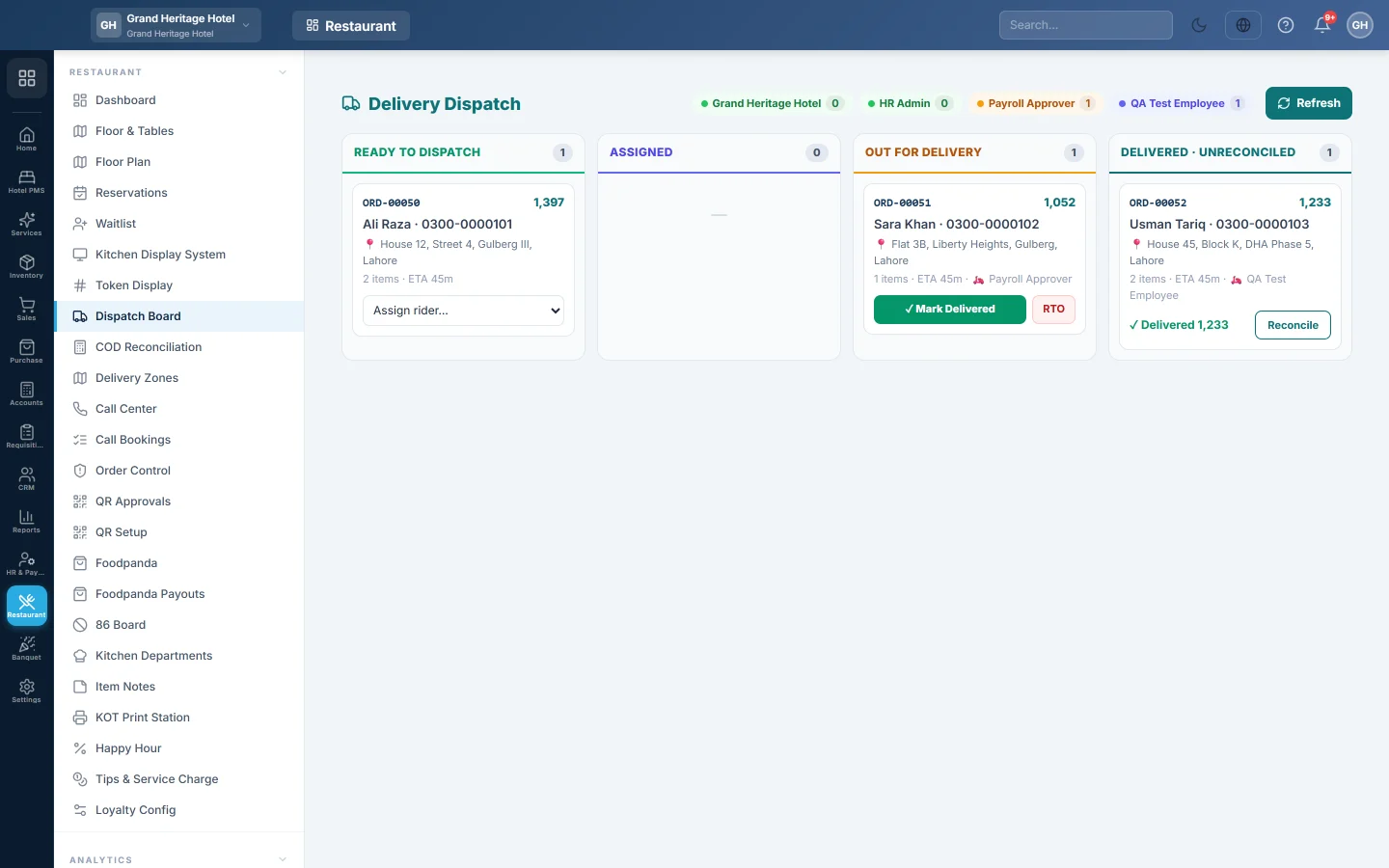
The Dispatch Board shows every delivery order of your branch from the moment the kitchen has it ready until the rider's cash is reconciled. The dispatcher assigns riders and moves each order forward from its card.
Before you begin
- Delivery must be switched on for your company. Your service provider turns on Delivery & riders; until then the Delivery menu items are hidden.
- Your role needs Assign Delivery Rider. See Users & Roles.
- Riders are users who have a role with "rider" in its name, such as the ready-made Rider role. If nobody has such a role, every user appears in the rider list. See Add users and give them roles.
- Set up your Delivery Zones so each order gets a delivery fee and an ETA.
Where to find it
Open Restaurant → Restaurant → Dispatch Board. The board shows the branch selected in the top bar and refreshes by itself every few seconds; Refresh reloads it at once.
Read the board
| Column | What is in it |
|---|---|
| Ready to Dispatch | Delivery orders the kitchen has marked ready that have no rider yet. |
| Assigned | Orders given to a rider who has not left yet. |
| Out for Delivery | Orders the rider has picked up. |
| Delivered · Unreconciled | Delivered orders whose cash the rider has not handed in yet. |
Each card shows the order number, the amount to collect (or Prepaid), the customer and phone, the address, the number of items, the ETA and the rider. The chips at the top show each rider and how many orders they hold: on a delivery, returning with cash, queued, or free.
Assign a rider
- Find the order in Ready to Dispatch.
- Open Assign rider… on its card and pick the rider.
The card moves to Assigned. If someone else assigned it a moment before you, the board says Already assigned.
To give an assigned order to someone else, use Reassign… on the card in Assigned.
Send the order out and mark it delivered
- When the rider leaves with the food, click 🛵 Out for Delivery on the card.
- When the rider is back, or calls to say it is delivered, click ✓ Mark Delivered.
- For a cash-on-delivery order, type the cash the rider collected in COD cash collected from the customer:. It starts at the amount due.
- Click OK.
The card moves to Delivered · Unreconciled. Click Reconcile on it to open COD Reconciliation for that rider.
A rider who uses the rider screen can do steps 1 and 2 from their phone instead, see COD Reconciliation.
Return an order (RTO)
Use RTO when the order comes back undelivered, for example when the customer refused it.
- Click RTO on the card in Assigned or Out for Delivery.
- Confirm.
An order that was not yet billed is cancelled. If the order already has an invoice, the board says Marked RTO — the invoice must still be voided manually to reverse stock & GL. Cancel that invoice from Sales Invoices so the stock and the sale are reversed.
Clear paid orders that no rider will take
A counter sale that the cashier rang as Delivery, already paid, lands in Ready to Dispatch as Prepaid. Assign a rider if it still has to go out; there is nothing to collect.
- Click No rider needed on the card to close one such order.
- When there are several with no customer, click Clear paid sales with no customer (N) at the top of Ready to Dispatch to close them all.
Neither button changes the sale; they only take the order off the board.
What happens in the books
When you mark a cash-on-delivery order delivered and it has no invoice yet, EloERP posts the sale with the delivery number (DLV-…) as the invoice number:
- Rider COD Clearing is debited with the bill, including the delivery fee. The fee is the one on the order when the call centre priced it, otherwise the zone's fee; it is counted once. The money is now "with the rider".
- Sales Revenue and the tax account are credited, and the delivery fee is credited as its own line.
- The food's stock and cost move as for any sale.
The rider's cash leaves Rider COD Clearing when you post it on COD Reconciliation. A prepaid order posts nothing here; it was billed when it was paid.
Common questions
The rider I want is not in the list. Give that user a role whose name contains "rider", for example the Rider role, in Users & Roles.
A delivery order is missing from the board. It is not ready yet, it belongs to another branch, or it was a Foodpanda order. Foodpanda's own rider delivers those, so they never come here.
Why does Reassign not show on a card? A rider can only be changed while the order is assigned or accepted. Once it is out for delivery, finish it or mark it RTO.
I typed the wrong COD amount. The amount is used on COD Reconciliation, where you enter the cash actually handed in. Any difference posts as short or over there.
Mark Delivered says the sale could not be posted. The order stays where it was. The message names the cause, such as a dish that needs a batch or serial number. Fix it, then mark the order delivered again.
Vielen Dank. Wenn Sie weitere Hilfe brauchen, schreiben Sie an info@eloerp.net.