Fixed Activities
Define the group classes, talks and clinic slots that run on set weekdays, so they appear on every guest's programme plan and send reminders by themselves.
Fixed activities are the things that happen at the same time on set weekdays, such as a morning walk, a yoga class or a talk. You define each one once. It then appears on the programme plan of every guest staying on the days it runs; nobody books it by hand.
Before you begin
- Set up your programmes first if an activity is only for some of them. See Programmes.
- Your role needs the programmes permissions. See Users & Roles.
Where to find it
Open Hotel → Setup → Fixed Activities.
Add an activity
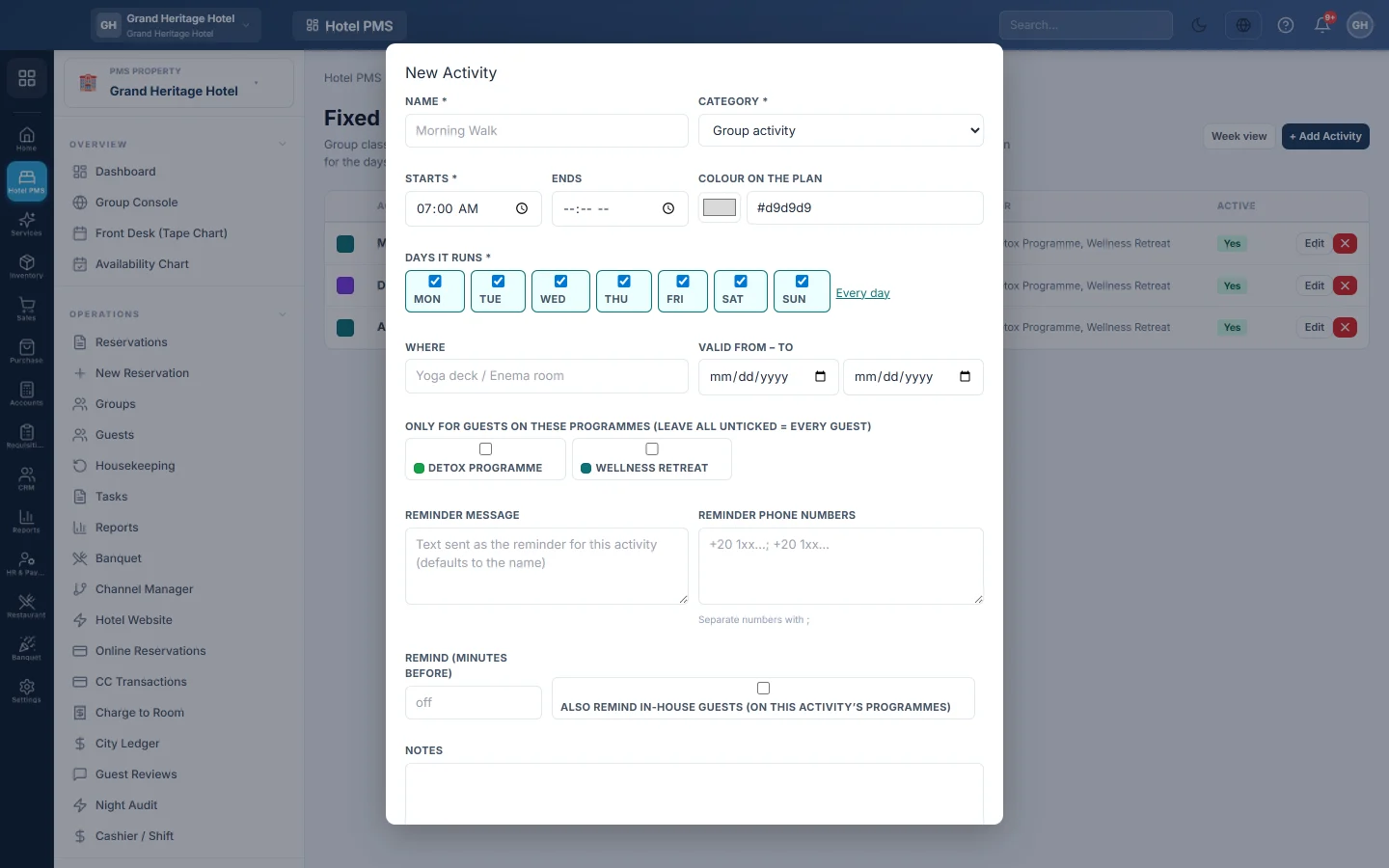
- Click + Add Activity.
- Enter the Name, for example Morning Walk.
- Pick the Category: Group activity, Clinic therapy, Extra treatment or Other. Each has its own default colour.
- Set when it Starts and, optionally, when it Ends.
- Under Days it runs, tick the weekdays, or click Every day.
- Enter Where it happens, for example Yoga deck.
- Optionally set Valid from – to for an activity that runs only for a while.
- Under Only for guests on these programmes, tick programmes to limit it. Leave all unticked for every guest.
- Click Save.
Send reminders
In the same window you can set reminders:
- Reminder message: the text sent; it defaults to the activity name.
- Reminder phone numbers: staff numbers to remind, separated by ;.
- Remind (minutes before): how early the reminder goes; leave empty for none.
- Also remind in-house guests (on this activity's programmes): tick to remind guests too.
Reminders are checked every five minutes and sent through your active message channel.
See the week
Click Week view to see the timetable as guests will see it, one column per weekday. Click an activity to edit it. List view goes back to the table.
Common questions
An activity does not show on a guest's plan. Check that it is Active, runs on that weekday, is inside Valid from – to, and is for the guest's programme or for every guest.
Can I cancel one day of an activity? Not here. Narrow the Valid from – to dates or clear that weekday, then set it back.
Are fixed activities charged? No. They are shown on the plan only. Charge extras through Services & Extras.
Thank you. If you still need help, write to info@eloerp.net.