Cashier / Shift
Open a front-desk cashier shift with a float, see the cash and card taken on folios during the shift, record cash in and out, and close with a counted drawer and a Z report.
The cashier shift tracks the money a front-desk cashier handles. You open a shift with a float, every cash payment taken on a folio or banquet event counts into it, and you close it by counting the drawer. Any difference is posted to your accounts.
Before you begin
- Your payment methods are set up, so cash and card payments are told apart. See Payment Methods.
- Your role needs the folio permissions. See Users & Roles.
Where to find it
Open Hotel → Operations → Cashier / Shift.
Open a shift
- When the page shows No open shift, enter the Opening cash float.
- Optionally type a Workstation (optional), for example Front Desk 1.
- Click Open shift.
Each cashier has their own shift. Payments you take on folios while your shift is open are counted in it.
Watch the shift
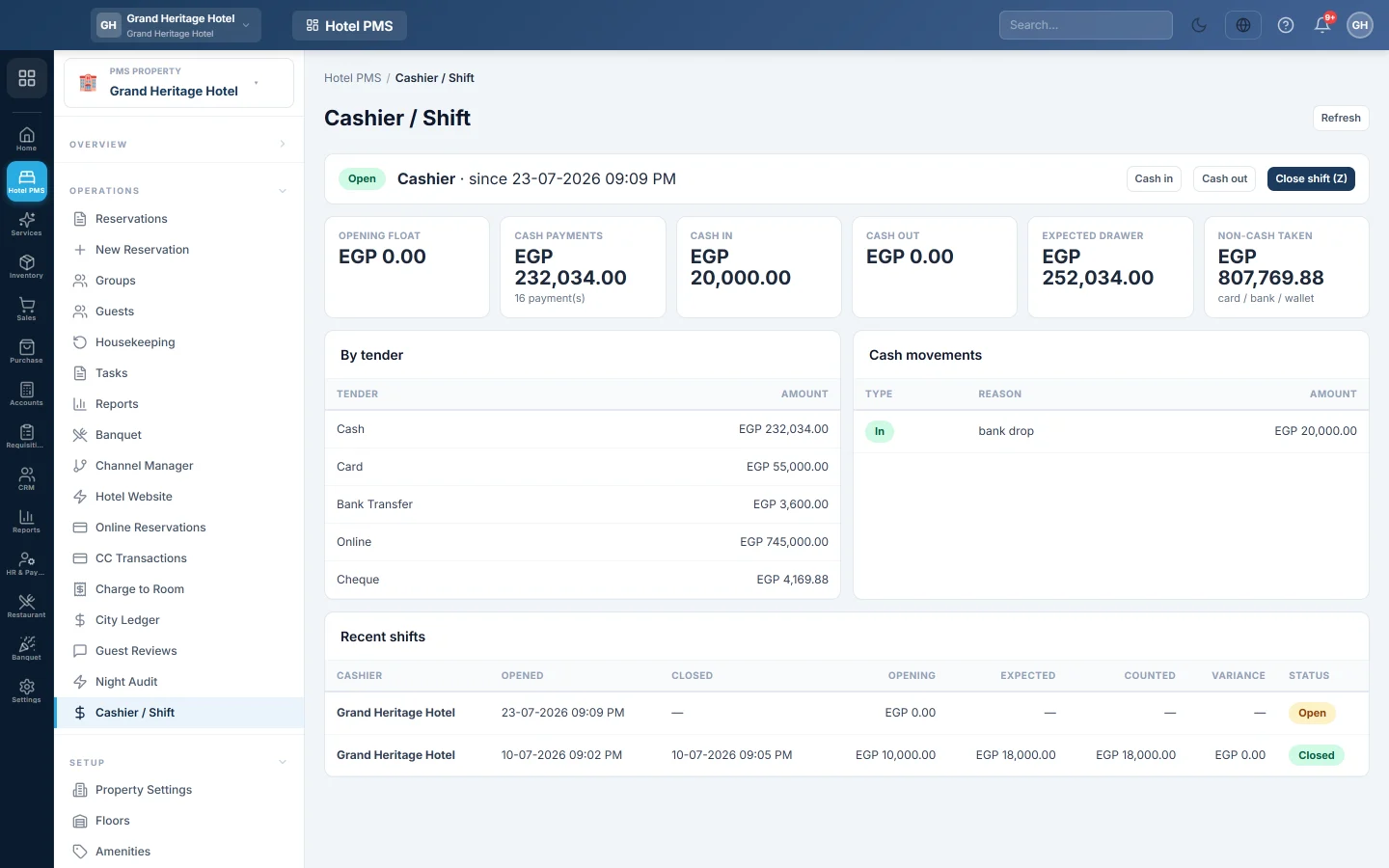
The open shift shows the Opening float, the Cash payments, the Expected drawer and the Non-cash taken by card, bank or wallet. By tender splits the takings by method, and Cash movements lists money put in or taken out by hand.
Record cash in or out
- Click Cash in or Cash out.
- Enter the amount and the reason, for example Petty cash / bank drop / float top-up.
- Add Notes (optional) and click Record.
These movements wait on Cash movements to post in Accounts, where the accountant posts them to the right account.
Close the shift
- Count the cash in the drawer.
- Click Close shift (Z).
- Enter the Counted cash. The window shows the difference as (short) or (over).
- Under Variance disposition, pick Cash Variance Suspense (GL), Cashier account or Do not post (informational only).
- Click Close shift.
The shift moves to Recent shifts with its Expected, Counted and Variance.
What happens in the books
Folio payments post to your accounts when they are taken, not at shift close. At close, a difference is posted as a journal voucher between Cash and the account you picked: Cash Variance Suspense, or the cashier's own employee account so a shortage can be recovered. Do not post records the difference without a voucher. Cashier account falls back to the suspense account when the user has no employee account.
Common questions
A payment is missing from my shift. It was taken while no shift was open, or by another cashier.
Can I remove a payment after closing the shift? No. A payment that belongs to a closed shift cannot be removed from the folio until the shift is corrected.
Is this the same as the POS till shift? No. Restaurant and shop tills have their own shift, see Open and close a shift.
Спасибо. Если помощь всё ещё нужна, напишите на info@eloerp.net.