Night Audit
Close the hotel's business date each night, marking no-shows, flagging overdue departures, saving the day's revenue snapshot and posting the day's revenue to your accounts, with a checklist of the night's tasks.
The night audit closes the hotel's day. It marks guests who never arrived as no-shows, flags guests who should have left, saves the day's numbers, and posts the day's revenue to your accounts. Days are closed one at a time, in order.
Before you begin
- Your role needs the night audit permission. See Users & Roles.
- Your chart of accounts is set up; the audit posts to room revenue, food and beverage revenue, other income and sales tax accounts, and creates them if needed. See Chart of Accounts.
Where to find it
Open Hotel → Operations → Night Audit.
Read the page
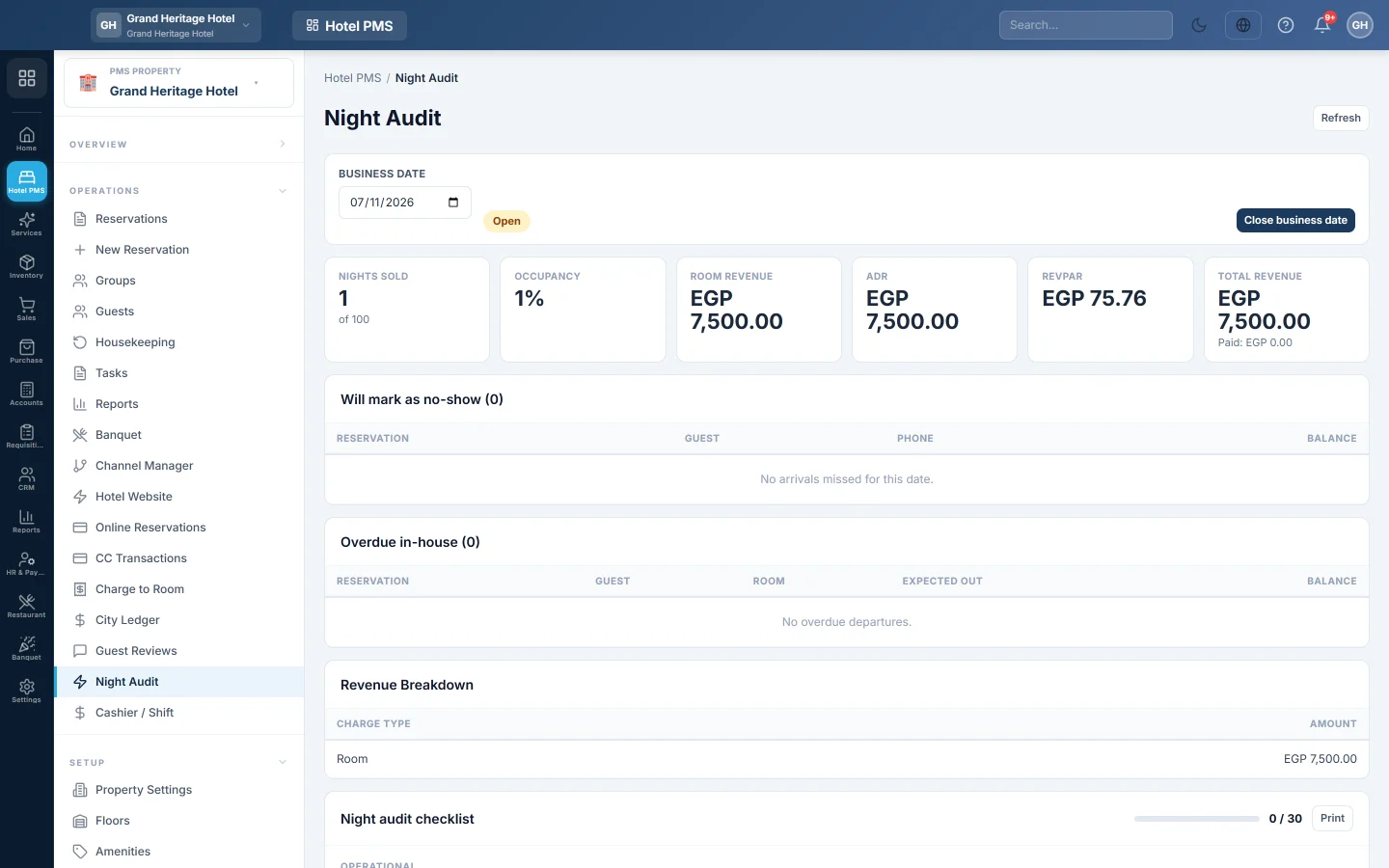
- Business date is the next day to close, marked Open or Closed.
- The tiles show Nights sold, Occupancy, Room revenue, ADR, RevPAR and Total revenue with what was Paid.
- Will mark as no-show lists confirmed guests due that day who have not checked in.
- Overdue in-house lists guests who are still in-house after their departure date.
- Revenue breakdown totals the day's charges by Charge type.
- Night audit checklist holds the night's tasks; Recent closes lists the days already closed.
Close the day
Follow Run the night audit. In short: deal with the guests in the two lists, tick the checklist, then click Close business date, read the summary and click Close date.
What happens in the books
Closing posts one voucher dated on the business date. Guest Ledger (In-House) is debited with all the day's charges not yet counted, and Room Revenue, F&B Revenue, Other Income and Sales Tax Payable are credited. Revenue therefore lands in the month the guest stayed, even for a stay that crosses month end.
When the folio is settled later, those charges clear the guest ledger instead of being counted again. See Check out and settle a folio.
Reopen the last close
Click Reopen last close to undo the most recent close. Its revenue voucher is reversed and the day can be audited again. Only the latest closed day can be reopened, and not if any of its charges are on a folio that has since been settled; reverse that settlement first.
Common questions
The message says Night audit runs in sequence. An earlier day is still open. Close the day the message names first.
Can I close tonight before midnight? Yes. You can close today's date at any time today, but never a date that has not started yet.
Are no-show fees charged by the audit? No. The audit only marks the bookings as no-show. To charge a fee, mark the no-show yourself first, see Cancel a reservation or mark a no-show.
Can I tick the checklist after closing? No. The checklist is frozen once the day is closed, so it shows what was really done that night.
Closing the day said "Unbalanced voucher". This is fixed. When a day's discounts, such as a card promotion or a rate reduction, made one revenue line negative, the close used to fail. The negative amount is now booked as a debit to that revenue account, so the day closes.
Where are the night audit reports? In PMS Reports Hub, under night audit.
Vielen Dank. Wenn Sie weitere Hilfe brauchen, schreiben Sie an info@eloerp.net.