Dashboard
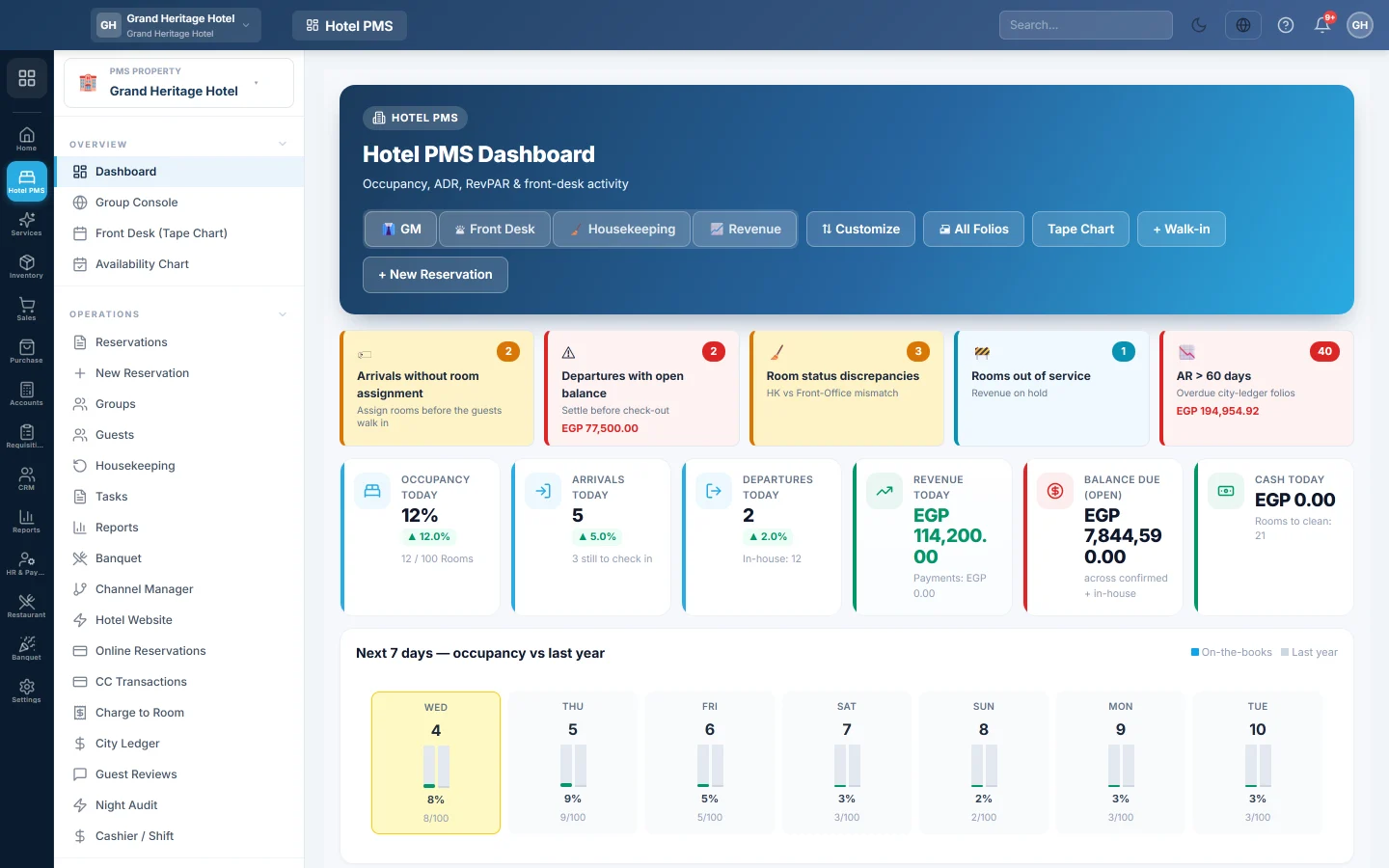
The hotel's home screen, with today's occupancy, arrivals, departures and revenue, the next days' bookings, housekeeping and VIPs, in views for the manager, front desk, housekeeping and revenue.
The hotel dashboard is the first screen of the Hotel module. It shows how full the hotel is today, who arrives and leaves, what was earned and paid, and what is coming in the next days.
Before you begin
- Set up your property, room types, rooms and rate plans first. Until then the dashboard shows Finish setup to unlock the front desk with a link to each step. Seasons is listed too but is optional; the banner closes without it. See Set up your hotel: rooms and rates.
- Your role needs the hotel dashboard permission. See Users & Roles.
Where to find it
Open Hotel → Overview → Dashboard.
Pick your view
The view buttons at the top change what the dashboard shows first:
- GM: the manager's view, with alerts, the main numbers and the worklist.
- Front Desk: alerts plus today's arrivals and departures.
- Housekeeping: room states and what to prepare for tomorrow.
- Revenue: the numbers and the forecast.
EloERP remembers your choice. Click Customize to move sections up or down for the view you are on, then Save layout. Reset to default brings back the standard order.
What the tiles show
- Occupancy today: rooms occupied out of all rooms, with last year's figure for the same day.
- Arrivals today with how many are still to check in, and Departures today with how many guests are In-house.
- Revenue today and Payments, Balance due (open) across confirmed and in-house stays, and Cash today.
- Next 7 days — occupancy vs last year, This Period, MTD and YTD occupancy, revenue, ADR (average daily rate) and RevPAR (revenue per available room).
- Budget attainment against your Budget Targets.
- 30-day forecast (on-the-books) and Forward look, with the rooms picked up in the last 24 hours and 7 days.
- Housekeeping today, the Room status grid and VIPs today.
- Occupancy heatmap — next 30 days × room type: click a cell to jump to that date on the tape chart.
- Guest mix, source of business, market segment and channel performance for the month.
Quick actions
The buttons at the top open the Tape Chart, a Walk-in, and a New Reservation. All Folios prints the folio of every in-house guest in one go.
Common questions
The Finish setup banner does not go away. One of property details, room types, rooms or rate plans still has nothing in it. Click that step and add at least one entry. Seasons are not needed.
The numbers are in the wrong currency. Hotel screens use the property's currency from Property Settings.
Budget attainment says No budget set. Add targets on Budget Targets.
I run several hotels. Where is the total? The Group rollup card ranks your properties; for more, open Group Console.
Vielen Dank. Wenn Sie weitere Hilfe brauchen, schreiben Sie an info@eloerp.net.