Audit Log
The record of who did what, when and from where in your company, with each change's before and after values, for checking mistakes and suspicious activity.
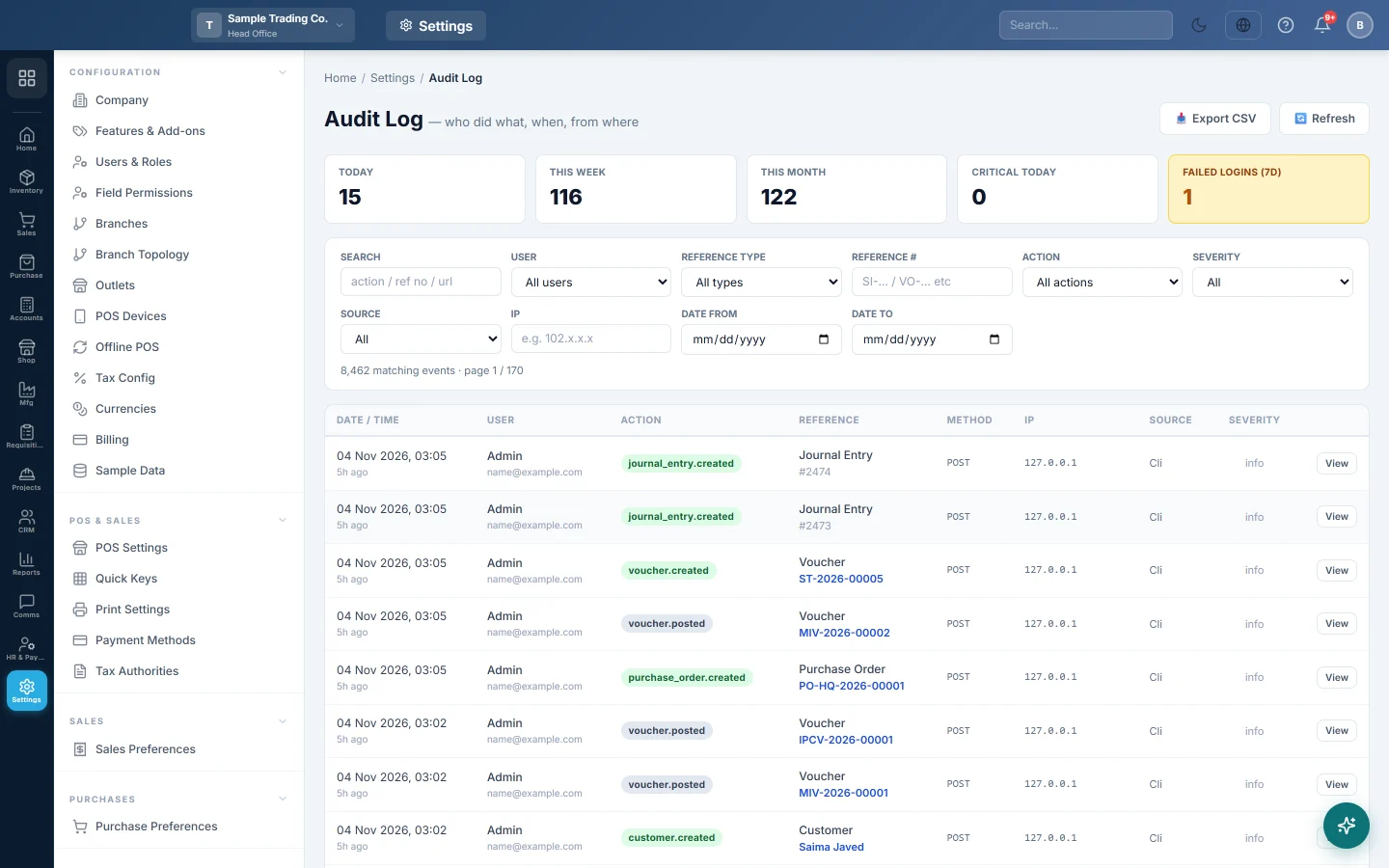
The Audit Log records who did what, when and from where: documents created, edited, cancelled or deleted, settings changed and sign-ins. Open an event to see exactly which values changed.
Before you begin
- You need a role with the permission to view the audit log.
Where to find it
Open Settings → System → Audit Log.
Read the counts
The strip at the top shows the number of events Today, This Week and This Month, the events marked Critical Today, and Failed Logins (7d). A red Critical Today box means something serious happened today, for example a deletion.
Find an event
- Type in Search to look for an action, a reference number or a page address.
- Narrow the list with the filters:
- User: one person, or All users.
- Reference Type and Reference #: a kind of document, or one document such as SI-0012.
- Action: for example created, updated or deleted.
- Severity: Info, Warning or Critical.
- Source: Web, API, Webhook, CLI or System.
- Date From and Date To.
- Use ‹ Prev and Next › to page through the results.
Each row shows the Date / Time, User, Action, Reference, Method and severity.
See what changed
- Click View on an event.
- Read Who, When, From (IP) and User agent.
- Under Changes, compare the BEFORE and AFTER value of each field.
- Click Show full trail to list every event for that same document, in order.
Export the log
- Set the filters for the events you want.
- Click Export CSV. The filtered events download as a spreadsheet file.
Common questions
Who deleted an invoice? Filter Action on the delete action and type the invoice number in Reference #, then click View.
There are many failed logins. Someone may be guessing a password. Check the User and From (IP) of those events, and ask the user to change their password and turn on two-factor sign-in in Security.
Can an entry in the audit log be changed or deleted? No. It is a record of what happened. Deleted documents themselves can be looked up in Deleted entries.
Events show System as the user. They were done by the system itself, for example a scheduled job or an automatic posting.
Terima kasih. Jika masih butuh bantuan, kirim email ke info@eloerp.net.