Increments
See who is due a yearly raise, issue increments one at a time or many at once, and print increment letters.
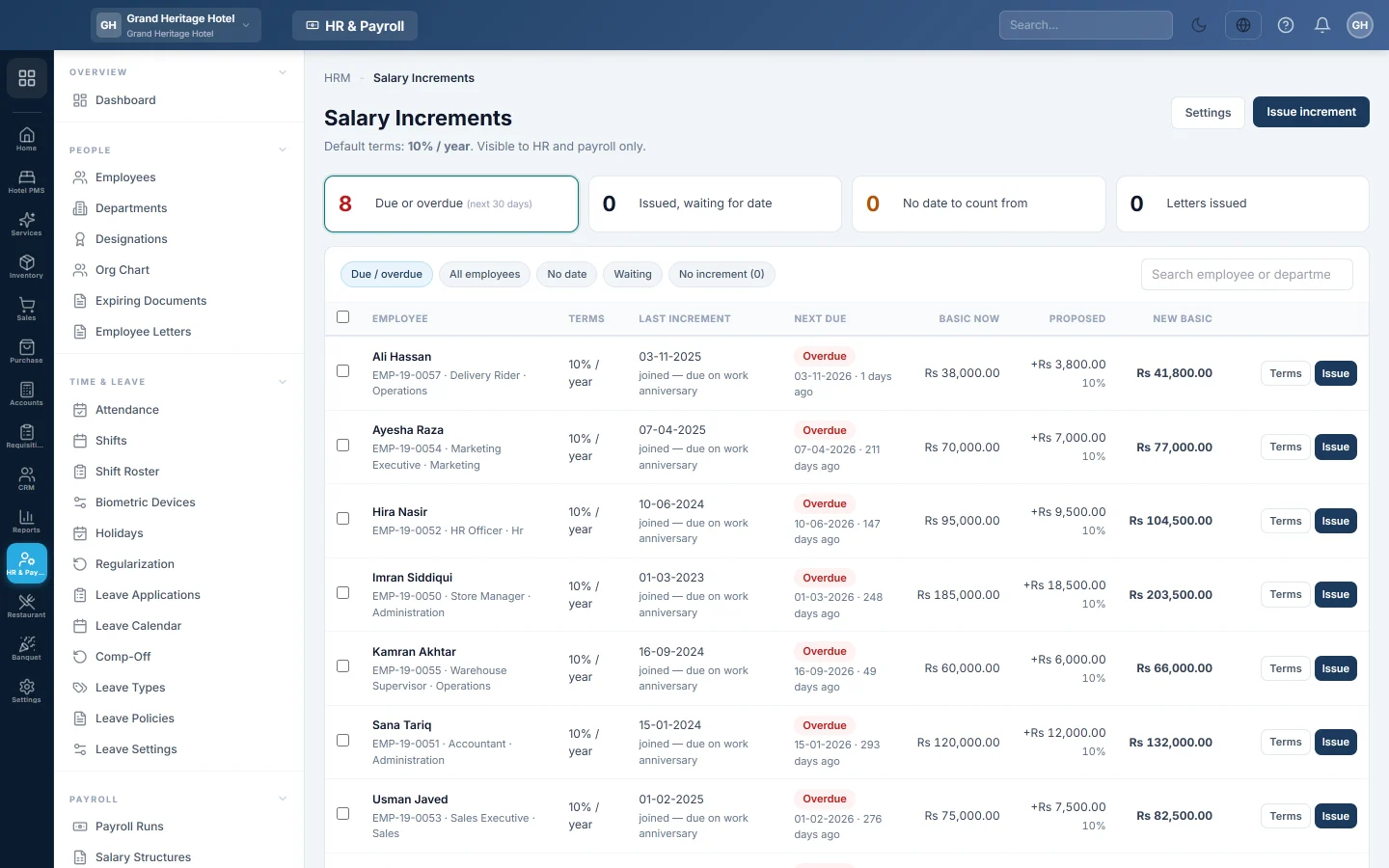
Increments tracks yearly raises. It lists who is due, works out the new basic salary from your terms, records each increment and prints the letter. Payroll pays each month at the salary in force in that month.
Before you begin
- Employees have a Basic Salary and a joining date. See Employees.
- This page is visible to HR and payroll only.
Where to find it
Open HR & Payroll → Payroll → Increments.
Set the default terms
- Click Settings.
- Under Default increment terms, choose Percentage of basic and a Minimum amount, and how often in Every (months). The increment is the higher of the two.
- Optional: change the Increment letter: Subject, Text, Signed by (name) and Signatory title.
- Click Save settings.
An employee with their own agreed terms, such as 15% a year, has them set on their employee record: open the Employment tab and fill Own terms for this employee.
Issue increments
- Click a card at the top: Due or overdue, next 30 days, Issued, waiting for date, No date to count from or Letters issued.
- Tick the employees to raise. Each row shows their basic now, the proposed increment and the new basic.
- Click Issue increments.
- Check or change each Effective from date, Increment and Reason. Set the Letter date.
- Click Issue & print letters, or Issue to record them without printing.
On its effective date, the employee's basic salary becomes the new figure. A future-dated increment waits until then.
Cancel or reprint
The Letters issued list keeps every increment. Reprint its letter, or click Cancel increment before it takes effect.
What happens in the books
An increment posts nothing by itself. It changes the basic salary that payroll pays from the effective date. An increment that starts mid-month is split by calendar days in that month's payroll.
Common questions
Why is someone under "No date to count from"? They have no joining date and no last increment date. Set the last increment date on their terms.
Can I give a raise backdated to an earlier month? Issue the increment with the earlier effective date. A draft run picks it up when you click Apply Tax/EOBI/OT. A finalized or paid month shows ↑ Increment on the employee's row: apply it and pay the balance, see Back-dated increment on a paid payroll. Or pay the difference with + Arrears on the next draft run, never both.
Does an increment change the employee's salary structure? It changes the Basic Salary on the employee record. For staff paid from structures, assign a new structure from the date instead. See Salary Structures.
Can I take someone off the due list? Yes. Tick No increment for this employee in their own terms, for example for a fixed contract.
Vielen Dank. Wenn Sie weitere Hilfe brauchen, schreiben Sie an info@eloerp.net.