Occupancy & ADR
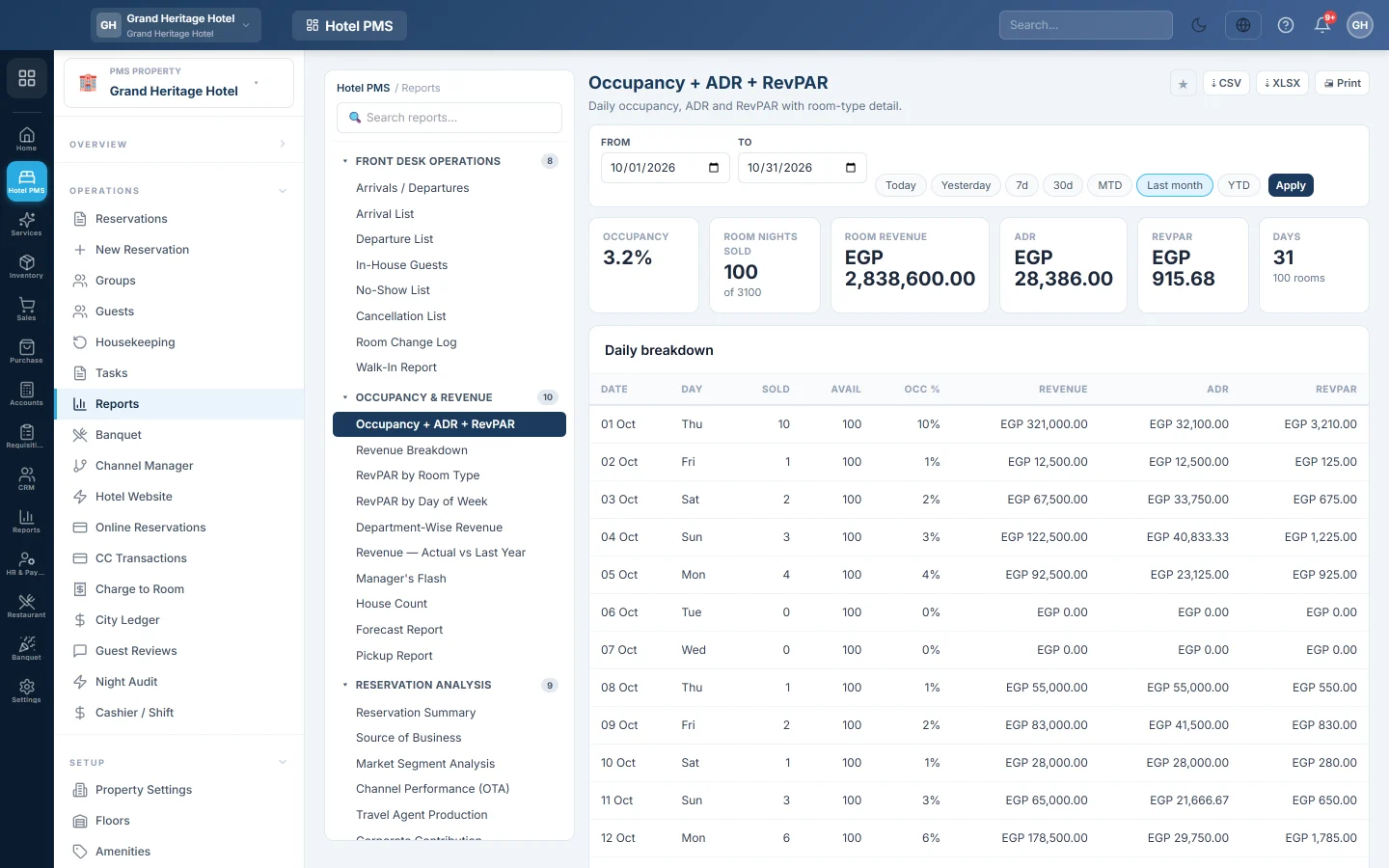
Daily occupancy, room nights sold, room revenue, ADR and RevPAR for any period, with a day-by-day breakdown.
Occupancy & ADR shows how full the hotel was, or will be, and at what average price. It gives the totals for the period and one line per day.
Before you begin
- Your role needs the hotel reports permission. See Users & Roles.
Where to find it
Open Reports → Hotel PMS Reports → Occupancy & ADR. In the hub it is Occupancy + ADR + RevPAR under Occupancy & Revenue.
Run the report
- Set From and To, or click a preset such as 30d or Last month.
- Click Apply.
Read the report
- Occupancy: room nights sold as a share of the room nights available.
- Room Nights Sold, out of the available room nights.
- Room Revenue: the total of the nightly rates of those nights.
- ADR (average daily rate): room revenue divided by room nights sold.
- RevPAR (revenue per available room): room revenue divided by room nights available.
- Days and the number of rooms counted.
Daily breakdown lists each Date and Day with rooms Sold, Avail, Occ %, revenue, ADR and RevPAR.
What is counted
- Rooms: active rooms marked sellable on Rooms.
- Nights: every night of confirmed, in-house and checked-out bookings. Future dates therefore show what is on the books.
- Cancelled and no-show bookings are left out.
Common questions
Why is occupancy above 100%? More room nights were sold than sellable rooms exist, for example when overbooking is allowed or rooms were made unsellable later.
Does room revenue include tax and extras? It is the nightly rate of each night, including extra adult, child and bed charges, before tax. Food, laundry and other charges are in Revenue Breakdown.
How do I export it? Click ⇣ CSV, ⇣ XLSX or Print.
Obrigado. Se ainda precisar de ajuda, escreva para info@eloerp.net.