Activities
List every call, email, meeting, task and note logged in CRM, add a follow-up, and mark it done.
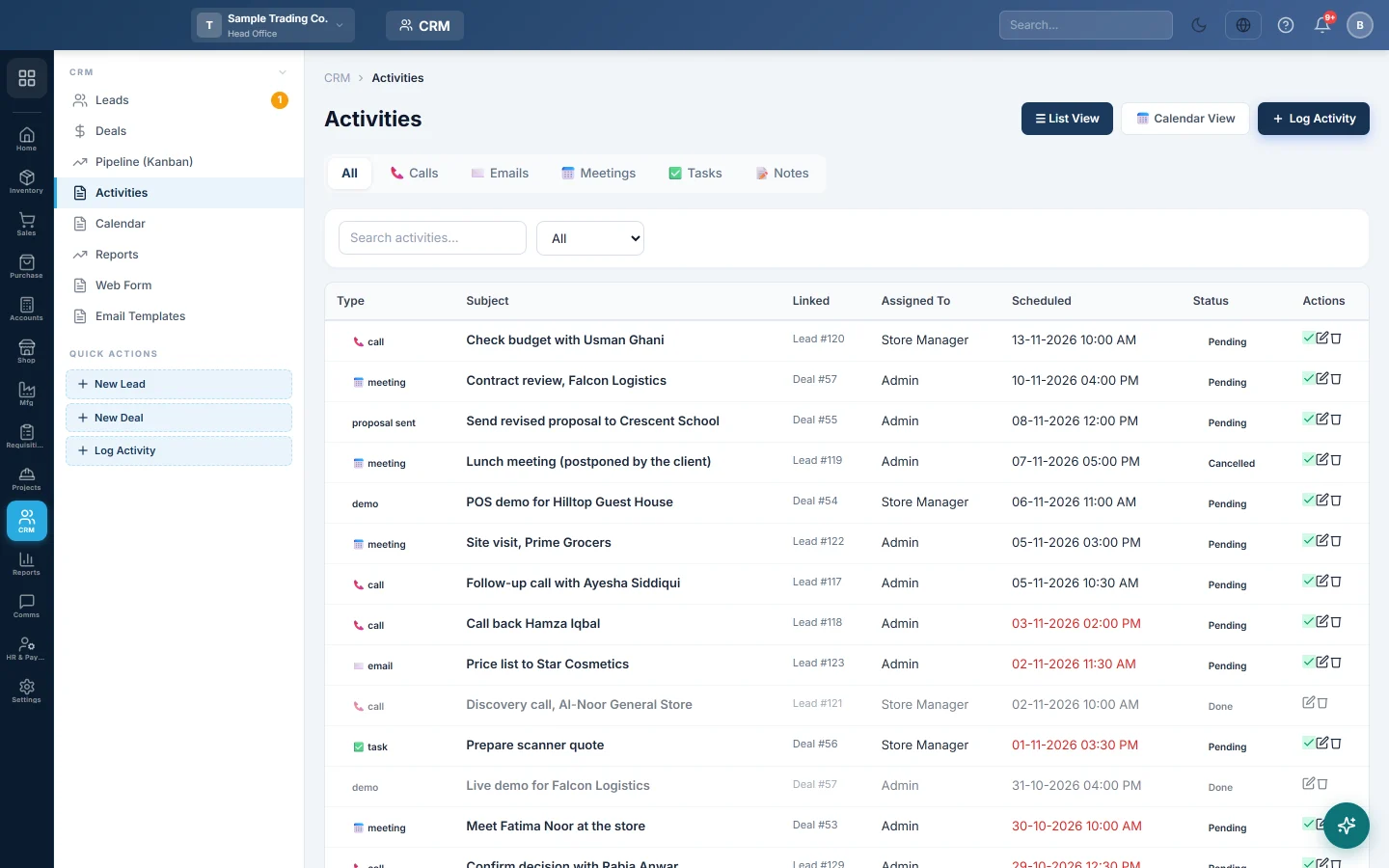
Activities is the to-do list for sales follow-up. It shows every call, email, meeting, task and note logged on leads and deals, and ones you add here.
Before you begin
- Your role needs the CRM activities permission. See Users & Roles.
- To tie a follow-up to a lead or deal, log it from that lead or deal. See Leads and Deals.
Where to find it
Open CRM → CRM → Activities. The side menu also has a Log Activity quick action.
Find activities
- Click a type tab: All, Calls, Emails, Meetings, Tasks or Notes.
- Type in Search activities... to search the subject.
- Choose Pending or Completed in the status drop-down.
The Linked column shows which lead or deal an activity belongs to. A Scheduled date in red is overdue.
Add an activity
- Click Log Activity.
- Choose the Type: Call, Email, Meeting, Task, Note, Demo or Proposal Sent.
- Choose the Status. Use Pending for something still to do.
- Type the Subject, for example Call Sara Khan about the price.
- Set the Scheduled date and time, and the Duration (min) for a meeting or call.
- Add a Description if needed.
- Click Save.
An activity added here is not linked to a lead or deal.
Finish, change or delete an activity
- Click the tick (Mark Complete) when it is done. Its status becomes Done.
- Click Edit to change it, for example to move the date.
- Click Delete and confirm to remove it.
Common questions
What is the difference between this list and the calendar? They show the same activities. Calendar lays them out by day for one month.
Why is the Assigned To column empty? Activities added on this screen have no owner. Log the activity from the lead or deal to pick who it is assigned to.
Do emails sent to leads show here? Yes. A bulk email from Leads logs an email activity on each lead.
Teşekkür ederiz. Hâlâ yardıma ihtiyacınız varsa info@eloerp.net adresine yazın.