Dashboard
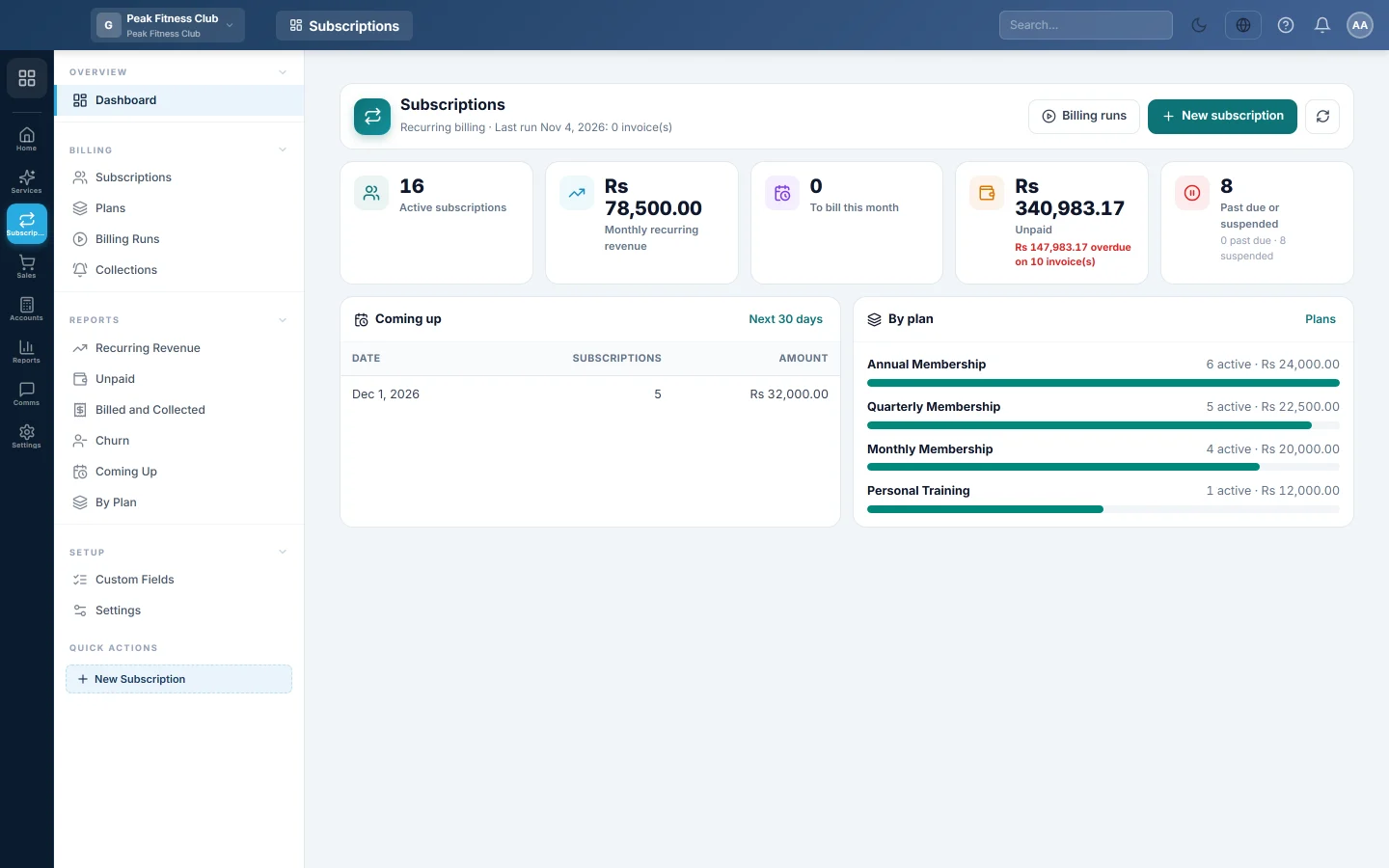
The home page of recurring billing, showing active subscribers, monthly recurring revenue, what bills this month, what is unpaid and what bills next.
The Subscriptions dashboard shows how your recurring billing is doing today. It covers how many customers are subscribed, what they are worth each month, what is still owed and what bills next.
Before you begin
- Subscriptions must be switched on for your company. A new company switches it on by picking Subscription / recurring billing as its business kind at sign-up. An existing company asks EloERP support to switch it on.
- Your role needs permission to view the Subscriptions dashboard. See Users & Roles.
Where to find it
Open Subscriptions → Overview → Dashboard.
Get started
Until your first invoice is raised, the dashboard opens with a Bill your customers on a schedule card. It has four steps, and each one is ticked when it is done:
- Create a plan: name, price and how often it bills. See Plans.
- Start a subscription: pick a customer and a plan. See Subscriptions.
- Preview and run billing: see every invoice before it is made. See Billing Runs.
- Turn on reminders: SMS, WhatsApp or email before and after the due date. See Collections.
Click a step to open that page. The card disappears once the first invoice exists.
Read the dashboard
The line under the title says when billing runs each day, or the date and invoice count of the last run.
| Tile | What it shows | Click it to open |
|---|---|---|
| Active subscriptions | Subscriptions that are billing now, with how many are on a free trial. | The list, filtered to Active. |
| Monthly recurring revenue | What all live subscriptions are worth in one month. A yearly plan counts one twelfth. | Recurring Revenue. |
| To bill this month | Subscriptions whose next invoice falls in this month. | The list, filtered to Bills this month. |
| Unpaid | The total still owed on subscription invoices, with the overdue part in red. | Unpaid. |
| Past due or suspended | Customers who are late, and customers whose service is stopped. | The list, filtered to Suspended. |
Below the tiles:
- Coming up lists the next billing dates in the next 30 days, with how many subscriptions bill and the amount. Next 30 days opens Coming Up.
- By plan shows the active subscribers and monthly value of each plan. Plans opens Plans.
Buttons at the top
- Billing runs opens the billing runs page, where you preview and run billing.
- New subscription puts a customer on a plan.
- The refresh button reloads the figures.
Common questions
Why does the Subscriptions module not appear on my rail? The module is off for your company, or your role has no Subscriptions permissions. Ask your administrator, or EloERP support to switch the module on.
Why is the monthly recurring revenue different from what I billed this month? Monthly recurring revenue is the monthly value of every live subscription at its current price. What was billed depends on which billing dates fell in the month. Recurring Revenue shows both side by side.
Does a subscription on a free trial count in the tiles? It is shown under Active subscriptions as "on trial" and counts in the monthly recurring revenue. It is not billed until the trial ends.
What time does billing run? At the hour set in Settings under Run billing every day at, in your company's own time. The line under the title shows it.
Obrigado. Se ainda precisar de ajuda, escreva para info@eloerp.net.