Doctors
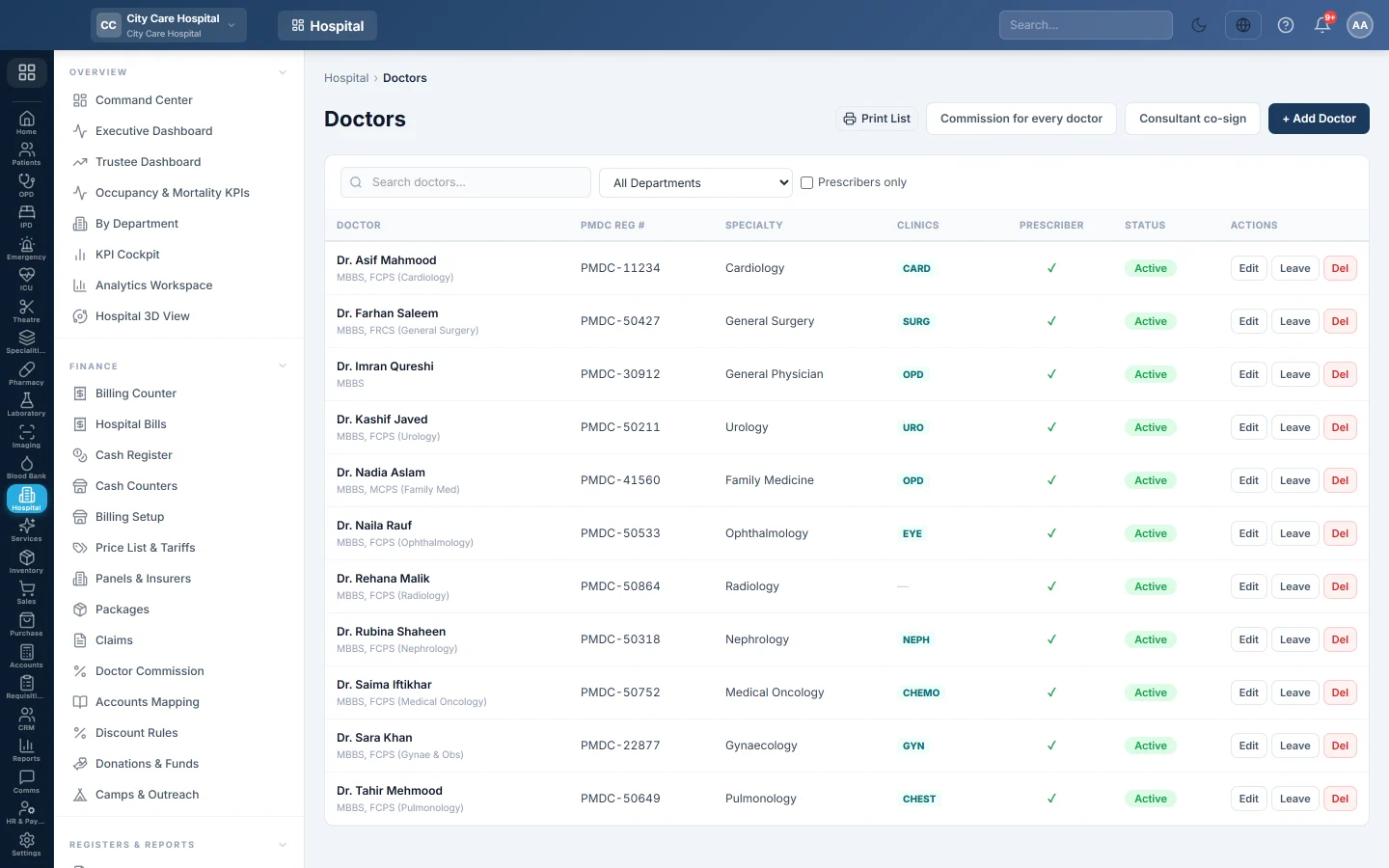
The hospital's doctor register, with PMDC number, clinics and fees, token prefix, room, login account, commission rules, leave and the HR employee link.
Doctors is the register of everyone who sees patients. Each doctor is assigned to one or more clinics with a fee and a token prefix, can be linked to a login for their own queue, and can have commission rules, leave days and an HR record.
Before you begin
- The departments exist. See Departments.
- For a doctor login, the user exists in Users & Roles.
- Your plan may limit how many active doctors you can have. When you reach it, EloERP says so and you cannot add another active doctor or turn an inactive one back on.
Where to find it
Open Hospital → Setup → Doctors.
Add a doctor
- Click + Add Doctor.
- Type the Full Name, for example Dr. Ayesha Malik, and the Specialty.
- Type the PMDC / PMC Reg # and PMDC Expiry.
- Type the Qualifications, Phone and Email.
- Optionally pick the Usual room. A room on a weekday schedule wins over this one.
- For a referring doctor, type the Lab Referral Commission %.
- In Login Account, pick the user this doctor signs in as. This gives them the doctor console and the My Day queue.
- In Paid by, choose Salary, Commission or Salary and commission.
- Keep Also add to HR as an employee ticked to create their HR record.
- Keep Can prescribe (e-Rx) and Active ticked.
- Under Clinic Assignments, click + Add Clinic for each clinic. Choose the Department, type the Fee and the Token prefix. Empty fields use the department's fee and code.
- Click Save.
See Add a doctor and set the consultation fee for a worked example.
Set commission
- For one doctor: click Edit, open the Commission tab and add rules.
- For everyone: click Commission for every doctor. Tick Book doctor commission on every bill to start booking it.
See Doctor Commission.
Record leave
- Click Leave on the doctor's row.
- Pick From and To, and type a Reason.
- Click Add leave.
Bookings are refused on these days. If bookings already fall in the leave, the window lists them so you can move them. Click × on a leave to remove it.
Junior doctors and co-sign
Click Consultant co-sign and tick the roles that sign as juniors. Their consultations are saved and the prescription goes to the pharmacy, but it waits for a consultant to co-sign. Prints show both names.
Find and remove doctors
Search by name or PMDC number, filter by department, or tick Prescribers only. An expired tag shows when the PMDC registration has expired. Del removes a doctor and their clinic assignments; their history stays.
Common questions
The doctor does not appear at the counter. They need an active clinic assignment in an active department that runs an OPD clinic.
"Doctor limit reached" when adding or reactivating. Your plan allows that many active doctors. Ticking Active on an inactive doctor takes a place too. Deactivate one you no longer use, or ask your service provider to raise the limit.
The HR employee was not created. The doctor is still saved. Open the doctor and click Create employee. See Employees.
Where are weekly clinic times set? On Doctor Schedules.
شكرًا لك. إذا كنت لا تزال بحاجة إلى مساعدة، راسلنا على info@eloerp.net.