Donations & Funds
For trust and welfare hospitals, keep funds and donors, receive donations with receipts and tax certificates, decide who pays through welfare bands, run sponsorships and campaigns, and report to the board.
Donations & Funds is the charity office of a trust hospital. It shows what each fund holds, records every donation with a receipt, and decides how much of a patient's bill a fund pays. The money and the records stay in step with the accounts.
Before you begin
- The page appears only when the Charity module is switched on for your hospital. Ask your service provider to switch it on.
- Each part needs its own right: receiving donations, managing funds, assessing patients, approving concessions, covering bills and setting up welfare. See Users & Roles.
- Cash and card donations need your open cash shift. So does covering a bill that was already paid in cash. See Cash Register.
Where to find it
Open Hospital → Finance → Donations & Funds.
Funds
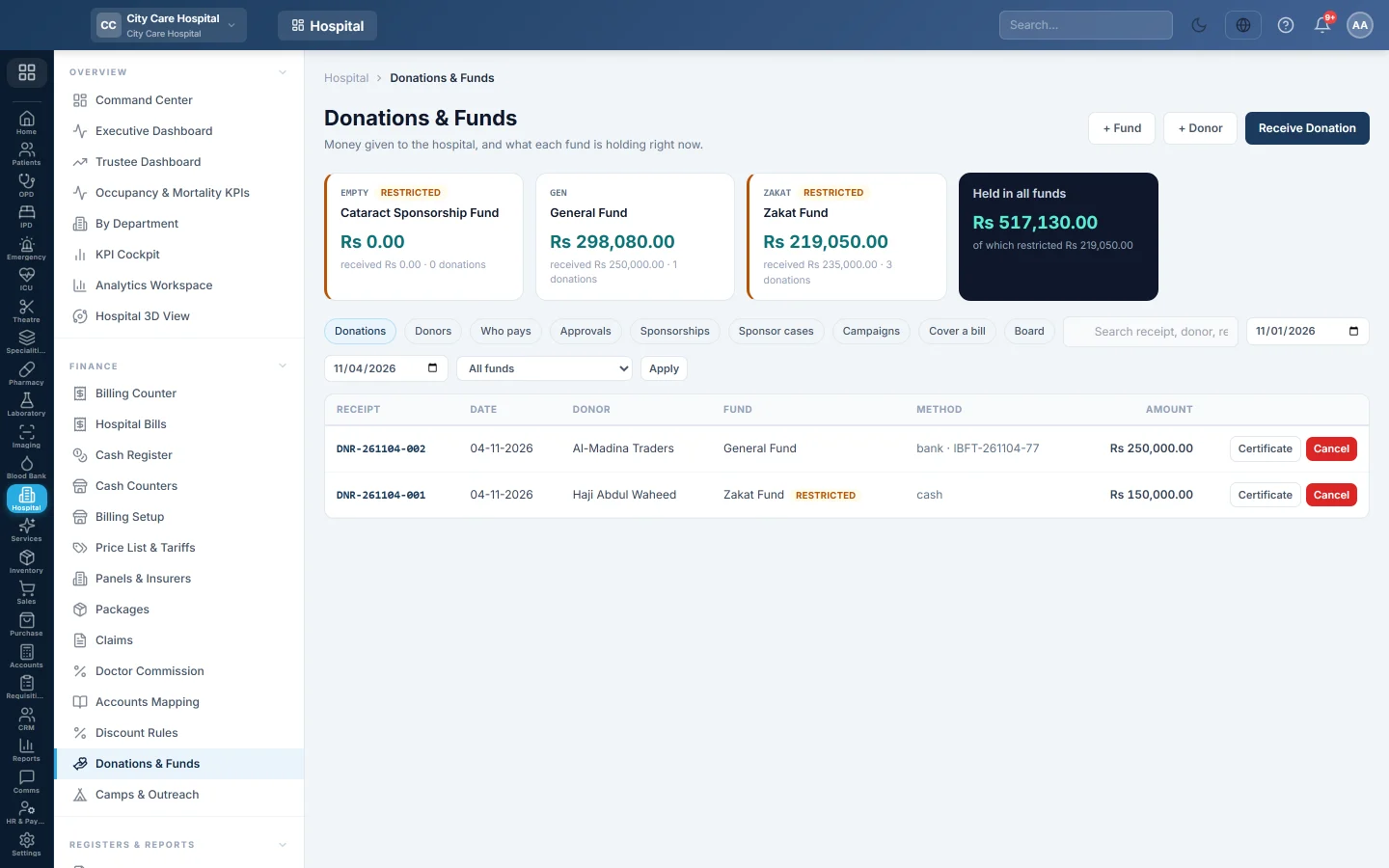
The cards at the top show each fund's balance, what it has received and how many donations. Held in all funds shows the total and the restricted part.
To add a fund:
- Click + Fund.
- Type a Code such as ZAKAT and a Name such as Zakat Fund.
- Choose the Type: General, Zakat, Sponsorship, Endowment, Grant or Other.
- Type an Opening balance if the fund already holds money.
- Tick Restricted when the money may only pay for what the donor named, and choose what it May pay for.
- Optionally pick the Income ledger and the bank account it is Kept in.
- Click Save fund.
Donors and donations
- + Donor adds a donor with their kind and contact details.
- Receive Donation records money in. See Record a donation and print the receipt.
- The Donations tab lists receipts by date and fund. Certificate prints a tax certificate; Cancel cancels a receipt with a reason.
- The Donors tab shows each donor's total, with Certificate for the tax year, Statement and Messages.
Who pays
The Who pays tab sets the welfare ladder: bands that say what share of the bill the patient pays, the means test, the patients waiting for assessment, and those on a band. See Set up welfare bands (who pays).
Here you also switch on Settle cover at the counter, and enter what a tax certificate says about the hospital.
Approvals
Concessions above a band's approval amount wait under Approvals until each level signs. Approvers click Approve or Refuse.
Sponsorships, cases and campaigns
- Sponsorships: a donor paying for something named, such as a pot, a count of procedures (for example 50 cataract surgeries) or one patient. A sponsorship pays a bill only once its money has arrived.
- Sponsor cases: what a donor may see about a patient who needs a sponsor, by code, not name.
- Campaigns: an appeal with a goal, such as an Eid appeal. Gifts are tagged on the receipt.
Cover a bill
The Cover a bill tab settles an existing patient bill from a fund, or writes it off as a concession. On a bill already paid in cash, the covered amount goes back to the patient from your drawer and shift, and the cover cannot be removed later. See Give a charity discount (welfare cover).
Board
The Board tab shows each fund's Opening, Received, Applied to patients and Unspent for the period. Applied means money that reached a patient; cancelling a receipt is not charity given. More reports are in the Reports Library.
What happens in the books
- A donation debits the payment method's cash or bank ledger and credits the fund's income ledger, by default Donations Received (4680).
- Cancelling a receipt posts the mirror entry.
- Charity cover is debited to Charity care funded by donations (5920) or Charity concession (5930). At the counter it sits in the bill's own entry, so cash shows only what the patient paid.
Common questions
Receive Donation is greyed out. Create a fund first.
The Who pays tab lists steps "Before the counter can settle cover". Follow them: a fund, a ladder of bands, a default band and a funded band.
A donor wants a yearly tax certificate. Open the Donors tab and click Certificate on the donor.
Does a cash donation show on my shift? Yes. It shows on the X report as of which donations.
Gracias. Si todavía necesita ayuda, escriba a info@eloerp.net.