Billing Setup
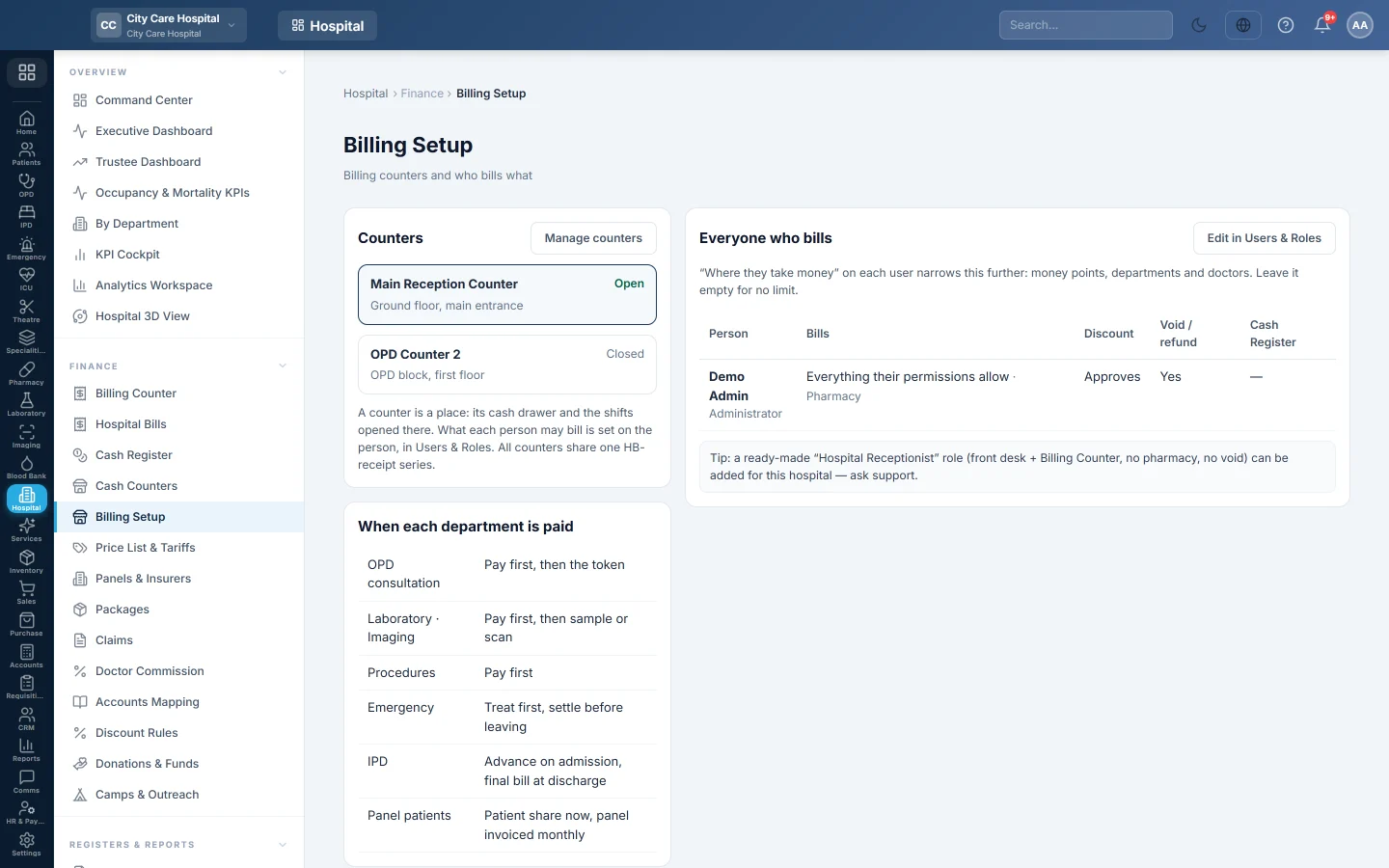
An overview of the hospital's counters and of everyone who can bill, with what they bill, their discount right, void right and cash register flag.
Billing Setup answers two questions on one page: which counters the hospital has, and who may bill what. It is a review page; you change the settings on the screens it links to.
Before you begin
- You need the HIMS settings right, or the users view or edit right.
- Users and their roles exist. See Users & Roles.
Where to find it
Open Hospital → Finance → Billing Setup. The page is titled Billing Setup, with the line Billing counters and who bills what under it.
Check the counters
Counters lists each counter, whether a shift is Open there, its location and its cash drawer. Click Manage counters to add or change them on Cash Counters.
A counter is a place: its cash drawer and the shifts opened there. All counters share one HB- receipt series.
Check who bills what
Everyone who bills lists each user who can take hospital payments:
| Column | What it shows |
|---|---|
| Person | The user and their roles. |
| Bills | Everything, Everything their permissions allow, or the money points and departments they are limited to. Pharmacy shows when they also dispense medicines. |
| Discount | No, Yes, Up to a percent, or Approves for users who approve discounts above the limit. |
| Void / refund | Whether they may void bills. |
| Cash register | Whether they are marked as a cashier; Needed when only marked cashiers may open a shift. |
Change what a person bills
- Click Edit in Users & Roles.
- Open the user.
- Under Where they take money, pick the Money points, Departments and Doctors they may bill. Leave a group empty for no limit.
- Save the user.
Company admins are never limited.
When each department is paid
The page also shows the hospital's payment rules:
- OPD consultation: pay first, then the token.
- Laboratory and imaging: pay first, then the sample or scan.
- Procedures: pay first.
- Emergency: treat first, settle before leaving.
- IPD: advance on admission, final bill at discharge.
- Panel patients: patient share now, panel invoiced monthly.
Common questions
A cashier sees "nothing yet — ask an administrator" on the counter. Their role has no billing right, or their Where they take money leaves out every department. Fix it in Users & Roles.
Can a receptionist bill without pharmacy or voids? Yes. Give them a role with counter billing only. Your service provider can add a ready-made hospital receptionist role.
Where are discount limits set? On Discount Rules.
Спасибо. Если помощь всё ещё нужна, напишите на info@eloerp.net.