Cash Register
The cashier's shift screen for hospital money. Open a shift with a float, record cash in and out, read the X summary, close with a counted total (Z) and see the day's collection.
Cash Register is where a hospital cashier opens and closes their billing shift. Every payment you take at the Billing Counter, Hospital Bills, procedures and the IPD screens is recorded on your open shift, so you can count the drawer at the end.
Before you begin
- Your user has a cash payment method and its cash ledger. See Payment Methods and Users & Roles.
- If the hospital has tills, they exist on Cash Counters.
- Hospital shifts are separate from the shop POS register. Money taken here appears only in these hospital shift reports.
Where to find it
Open Hospital → Finance → Cash Register. The Billing Counter's Open shift or Close shift button opens it too.
Open a shift
- Choose your Counter, if counters exist. A counter in use is shown but cannot be chosen.
- Type the Opening Float, the cash already in the drawer. The last counted total at that counter is suggested as Carried from.
- Click Open Shift.
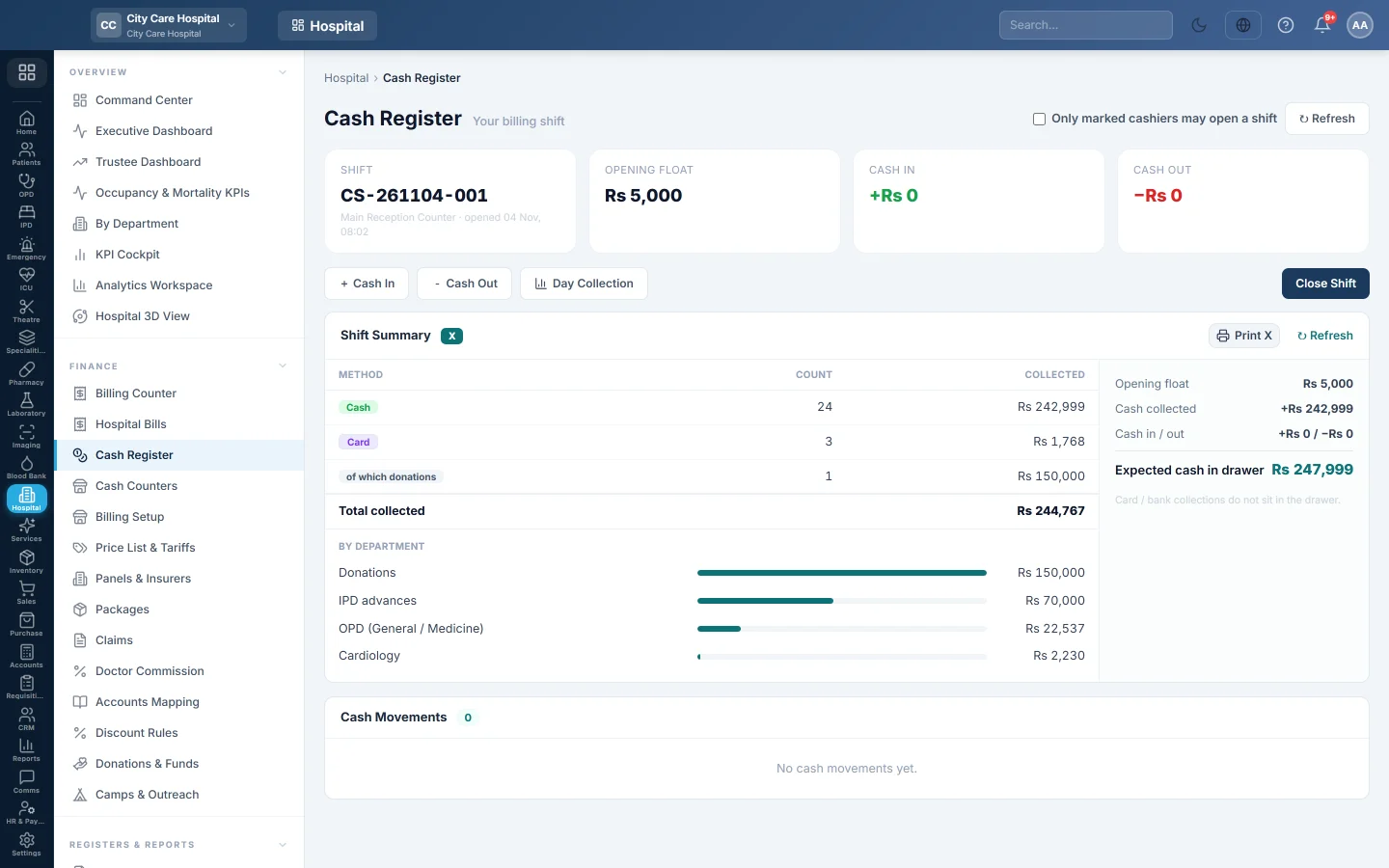
The page then shows the shift number, Opening Float, Cash In and Cash Out.
Record cash in or out
Use this for a float top-up, petty cash or a bank drop, not for patient payments.
- Click + Cash In or - Cash Out.
- Type the Amount.
- In Cash came from or Cash went to, choose the account, for example the bank or petty cash.
- Type the Reason and, if you like, Notes.
- Click Record.
The movement is listed under Cash Movements and posts at once to the accounts.
Read the Shift Summary (X)
The Shift Summary shows, without closing anything:
- collections by method, with Refunds and of which donations on their own lines;
- collections By department;
- the drawer check: Opening float, Cash collected, Cash in / out and Expected cash in drawer.
Card and bank collections do not sit in the drawer, so only cash counts towards the expected cash. Click Print X for an A4 or 80 mm copy.
Close the shift (Z)
- Click Close Shift.
- Count the cash and type it in Counted Cash. EloERP shows Balanced — no variance, Over by or Short by.
- Add Notes if needed, for example why the drawer is short.
- Click Close Shift (Z). The Z report prints.
See Open and close a cashier shift for the end-of-day routine.
Day Collection
Click Day Collection for the whole day across all shifts. Pick the date and, with several branches, the branch. It shows the total, By Method, By Type, By Department, By Cashier and each shift's expected, counted and difference. Outside any shift warns about payments taken with no shift open. Print it with Print.
Close another cashier's shift
Users with the force-close right see Other open shifts. Click Force-close, type the Counted Cash if it was counted, give a Reason, then click Force-close (Z).
Only marked cashiers
An administrator can tick Only marked cashiers may open a shift. Then only users marked as cashiers in Users & Roles can open a shift.
What happens in the books
- Cash In debits the drawer's cash ledger and credits the account you chose. Cash Out does the opposite.
- On close, a shortage debits Cash Over/Short and credits the drawer. An overage does the reverse. Nothing posts when the drawer balances.
- The drawer is the counter's own cash ledger when the counter has one, otherwise the cashier's own cash ledger.
Common questions
The counter shows "in use". Another cashier has a shift open there. They close it, or a supervisor force-closes it.
The Billing Counter says to open a shift first. Payments need an open shift. Open one here, then go back.
Why is the expected cash lower than the total collected? Card, bank and wallet payments are in the total but not in the drawer.
The day total is more than the shifts total. Some payments were taken outside any shift. The Outside any shift line shows how many.
Спасибо. Если помощь всё ещё нужна, напишите на info@eloerp.net.