Hospital Bills
The day's list of hospital bills from every counter and department, where you collect an OPD fee, reprint a receipt, refund some lines and void a bill.
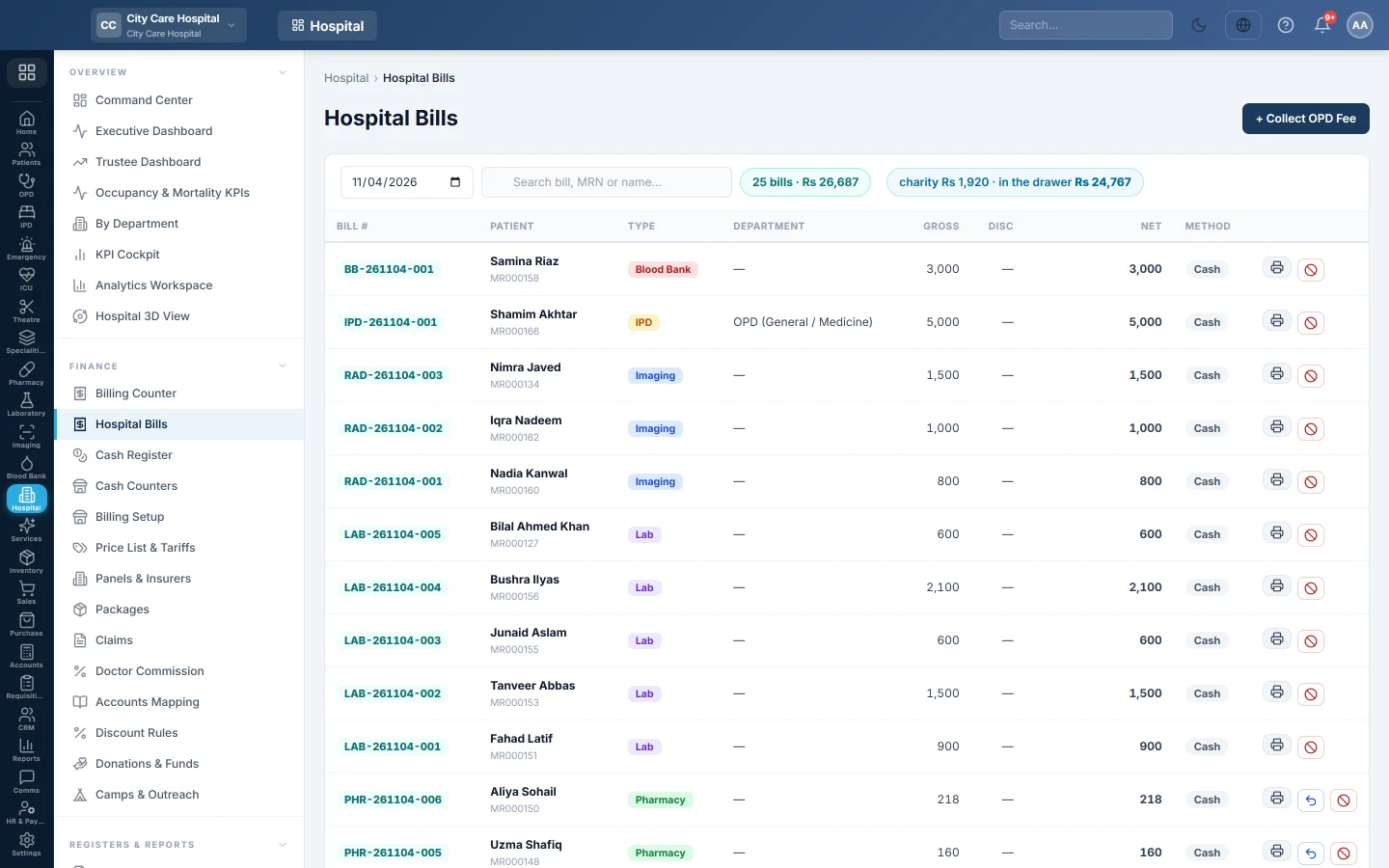
Hospital Bills lists every bill for one day: counter bills, OPD fees, procedures, lab, imaging, IPD and the rest. You use it to find a bill, reprint its receipt, collect a single OPD fee, refund some lines or void a bill.
Before you begin
- Viewing needs the billing view right. Collecting needs the billing create right. Refunding lines and voiding need the void right. See Users & Roles.
- Collecting, refunding or voiding needs your open cash shift. See Cash Register.
Where to find it
Open Hospital → Finance → Hospital Bills. The Billing Counter also has a Hospital Bills button.
Find a bill
- Pick the day in the date box. Today is shown first.
- Type a bill number, MRN or patient name in Search bill, MRN or name….
The chip next to the search shows the number of bills and their net total. When charity covered part of the bills, a second chip shows the charity share and what is in the drawer.
| Column | What it shows |
|---|---|
| Bill # | The bill number, and VOIDED on a voided bill. |
| Type | Where the bill came from, for example counter, OPD fee or lab. |
| Department | The department; Several for a counter bill with many departments. |
| Gross, Disc, Net | Before discount, the discount, and what is due. A charity split shows under Net. |
| Method | How it was paid. |
Instalments due at the top lists instalments due this week and any that are overdue.
Collect an OPD fee
For a single consultation fee you can collect here instead of the Billing Counter.
- Click + Collect OPD Fee.
- Pick the Patient, the Department and, if needed, the Doctor.
- Check the Fee. A lock means it is the tariff price and cannot be changed.
- Type a Discount if your role allows it.
- Choose the payment method.
- Optionally open Vitals & Allergies to record them for the doctor.
- Click Collect & Print.
A queue token is issued and shown at the top of the screen. With a free OPD the button reads Issue Token and no bill is made.
Reprint a receipt
Click the printer on the bill's row and choose A4 or 80 mm.
Refund some lines
When the patient keeps part of a Billing Counter or pharmacy bill, refund only the lines they give back.
- Click the refund button on the row (its tip reads Refund some lines).
- In Refund lines, tick each line to refund.
- Type the Reason.
- Click Refund selected.
A test whose sample is collected, a scan already started or a consultation already called cannot be refunded. On a pharmacy bill the ticked medicines go back into stock. See Refund one line of a bill.
Confirm payments from the patient portal
When patients may pay bills in the patient portal, the box Payments from the patient portal shows at the top with the number to check. Click Confirm, pick the Account the money came into and click Receive on the bill. The payment is received in your open shift. Click Reject to refuse one with a reason the patient reads. See Pay dues online.
Void a bill
- Click the void button on the row.
- Type the Reason.
- Click Void & Refund.
Voiding a pharmacy bill also returns its medicines to stock and to their batch, takes their cost back out of cost of sales, and puts the prescription back in the pharmacy queue. A bill on a panel invoice cannot be voided on its own.
What happens in the books
An OPD fee debits the payment method's cash or bank ledger and credits the department's revenue ledger. A void posts the mirror of every entry still standing on the bill, and the refund leaves the drawer of the person who voids it. A line refund reverses only those lines' revenue, less their share of any discount, and their doctor commission.
Common questions
Can I refund one line of a counter bill? Yes. Click Refund some lines on the row. Bills on a panel or with charity cover are voided whole instead.
The fee box is locked. The price comes from Price List & Tariffs. Change it there.
Why did the fee show as waived? The patient came back within the department's free follow-up days. See Departments.
The void refund is missing from my drawer. The refund lands on the shift of the person who voided it, not on the original cashier's shift.
شكرًا لك. إذا كنت لا تزال بحاجة إلى مساعدة، راسلنا على info@eloerp.net.