Lab Orders
Book lab tests for a patient, follow each order from sample to released report, and print the day's order register.
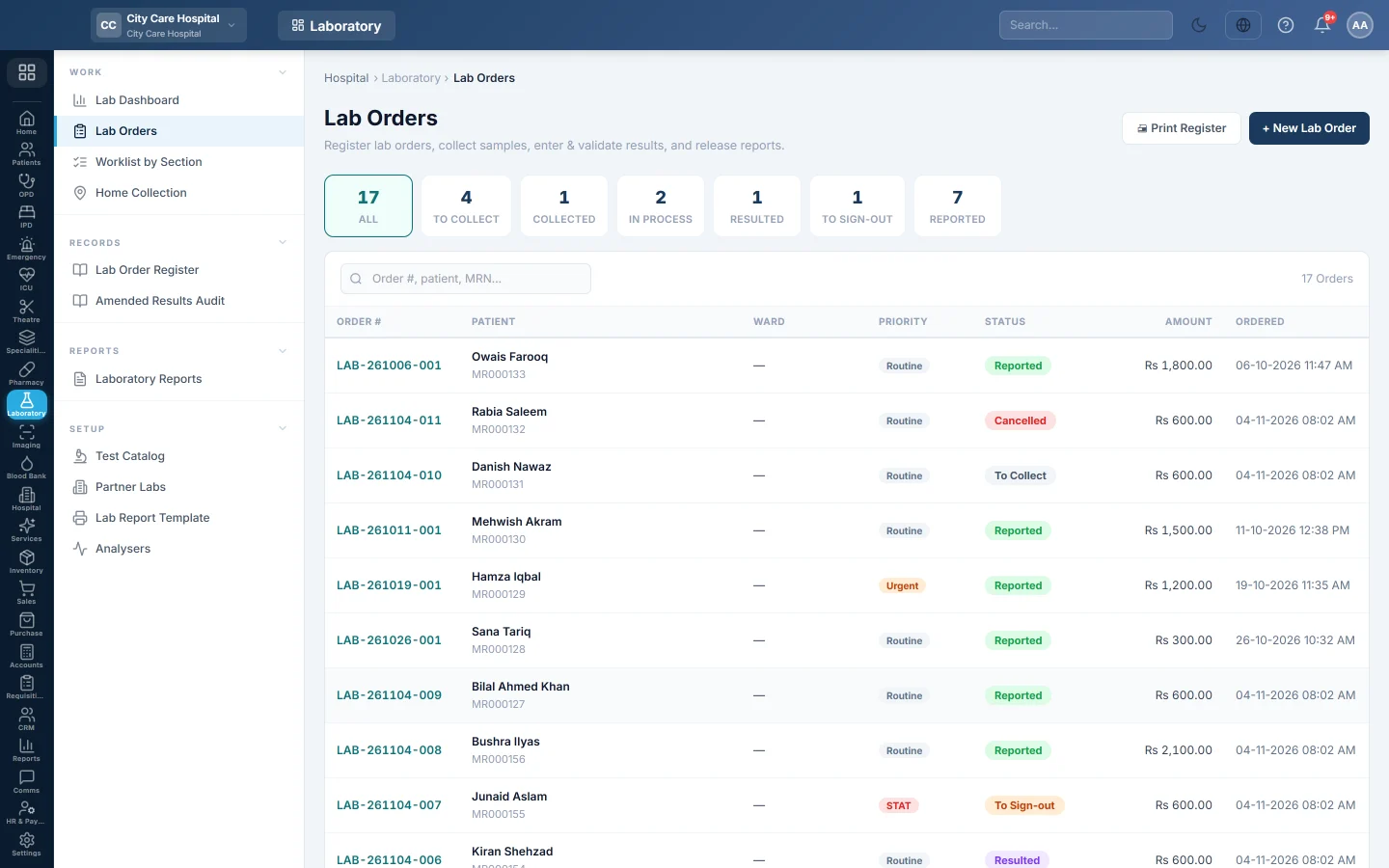
Lab Orders is the lab's main list. Every test booked for a patient is an order here, whether the front desk booked it or a doctor sent it from the consultation screen.
Before you begin
- The Laboratory department is switched on for your hospital. Your service provider turns it on.
- Your tests exist with a price in the Test Catalog. A test without a price bills nothing.
- To book an order you need Manage Lab Orders / Workflow, or the permission to create encounters. See Users & Roles.
Where to find it
Open Laboratory → Work → Lab Orders.
Book a lab order
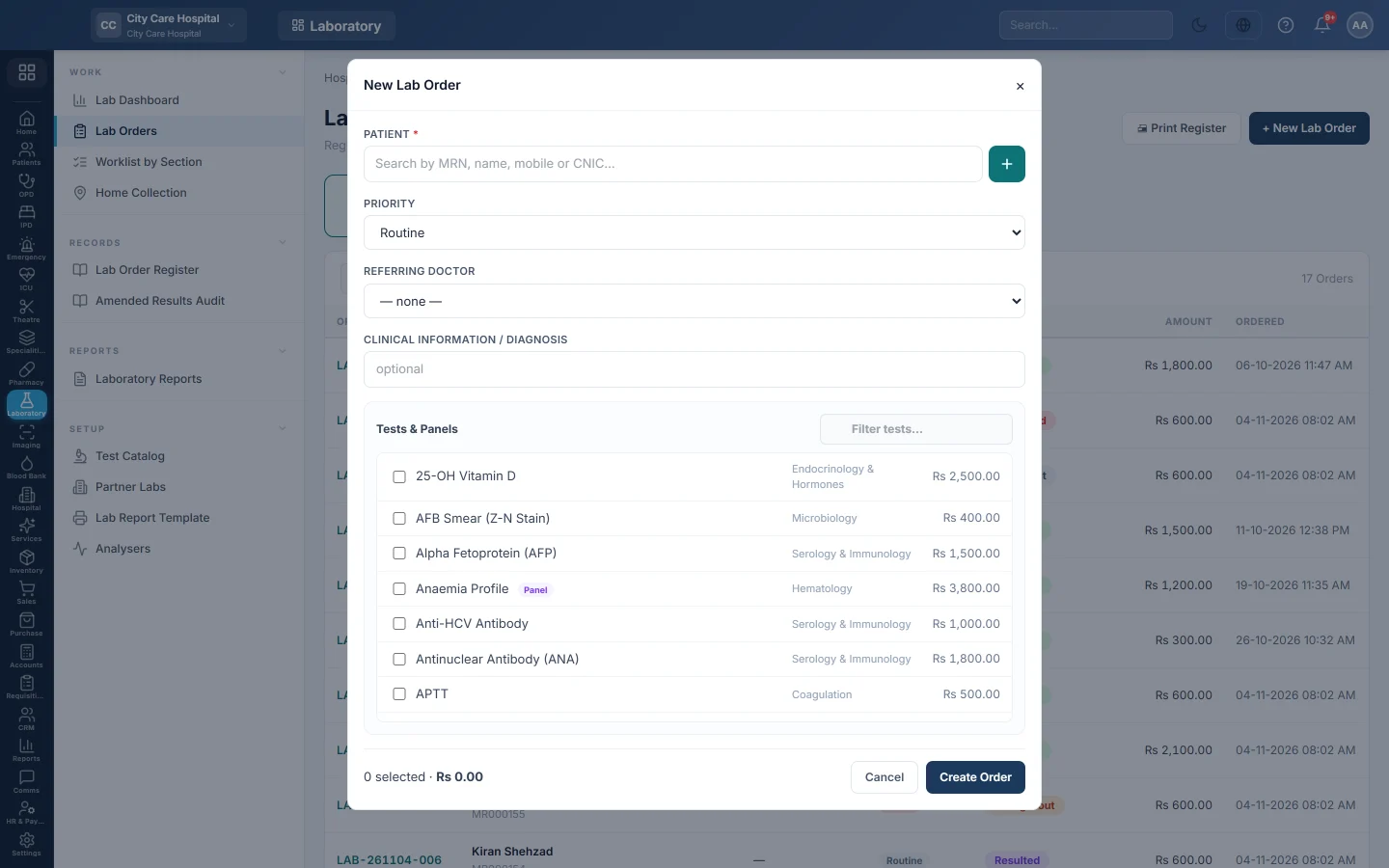
- Click + New Lab Order.
- Under Patient, search by MRN, name, mobile or CNIC and pick the patient. If they are new, click Register new patient and fill in the short form, or register them fully first. See Register Patient.
- Choose the Priority: Routine, Urgent or STAT.
- Pick the Referring Doctor if a doctor sent the patient, and type any Clinical information / diagnosis.
- Under Tests & Panels, tick each test. Type in Filter tests… to find one quickly. Each line shows its section and price.
- Check the count and total at the bottom, then click Create Order.
The order opens at once. EloERP gives it an order number and makes one specimen for each specimen type, each with its own accession number for the tube label. A panel such as a lipid profile expands into all of its result lines.
If home collection is switched on, the form also has a Home sample collection box. Tick it and fill in the Address and Phone for the visit. See Home Collection.
Orders from doctors
A doctor in the OPD consultation can tick tests under Recommended Tests / Investigations and click Send to Lab. The order appears here with the doctor as referrer. A test is matched by its exact name or code in your catalog. Names the lab does not know, such as an X-ray, go to Radiology instead, and anything neither knows is listed in the message.
Orders for admitted or emergency patients show the ward and bed in the Ward column. Their charges go on the patient's hospital bill, not the lab counter.
Follow an order
The chips at the top count the orders at each stage. Click one to see only those orders.
| Chip | What it means |
|---|---|
| To Collect | Booked; no sample taken yet. |
| Collected | Samples taken, not yet received in the lab. |
| In Process | In the lab; results still to enter. |
| Resulted | All results entered; waiting for technical verification. |
| To Sign-out | Verified; waiting for the pathologist to release it. |
| Reported | Released. The report can be printed. |
Click any row to open the order. The work on the order is explained in Take a lab sample and enter results and Verify and sign out a lab report.
Use the search box to find an order by order number, patient name, MRN or phone.
Print the order register
Click Print Register to print the orders on screen, with their stage and amount. Pick a chip or search first to print only those orders. Use it to hand over at the end of a shift.
Cancel an order
- Open the order.
- Click Cancel and confirm.
You can cancel an order only before it is reported and before it is billed.
Common questions
The New Lab Order button is missing. Your role cannot book orders. Ask for Manage Lab Orders / Workflow.
A test is missing from the list. It is inactive or not in the catalog. Add or activate it in the Test Catalog.
Why does the order total show Rs 0? The tests have no price in the catalog. Set the price, then book a new order.
Can I cancel a billed order? No. Cancelling is refused once the order is billed. Void the bill first.
Where do I take the payment? On the order itself. See Bill a lab order.
Terima kasih. Jika masih butuh bantuan, kirim email ke info@eloerp.net.