Donors & Donations
Keep the blood donor register, check each donor's eligibility, defer donors, record donations and print donor cards and collection registers.
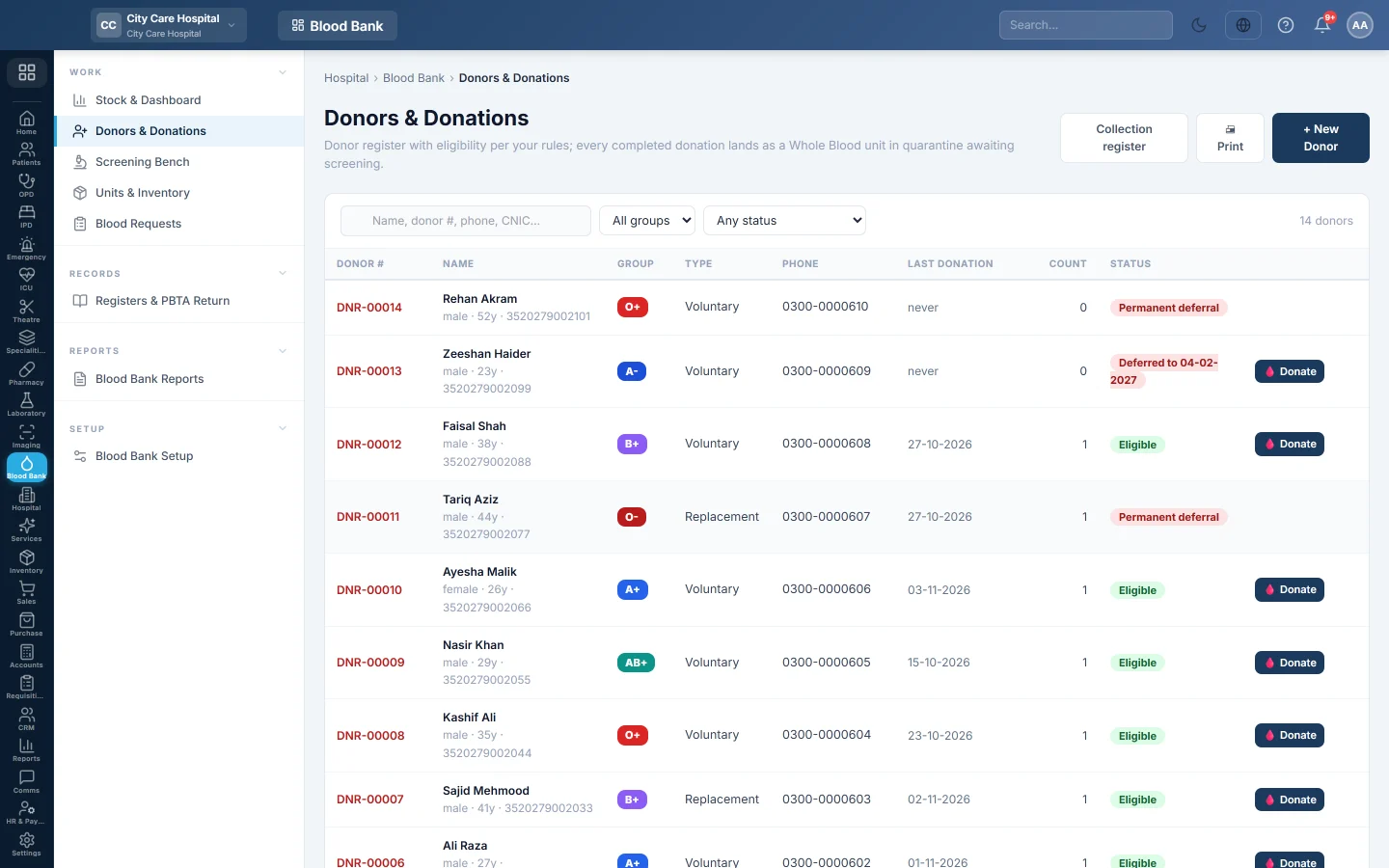
Donors & Donations is the donor register and the collection desk. You add donors, check whether they may donate today, and record each donation. A completed donation creates a Whole Blood unit in quarantine.
Before you begin
- Your role needs Register Donors & Record Donations to add donors and record donations. View Blood Bank shows the lists only. See Users & Roles.
- Set the donor rules first: age, weight, Hb and the interval between donations. See Blood Bank Setup.
- The Whole Blood component must exist in setup. A donation is refused without it.
Where to find it
Open Blood Bank → Work → Donors & Donations.
Add a donor
- Click + New Donor.
- Type the Full name. Add Father / Husband, CNIC, Phone and Sex.
- Enter the Date of birth, or the or Age (years) field if the donor does not know it.
- Choose the Donor type: Voluntary, Replacement or Directed.
- Pick the Blood group (if known). Leave it as unknown — set by screening if you are not sure.
- Click Save. EloERP gives the donor a number such as DNR-00012.
Check a donor and record a donation
- Search by name, donor number, phone or CNIC, or filter by group and status.
- Click the donor's row. The donor card shows Eligible to donate, or the reasons they are not.
- Click 🩸 New donation, or 🩸 Donate in the list.
- Fill in the pre-donation checks and the questionnaire, then click Record donation.
For every field of the donation form, see Register a donor and record a donation.
Defer a donor or lift a deferral
- Open the donor and click Deferral….
- Choose Temporary deferral with a Deferred until date, or Permanent deferral.
- Type the Reason, for example on antibiotics.
- Click Save.
To lift it, choose Eligible (lift deferral). A reactive screening result defers the donor automatically, permanently or for the days set in your rules.
- 🖨 Print prints the list that is open: the Blood Donor Register or the Blood Donation Register.
- 🖨 Donor Card on an open donor prints a small card with the donor number, group and last donation. Donors keep it for their next visit.
See the collection register
Click Collection register to switch from donors to donations. Pick a date range. Each row shows the donation number, the donor, weight, Hb and BP, the bag, the volume, the outcome and the screening result. Click Donor register to switch back.
Common questions
The Donate button is missing for a donor. The donor is permanently deferred. Lift the deferral first if it was set by mistake.
Record donation stays greyed out. Enter Weight kg and Hb g/dL. The button also stays off while the donor is not eligible, for example when the last donation was too recent.
A donor ticked one questionnaire box and the donation was refused. Any YES answer means the donor must be deferred, not bled. Untick it only if the answer was entered by mistake.
Where does the donor's blood group come from? From screening. When a donation is verified, EloERP writes the tested group to the donor record.
How do I link a replacement donor to a patient? Choose Replacement (against a request) as the donation type and pick the request. See Blood Requests.
Vielen Dank. Wenn Sie weitere Hilfe brauchen, schreiben Sie an info@eloerp.net.