Stock & Dashboard
See blood stock by group and component, units in quarantine, units about to expire, open requests and this month's reactive donations and reactions at a glance.
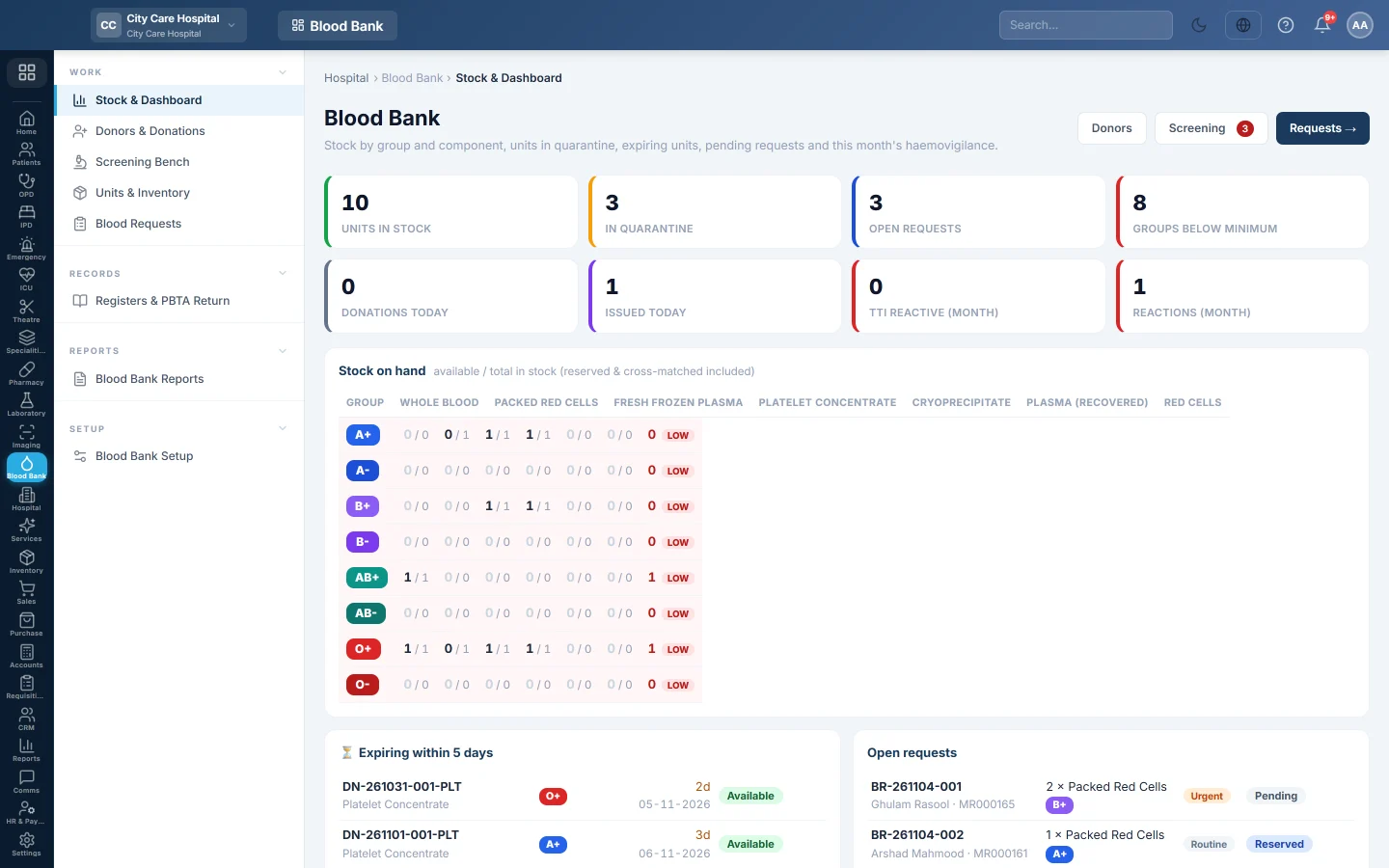
The Blood Bank dashboard shows your blood stock by group and component. It also shows units in quarantine, units expiring soon and waiting requests. Blood bank staff open it at the start of every shift.
Before you begin
- The Blood Bank department must be switched on for your hospital. Your service provider turns it on.
- Your role needs View Blood Bank or any other blood bank permission. See Users & Roles.
- The low-stock and expiry warnings follow your rules in Blood Bank Setup.
Where to find it
Open Blood Bank → Work → Stock & Dashboard.
Read the tiles
| Tile | What it counts |
|---|---|
| Units in stock | Units that are available, reserved or cross-matched. |
| In quarantine | Collected units still waiting for screening. Click it to open the Screening Bench. |
| Open requests | Requests that are pending, reserved or cross-matched. Click it to open Blood Requests. |
| Groups below minimum | Blood groups with fewer red-cell units than your minimum. |
| Donations today | Completed donations collected today. |
| Issued today | Units issued to patients today. |
| TTI reactive (month) | Donations discarded this month because a screening test was reactive. |
| Reactions (month) | Transfusion reactions recorded this month. |
Read the stock grid
Stock on hand has one row per blood group and one column per component. Each cell shows the available units first, then the total in stock, for example 3 / 5. The total includes units already reserved or cross-matched for a patient.
The Red cells column adds available Packed Red Cells and Whole Blood. A row turns red with a LOW tag when it is below Minimum red-cell units per group.
Act on expiring units and open requests
- Expiring within … days lists in-stock units by expiry date, with the days left. Use the oldest units first, or discard expired ones on Units & Inventory.
- Open requests lists waiting requests, emergency first. Click a row to open the request.
- 14-day donations & issues compares what came in with what went out each day.
The buttons at the top open Donors, Screening (with the number waiting) and Requests.
Common questions
Why does a group show LOW when I have Whole Blood in the fridge? Only available units count. Units in quarantine, reserved or cross-matched are not counted as free stock.
Why is the total bigger than the available number? The total includes units reserved or cross-matched for patients. They are still on your shelf but are held for someone.
How do I change the low-stock level or the expiry warning? Change Minimum red-cell units per group and Expiry alert (days) in Blood Bank Setup.
The Open requests tile and the Blood Requests page show different counts. The tile leaves out requests that already have units issued. The Open filter on Blood Requests includes them.
Gracias. Si todavía necesita ayuda, escriba a info@eloerp.net.