Modality Worklist
The radiographer's board of exams per machine for the day, to mark patients arrived, record exams performed, print the day sheet and export the worklist to a PACS.
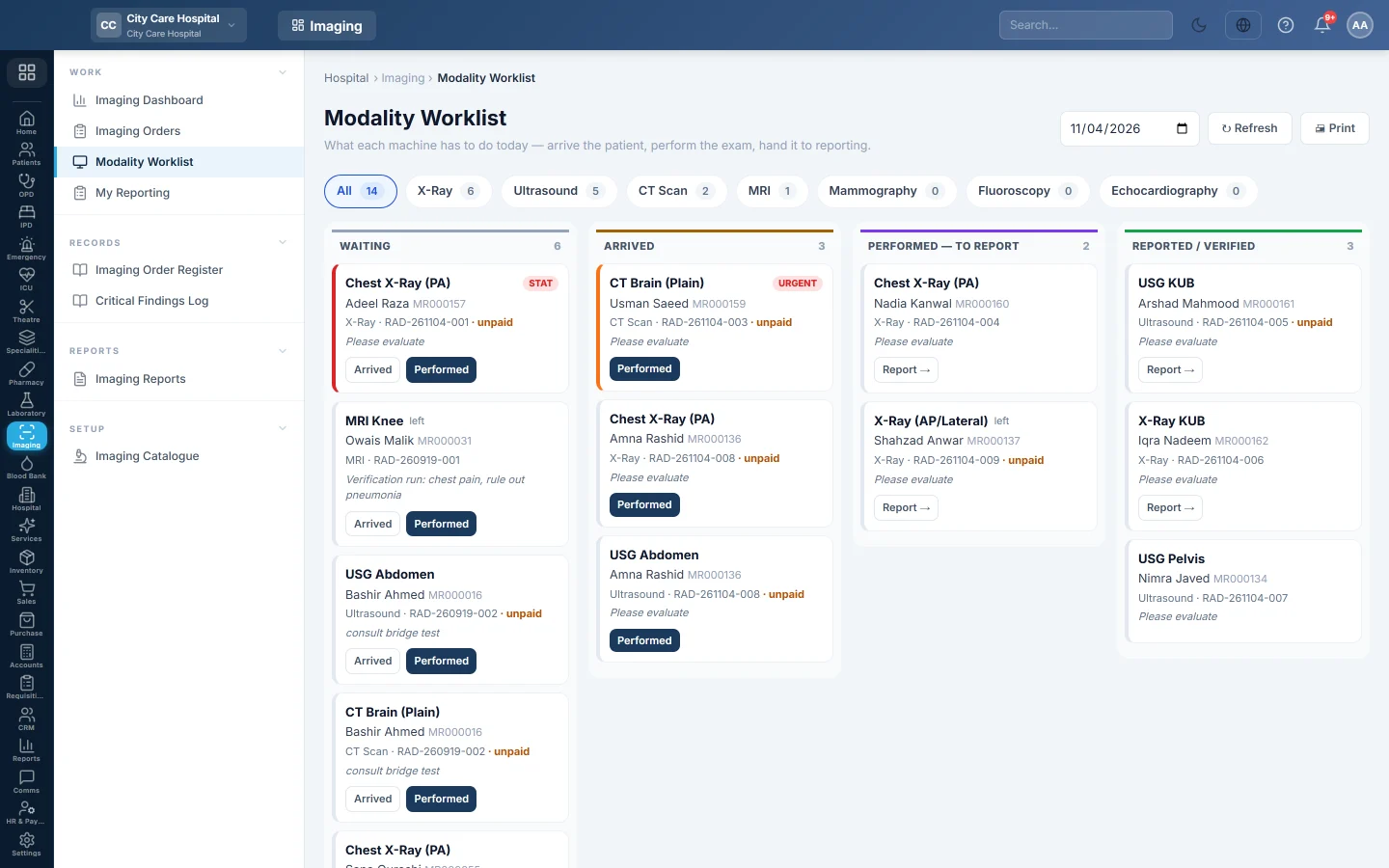
The Modality Worklist shows what each machine has to do today, with STAT exams first. Radiographers mark patients arrived, record the exam as performed and hand it to reporting.
Before you begin
- Your role needs Perform Exams (Technologist Worklist) to use the Arrived and Performed buttons. See Users & Roles.
- Each exam belongs to a modality set up in the Imaging Catalogue.
Where to find it
Open Imaging → Work → Modality Worklist.
Read the board
Pick a modality chip, such as X-Ray or CT Scan, to see one machine. All shows every machine. The board has four columns:
- Waiting: ordered or scheduled, the patient is not here yet.
- Arrived: the patient is in the department.
- Performed — to report: done, waiting for a report.
- Reported / verified: performed today and already reported.
Each card shows the exam, the side for left or right exams, the priority, the patient and MRN, the order number and the clinical information. ER or the ward and bed show where an inpatient is. unpaid warns that a walk-in has not paid yet; on admission bill means the ward will settle it, and on ER bill means the ER visit's bill will.
Waiting exams stay on the board until they are done, whatever the date. Performed exams show only on the day they were performed. Change the date at the top to look at another day.
Work an exam
- When the patient comes in, click Arrived on the card.
- When the exam is done, click Performed. You are recorded as the technologist.
- Click Report → to open the order for reporting.
To record the films used, contrast or a viewer link, open the order and use Perform there instead. See Perform an exam.
Print the day sheet
Click Print to print the board for the chosen modality and date. The sheet lists the time, order number, patient, exam, priority, status and clinical information, with a Paid column and a Done by / time column to fill in by hand.
Export the worklist to a PACS
When a PACS link is set in the Imaging Catalogue, two more buttons appear:
- Worklist CSV downloads the exams still to be done that day, for the chosen modality, as a CSV file.
- HL7 downloads the same exams as HL7 order messages.
Each exam gets a DICOM accession number when it is exported, if it has none yet. Load the file into your PACS or RIS broker so the machine's worklist matches.
Common questions
A patient is missing from the board. Check the modality chip and the date. A cancelled order never shows.
Can I undo Performed? No. The exam moves to reporting. Ask the radiologist to note the problem in the report.
Why do STAT exams come first? The board sorts by priority, then by scheduled time, then by order time.
The export says no exam is due. No exam for that modality is still waiting to be done on that date.
Gracias. Si todavía necesita ayuda, escriba a info@eloerp.net.