Imaging Orders
Register imaging orders, follow each exam from waiting to verified, bill the order at the imaging counter and cancel orders that will not go ahead.
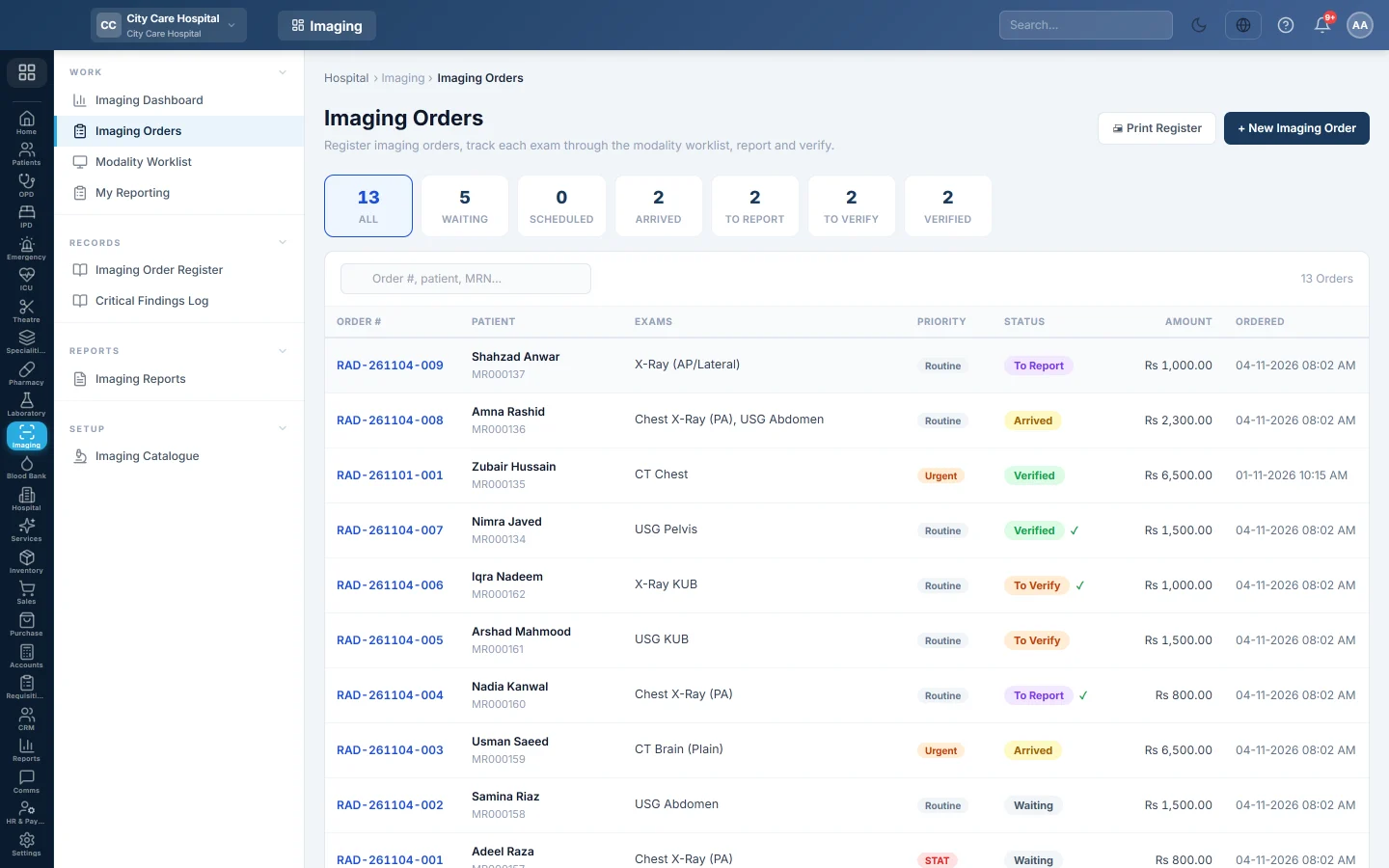
Imaging Orders is the list of every imaging order in the hospital. Each order holds one or more exams, and each exam moves from Waiting to Verified as it is done and reported.
Before you begin
- The exams and their prices are in the Imaging Catalogue.
- To create orders your role needs Order Imaging Exams. To bill, it needs Bill Imaging Exams. See Users & Roles.
- To bill at the counter, open your cash shift on Cash Register first.
Where to find it
Open Imaging → Work → Imaging Orders.
Where orders come from
- The imaging desk creates a walk-in order here with + New Imaging Order. See Order an imaging study.
- A doctor in OPD ticks the scans under Recommended Tests / Investigations and clicks Send to Lab. Names that match the imaging catalogue become an imaging order.
- The ward and ER orders from the patient's chart. These orders go on the admission or ER bill.
- The Billing Counter creates an order when it bills a walk-in scan.
Follow an order
The chips across the top filter the list and show how many orders are in each stage.
| Status | Meaning |
|---|---|
| Waiting | Ordered, the patient has not come to the machine yet. |
| Scheduled | Booked for a time. |
| Arrived | The patient is at the department. |
| To Report | The exam is performed and waits for a report. |
| To Verify | A draft report is saved and waits for the radiologist to sign. |
| Verified | Every exam on the order has a signed report. |
An order's status is its least advanced exam. For example, an order with one verified and one waiting exam shows Waiting.
Type an order number, patient name, MRN, phone or CNIC in the search box to find an order. A green tick next to the status means the order is billed.
Open an order
Click a row. The order page shows the patient, the referring doctor and the clinical information at the top, and one card per exam below.
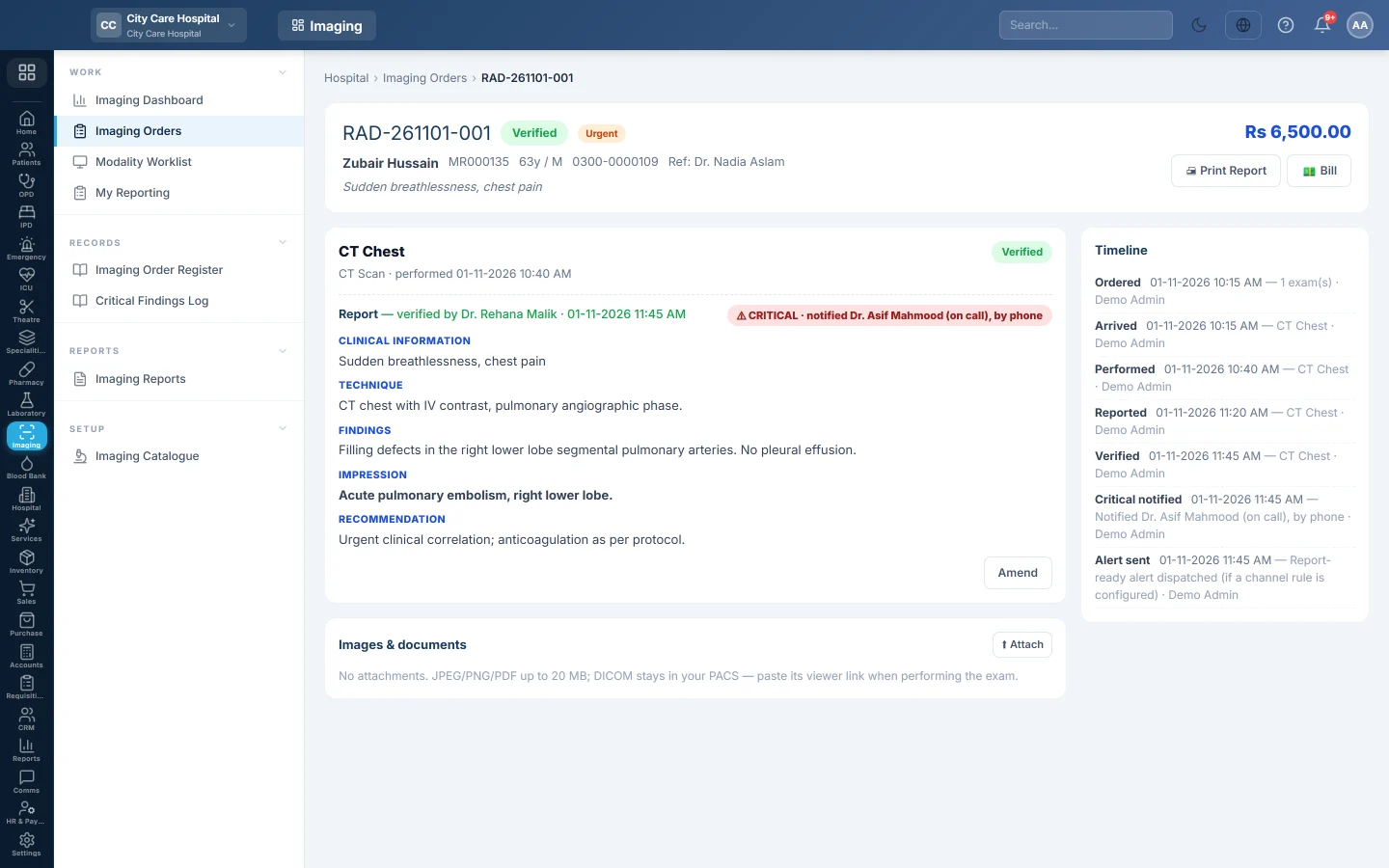
On each exam card you can:
- Click Arrived when the patient reaches the department.
- Click Perform to record the exam. See Perform an exam.
- Write, save and sign the report. See Report and sign a scan.
- Click Images to open the study, when a viewer link or PACS study is set.
Use Attach under Images & documents to add JPEG, PNG or PDF files up to 20 MB, such as a scanned film or an outside report. The Timeline on the right lists every step with the time and the user.
Bill an order
- Open the order and click Bill.
- Check the Total.
- Choose the Payment Method. For a panel patient, turn on Bill to the patient's panel instead; nothing is collected.
- Type a Discount if one is allowed.
- Click Collect & Bill.
EloERP prints an 80 mm Radiology Receipt and marks the order Billed. Panel patients are charged at the panel's rate for each exam. Exams already paid at the Billing Counter are left out of the bill.
Cancel an order
- Open the order and click Cancel.
- Confirm.
You can cancel only before any exam is performed and before the order is billed. A billed order needs its bill voided first. When a scan on the order was paid at the Billing Counter, cancelling says refund that line first. Refund it on Hospital Bills with Refund some lines, then cancel.
A refused cancel changes nothing. A ward or ER order keeps its charge on the patient's bill.
Print the register
Click Print Register to print the orders in the current chip and search as an A4 list. It is the department's day sheet for a handover. For a register over a date range, use Imaging Order Register.
What happens in the books
When you click Collect & Bill, EloERP posts a radiology bill voucher:
- The cash or bank account of the payment method is debited with the net amount. For a panel patient, the panel's receivable is debited instead.
- A discount is debited to Discount allowed.
- Radiology / Imaging Revenue is credited with the full exam value.
Orders on a ward or ER bill post nothing here; the charge posts when that bill is settled.
Common questions
The Bill button says to open my cash shift. Open a shift on Cash Register, then bill again.
Why does the order total show Rs 0? The exams have no price in the Imaging Catalogue. Set the price, then create the order again.
Can I change the exams on an order? No. Cancel the order and create a new one, as long as nothing is performed or billed.
Why is the Cancel button missing? The order is billed, verified or already cancelled.
Bill says No billable exams on this order. Every exam left on the order was paid at the Billing Counter. Nothing more is due here.
The patient was billed at the Billing Counter. Do I bill here too? No. The counter marks the order as billed and the green tick appears in the list.
Teşekkür ederiz. Hâlâ yardıma ihtiyacınız varsa info@eloerp.net adresine yazın.