Eye Clinic
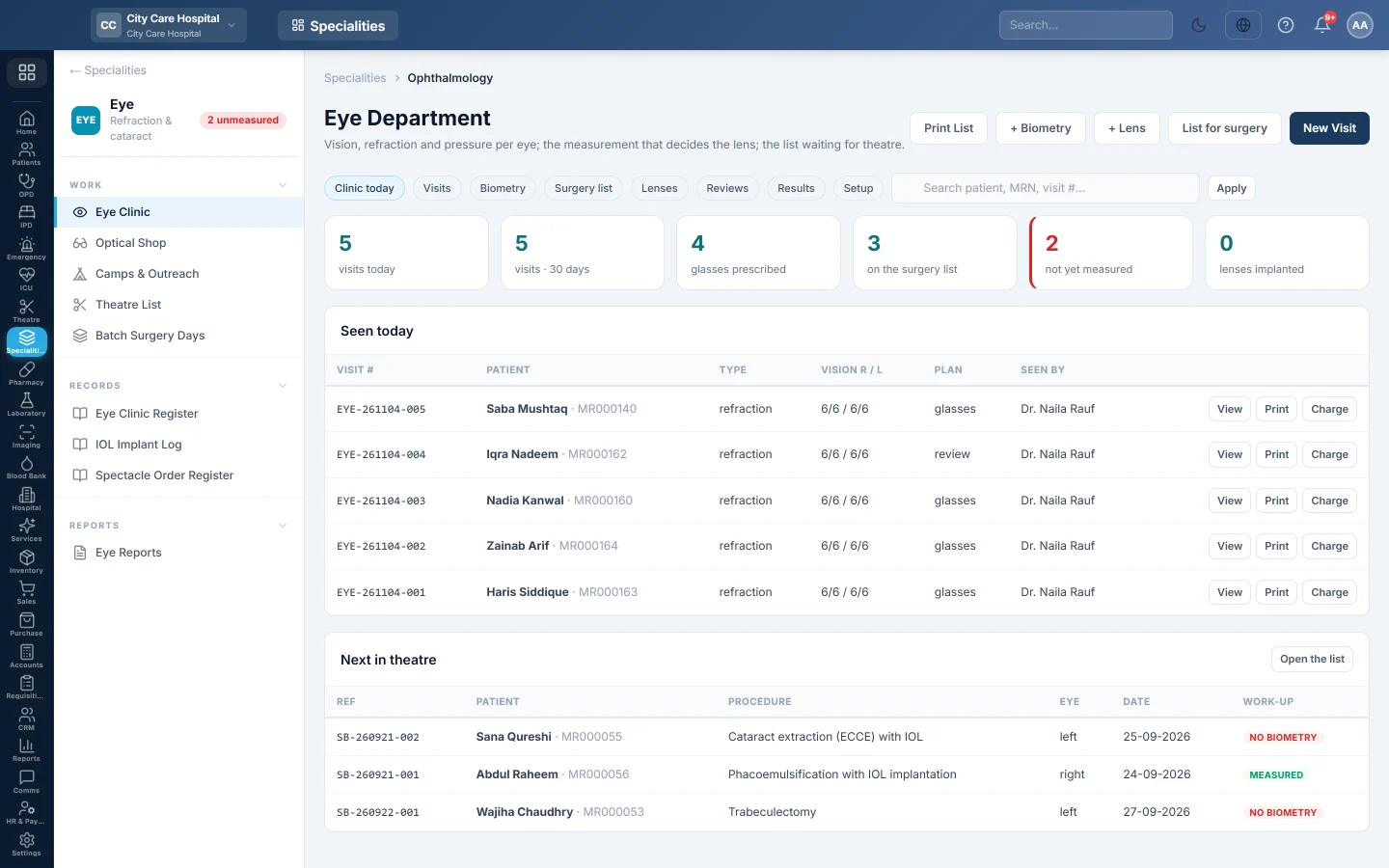
The eye department on one screen, from visits with vision, refraction and pressure per eye to biometry and lens power, the surgery list, the lens implanted, post-operative reviews and results.
The Eye Department screen follows the way an eye clinic's day runs. You record each visit with vision, refraction and pressure for both eyes, measure the eye for a lens, put the patient on the surgery list, log the lens that went in and record the reviews afterwards.
Before you begin
- The Ophthalmology department is switched on for your hospital, and the eye doctors exist. See Doctors.
- The patient is registered. See Register Patient.
- On the Setup tab, the procedures you perform and the complications you record are filled in. Eye visit prices are in the price list. See Price List & Tariffs.
- Your role needs Record Eye Exams & Refraction; biometry and lenses need Record Biometry & IOL Implants.
Where to find it
Open Specialities → Eye → Work → Eye Clinic.
Set up the department once
On the Setup tab:
- Under Operations this hospital performs, click Start from the usual eye list, then rename, reorder or switch off what you do not do. + Procedure adds one.
- Under Complications this hospital records, click Start from the usual list.
- Under Eye clinics, add the clinics you run. Each one is a department with its own queue and tariff.
Record an eye visit
- Click New Visit.
- Pick the Patient, the Date, the Type (such as Refraction, Examination or Post-operative) and who it was Seen by.
- Type the Complaint.
- For Right (OD) and Left (OS), record Vision unaided, Pinhole, Best corrected and Near, the refraction (Sph / Cyl / Axis and Add), IOP (mmHg), Cup : disc and Cataract grade.
- Note the Slit lamp, Fundus and Diagnosis, and the IOP method and IPD (mm).
- Pick the Plan: Glasses, Surgery, Medication, Review, Refer or Nothing needed. Tick Glasses prescribed if you wrote a prescription.
- Click Save visit.
On the visit row, Print gives the examination record or spectacle prescription, and Charge opens Charge the visit: pick the Payment method and click Post charge. An admitted patient is charged to their admission instead.
Measure the eye for a lens
- Click + Biometry, or Measure on a visit.
- Pick the Eye and type the Axial length (mm), keratometry, ACD (mm), A-constant and Target refraction (D).
- Choose the Formula and Device. The SRK II estimate shows; click Use this or type the Power chosen (D).
- Type the Lens planned and click Save measurement.
Print on the measurement gives the biometry sheet for theatre.
Put a patient on the surgery list
- Click List for surgery, or List on a visit.
- Pick the Operation, the Eye, the Urgency, the Surgeon and a Target date, and add the Diagnosis.
- Click Add to the list.
The case goes on the theatre waiting list and is scheduled there. The Surgery list tab shows each case's work-up: measured or no biometry, and lens logged.
Record the lens implanted
- Click + Lens, or Record lens on the surgery list.
- Set Implanted on, the Eye, Lens type, Power (D), Model and Manufacturer.
- Type the Serial no and Lot no. Recalls happen, so always record them.
- Pick the Surgeon and click Record lens.
Record the reviews
Every eye operation is owed a review on day 1, week 1 and month 1. The Reviews tab lists those Overdue and Due this week. Click Record review, type the best-corrected vision and IOP for each eye, pick anything found from the complication list, and save. Tick Seen at an outreach camp if the review happened at a camp.
The Results tab shows the period's operations, vision at the last review, cancellations and complications.
Common questions
The surgery list is empty. Eye cases booked in the theatre module appear here. Use List for surgery to add one.
A case shows no biometry. The eye was not measured. Click Measure before the patient reaches theatre.
Where do glasses get made? In the Optical Shop, which takes the prescription from the visit.
Where are the registers? See Eye Clinic Register and IOL Implant Log.
Thank you. If you still need help, write to info@eloerp.net.