Cath-Lab Board
Schedule angiography and angioplasty cases, record the pre-procedure checks, write and sign the procedure report, log stents and devices, and bill the case.
The Cath-Lab Board lists the day's cath-lab cases: coronary angiography, angioplasty (PCI) and primary PCI. Open a case to record the checks, write the procedure report, log the devices used and bill it.
Before you begin
- The Cardiology department is switched on for your hospital, and a cath-lab department and the cardiologists exist. See Departments and Doctors.
- The patient is registered. See Register Patient.
- To bill a case, the patient needs an admission, or EloERP opens a day-case admission for a walk-in.
- Your role needs the cath-lab permissions, such as Manage Cath-Lab Cases. See Users & Roles.
Where to find it
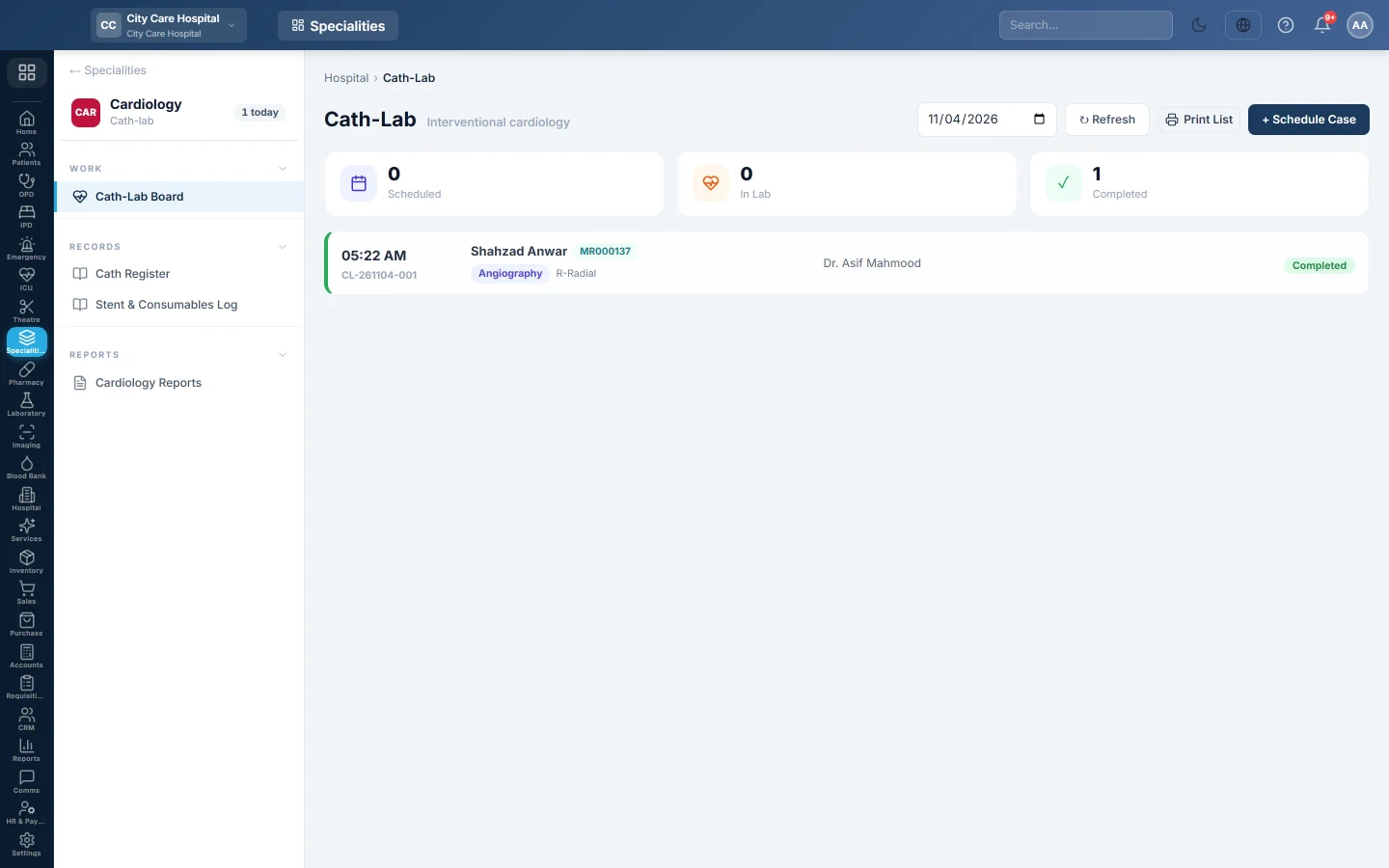
Open Specialities → Cardiology → Work → Cath-Lab Board.
Read the board
Pick a date at the top. The tiles count the cases Scheduled, In Lab and Completed. Each row shows the time, case number, patient, procedure, access site, cardiologist, stents and status. Emergency cases are marked Emergency. Click a row to open the case.
Schedule a case
- Click + Schedule Case.
- Pick the Patient, the Department and the Cardiologist.
- Set the Date / Time and pick the Procedure: Coronary Angiography, Angioplasty (PCI), Primary PCI or Other.
- Choose the Priority and the Access Site, for example Right Radial.
- Pick the Linked Admission if the patient is admitted, or leave Walk-in / none.
- Fill in the Pre-procedure checks: creatinine, coagulation (INR) and contrast allergy, with their dates.
- Type the Indication, for example unstable angina.
- Click Schedule.
An elective case cannot be booked without its checks. An emergency or primary PCI can be booked without them.
Take the patient in
- Open the case.
- Under Pre-procedure checks, complete any missing check, including Fasting since (at least 4 hours), and click Save checks.
- Click Patient In (Start).
EloERP refuses to start while a check is missing. For an emergency, type the reason under Emergency — reason the missing checks are waived and save it first.
A case moves one step at a time: Scheduled, then In Lab, then Completed. The only other move is Cancel, before the case is completed.
Write the procedure report
On the Procedure Report tab:
- Choose the Coronary Dominance.
- For each Vessel, type the Stenosis %, the Lesion and the Intervention, such as Stent (DES).
- Write the Findings / Summary, and fill in Stents Deployed, Contrast and Fluoroscopy time.
- Pick the Recommendation, the Condition on Leaving, any Complications and the Post-procedure Orders.
- Click Save Draft, or Sign & Lock when it is final. A signed report cannot be edited.
Log the devices
- Open the Devices tab and click + Add item.
- Choose the Type (stent, balloon, catheter, wire, contrast or consumable) and describe it, for example DES 3.0x18.
- Type the Vessel, Size, Lot and UDI, the Qty and the Price.
- Leave Billable ticked for items charged to the patient, and click Save on the row.
Complete and bill the case
- Click Complete Case.
- On the Devices tab, type the Procedure Fee if one applies.
- Click Bill to Patient Account, or Open Day-Case & Bill for a walk-in.
The billable items and the fee are added to the patient's admission bill and settled at IPD billing or discharge. Each item is billed once. A completed case stays completed; it cannot be reopened.
Common questions
Patient In (Start) is refused. A pre-procedure check is missing or out of date. The message lists which ones.
How do I cancel a case? Click Cancel on a scheduled or in-lab case, give the Reason and click Confirm. A completed case cannot be cancelled, and neither can a case with a billed fee or item.
Can I reopen a completed or cancelled case? No. Schedule a new case for the patient.
Where is the list of all cases? See Cath Register. Stents by lot are in Stent & Consumables Log.
Can I print the day's list? Yes. Click Print List at the top of the board.
Спасибо. Если помощь всё ещё нужна, напишите на info@eloerp.net.