MLC Register
The medico-legal case register - every MLC with its nature, incident, place, police station and FIR number, for the police and the courts.
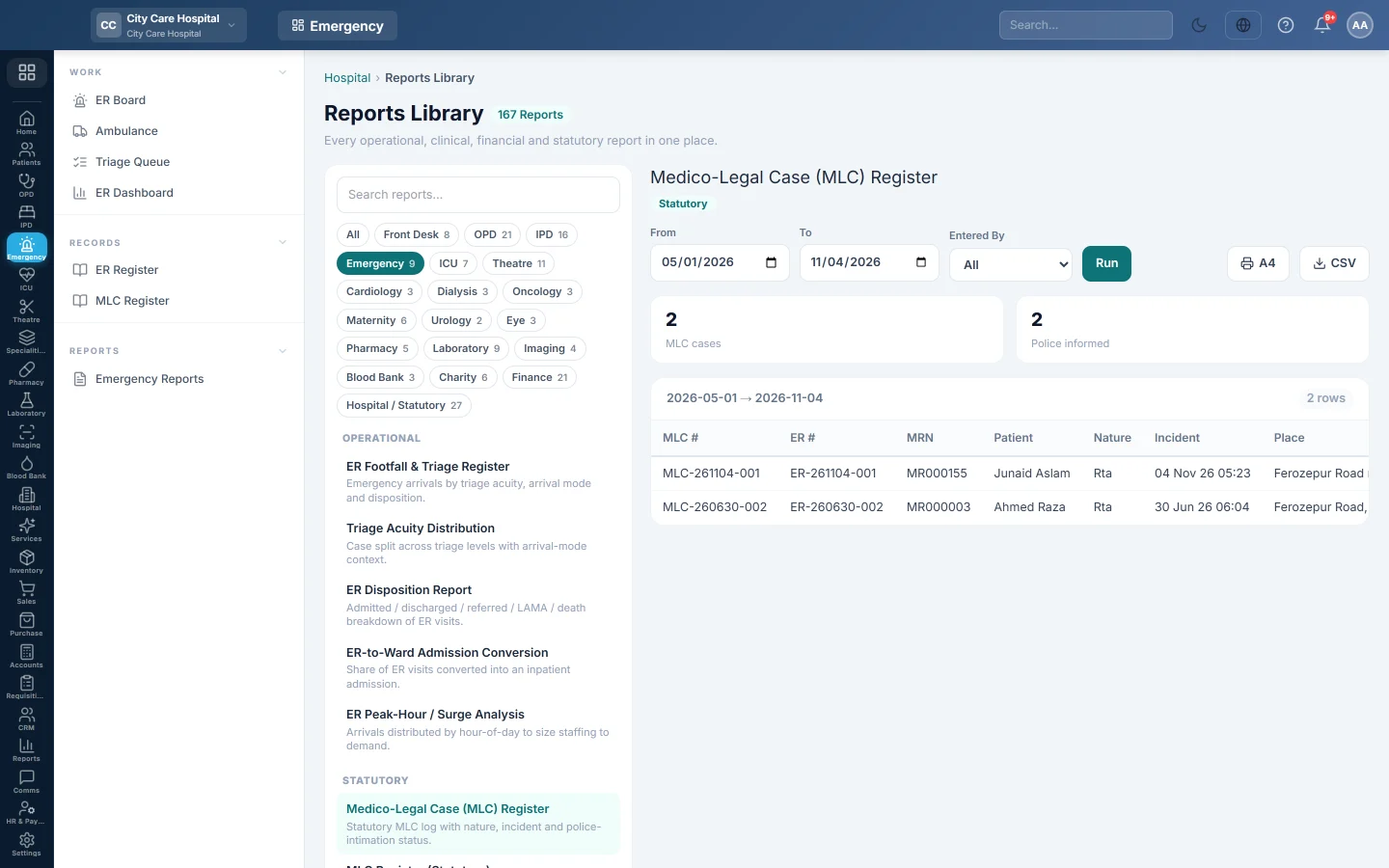
The MLC Register lists the medico-legal cases recorded in a period. Hospitals keep it for the police and the courts: the nature of the case, the incident, and whether the police were informed.
Before you begin
- Your role needs the hospital reports permission. See Users & Roles.
- Cases appear once the MLC is recorded on the ER visit. See Record a medico-legal case (MLC).
Where to find it
Open Emergency → Records → MLC Register. It opens as Medico-Legal Case (MLC) Register.
Run the register
- Set From and To.
- Optionally pick a user in Entered By.
- Click Run.
- Click A4 to print, or CSV to download every row.
What the report shows
The tiles count MLC cases and Police informed.
| Column | What it shows |
|---|---|
| MLC #, ER # | The MLC number and the emergency visit. |
| MRN, Patient | Who it concerns. |
| Nature | For example Road Traffic Accident, Assault, Burn, Poisoning or Firearm. |
| Incident, Place | When and where it happened. |
| Police | The police station informed. |
| FIR # | The FIR number, when the police gave one. |
| Entered By, Entered At | Who recorded it and when. |
Common questions
A case ticked MLC at arrival is missing. The MLC details were not recorded on the visit yet. Open the visit and click Record MLC.
The FIR number is blank. Add it when the police give it. The record is locked, so someone with the unlock permission must unlock it for the correction.
Is there a statutory version? Yes. MLC Register (Statutory) in Emergency Reports is laid out for court reporting.
Terima kasih. Jika masih butuh bantuan, kirim email ke info@eloerp.net.