Deaths & Mortuary
Every death on the ward or in the emergency, from the cause-of-death certificate and police intimation for medico-legal cases to releasing the body to the family.
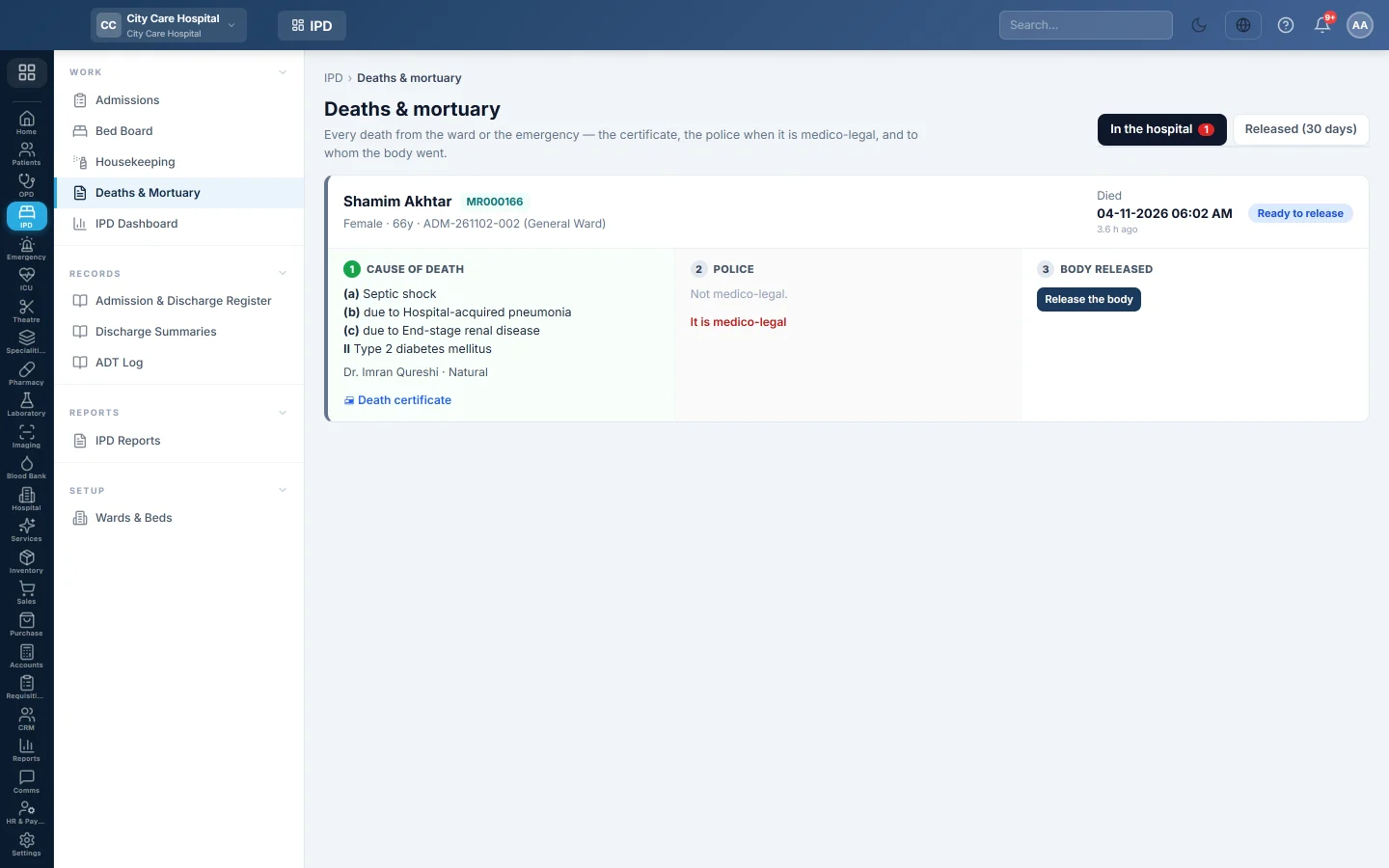
Deaths & Mortuary follows each death in the hospital until the body leaves. Each death has three steps: the cause of death, the police for a medico-legal case, and the release of the body.
Before you begin
- Certifying, recording the police and releasing a body need the mortality manage permission. See Users & Roles.
Where to find it
Open Inpatients (IPD) → Work → Deaths & Mortuary. The page is titled Deaths & mortuary.
How a death gets here
A death appears here when an admission is discharged as Expired, or an emergency visit ends in death. The patient is marked deceased. If the emergency visit was a medico-legal case, or the patient has an MLC alert, the death is marked MLC.
Certify the cause of death
- On the death card, under Cause of death, click Certify.
- Choose the Certifying doctor.
- Type (a) Immediate cause, and the conditions it was due to in (b) and (c).
- Add Other significant conditions and choose the Manner.
- Click Save certificate.
Click Death certificate to print it. The patient's CNIC prints masked unless your role may see full CNICs. The causes also go to the mortality register. See Mortality & MRC.
Intimate the police
This step is for medico-legal deaths. Click It is medico-legal if a death was not marked MLC but should be.
- Under Police, click Intimate the police.
- Type the Police station and the Officer.
- Click Record & print. The police intimation prints.
Release the body
A body can be released once the death is certified, or for an MLC once the police are intimated.
- Under Body released, click Release the body.
- Type who it is Released to, their Relation and CNIC, and a Note.
- Click Release.
The card moves to Released (30 days). The In the hospital tab shows every body still in the hospital, with how long ago the death was and what it is waiting for.
Common questions
A death is not listed. It was not recorded as Expired at discharge or as a death in the emergency. Check the discharge type on the admission.
Release the body is not offered. The death is not certified yet, or for an MLC the police have not been intimated.
The certificate shows the CNIC with stars. Your role does not have the permission to see full CNICs, so the print masks it. Ask your administrator if the certificate must carry the full number.
An MLC death has no certificate. That is allowed: the post-mortem may certify it later. The body can be released after the police intimation.
Спасибо. Если помощь всё ещё нужна, напишите на info@eloerp.net.