Patient Master Index
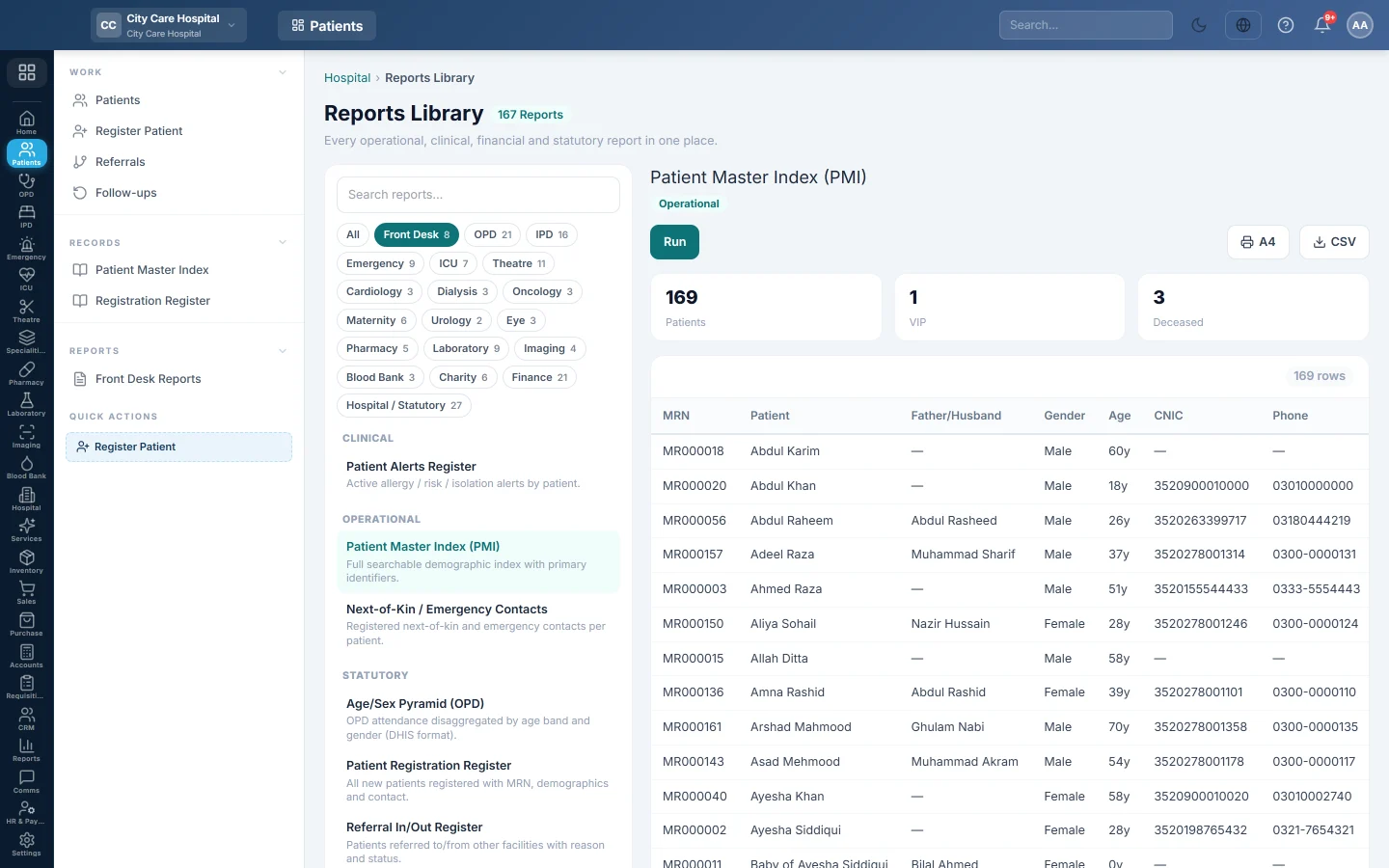
The Patient Master Index (PMI) lists every registered patient with MRN, father or husband's name, age, CNIC, phone and category, to print or export.
The Patient Master Index (PMI) is the full list of registered patients with their main identifiers. Medical records staff print it or export it to check for duplicates and missing details.
Before you begin
- Your role needs the hospital reports permission. See Users & Roles.
- The report opens in the Reports Library, which runs every hospital report the same way.
Where to find it
Open Patients → Records → Patient Master Index. The report opens and runs at once.
Run the index
- Open the report. It lists all patients in name order, 50 to a page.
- Use ‹ and › under the table to move between pages.
- Click A4 to print it on landscape A4 with your letterhead, or CSV to download it for Excel.
What the report shows
The tiles at the top count Patients, VIP and Deceased.
| Column | What it shows |
|---|---|
| MRN | The patient's medical record number. |
| Patient | The full name. |
| Father/Husband | The father's or husband's name, when recorded. |
| Gender, Age | Age comes from the date of birth, or the age typed at registration. |
| CNIC | The CNIC number, masked to its first five digits and last digit unless your role may see full CNICs. |
| Phone | The contact number. |
| Category | General, Panel, Corporate or Charity. |
Archived patients are left out.
Common questions
How do I find one patient in the index? Use Patients instead; its search finds a patient by MRN, name, CNIC or phone.
Why is the CNIC masked? Your role does not have the permission to see full CNICs. The print and the CSV mask it the same way; ask your administrator if you need it.
The CSV has more rows than the screen. The screen shows 50 rows a page. CSV downloads every row.
How do I see who registered patients in a month? Use the Registration Register, which has dates and the user who registered each patient.
Obrigado. Se ainda precisar de ajuda, escreva para info@eloerp.net.