Register Patient
The full patient registration form (demographics, CNIC, payer, contact, next of kin and clinical alerts) that gives a new patient their MR number.
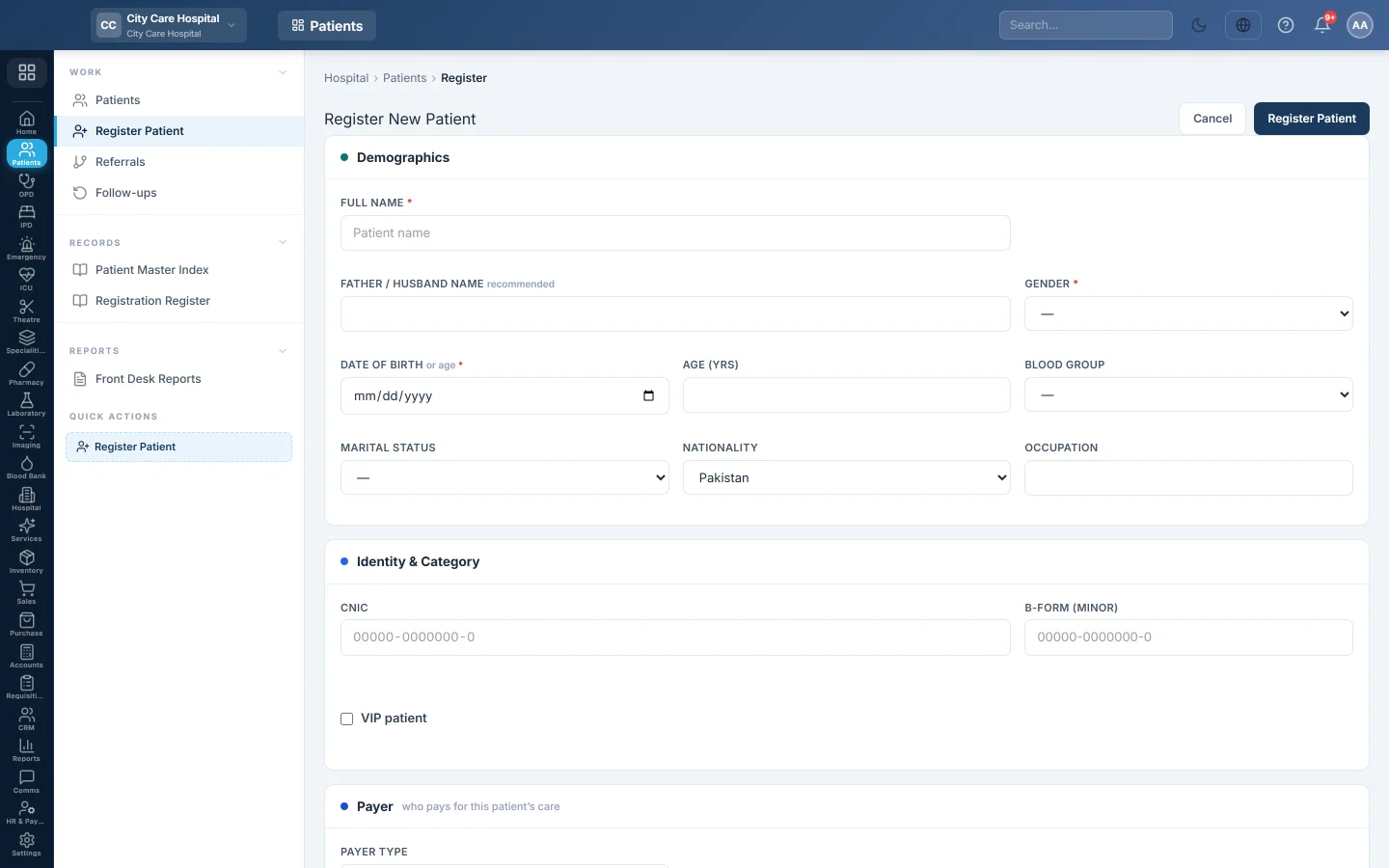
Register Patient is the full registration form. Saving it gives the patient a new MR number (MRN) and opens their patient file.
Before you begin
- Your role needs the permission to register patients. See Users & Roles.
- For panel, insurance or scheme patients, add the panel or insurer first. See Panels & Insurers.
- Search Patients first, so you do not register the same person twice.
Where to find it
Open Patients → Work → Register Patient, or click + Register Patient on the Patients list. The side menu also has a Register Patient quick action.
Fill in the form
Fields with a red star are required: Full Name, Gender, Phone, and either Date of Birth or Age (yrs).
| Section | Fields |
|---|---|
| Demographics | Full Name, Father / Husband Name (recommended), Gender, Date of Birth or Age (yrs), Blood Group, Marital Status, Nationality, Occupation. A date of birth fills in the age. |
| Identity & Category | CNIC (typed as 00000-0000000-0), B-Form (minor) for a child, and VIP patient. |
| Payer | Payer type: Cash (self-pay), Panel / corporate, Insurance, Government scheme or Welfare / charity. For a panel, insurance or scheme, pick it and enter the Member / card no. and Card expiry. |
| Contact | Phone, Alt. Phone, Email, City, Address. |
| Next of Kin | Click + Add for each relative: Name, Relationship, Phone, CNIC. Tick Emerg. for the emergency contact. |
| Clinical Alerts | Click + Add for each allergy or flag: Type (Allergy, Infection, MLC, Other), Severity and Description, for example Penicillin allergy. |
| Notes | Anything else the desk should know. |
Click Register Patient at the top or bottom of the form. The patient file opens with the new MRN.
What the payer type changes
The payer type sets the patient's category: cash is General, panel, insurance and scheme are Panel, and welfare is Charity. A panel patient's bills can be charged to the panel. See Panels & Insurers.
When you edit an existing patient, the form also has a welfare request button for patients who need help paying.
Common questions
It says a patient with this CNIC already exists. That person is already registered, and the message shows their MRN and name. Open them from Patients instead of registering again.
The patient does not know their date of birth. Leave Date of Birth empty and type the Age (yrs).
The CNIC field is greyed out when I edit a patient. Your role may not see full CNICs, so the number is masked and kept as it is. Ask an administrator to correct it.
There is no panel in the list. None of that kind is set up yet. Add it under Panels & Insurers, then come back.
Where do allergies show later? In a red banner on the patient file, and in the consultation, where they warn the doctor while prescribing.
Teşekkür ederiz. Hâlâ yardıma ihtiyacınız varsa info@eloerp.net adresine yazın.