COD Cash Ledger
See how much of the money your online orders promised actually reached the bank, what couriers and gateways kept, and how much is still on the way.
The COD Cash Ledger answers one question: of the money your online orders promised, how much reached your bank, and where is the rest? It shows cash-on-delivery and prepaid (card and wallet) orders side by side.
Before you begin
- Your couriers are set up, see Courier Accounts, and your COD orders go out with them. See Dispatch.
- The money figures come from courier remittances and gateway payouts you post on Statements. Until you post one, those boxes read zero.
- Your role needs View Money in Transit or View E-commerce Financial Report. See Users & Roles.
Where to find it
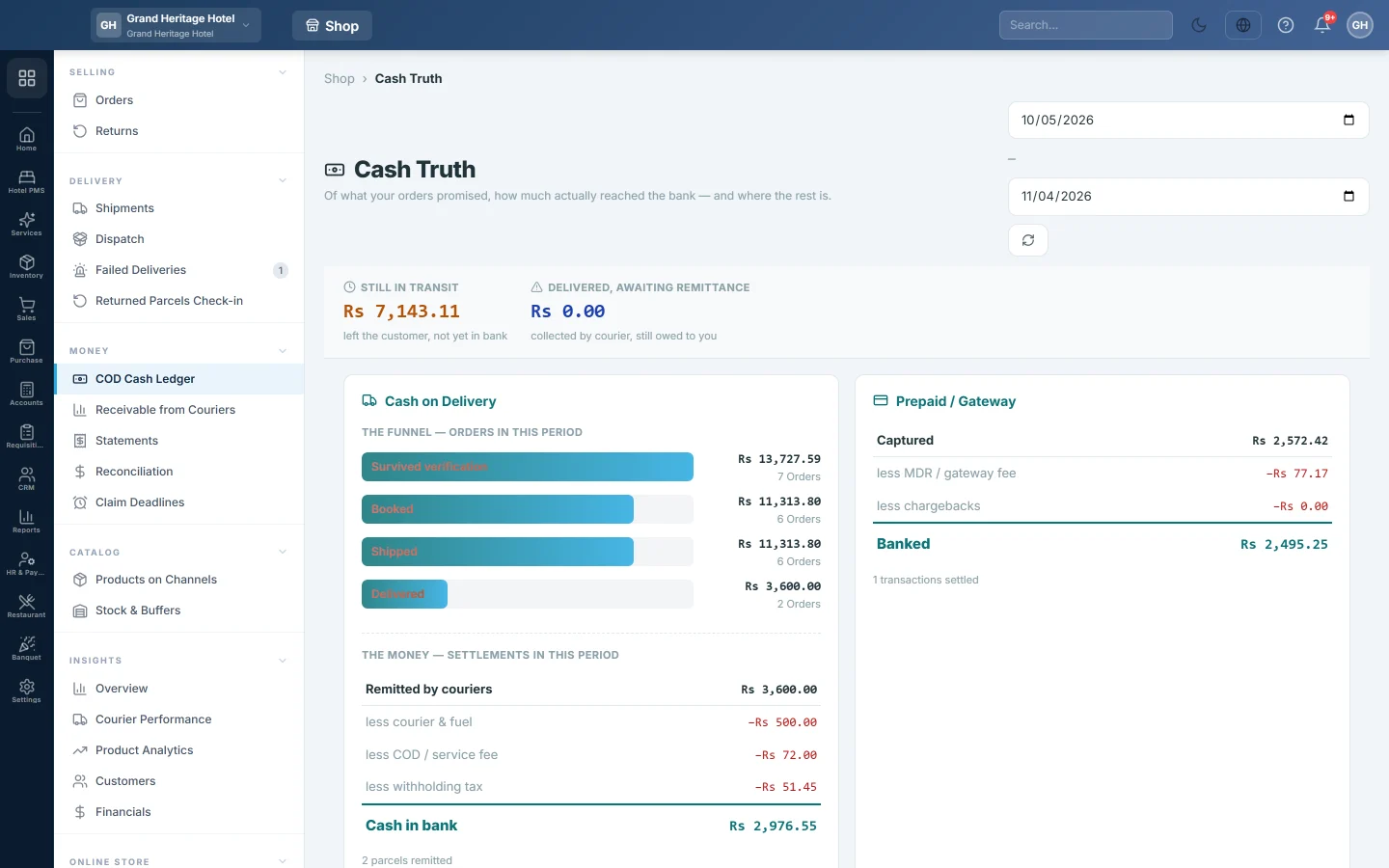
Open Online shop → Money → COD Cash Ledger. The page opens with the heading Cash Truth.
Pick the period
- Set the start and end dates at the top right. The page opens on the last 30 days.
- Click the refresh button next to the dates to load the figures again.
Read the page
The strip at the top shows two figures for right now, whatever dates you pick:
- Still in transit: money that has left your customers but is not yet in your bank. It is the balance of every courier's COD clearing account plus every gateway's clearing account.
- Delivered, awaiting remittance: delivered cash-on-delivery orders the courier has not yet paid you for. This is part of the money still in transit.
The Cash on Delivery box has two halves:
- The funnel — orders in this period counts the COD orders placed between your dates and how far they got: Survived verification, Booked, Shipped and Delivered. Each bar shows the value and the number of orders. The bars shrink as orders are cancelled, refused or returned.
- The money — settlements in this period adds up the courier remittances dated between your dates. It starts at Remitted by couriers, takes off less courier & fuel, less COD / service fee, less other deductions and less withholding tax, and ends at Cash in bank. A less unexplained variance line appears when the figures do not add up.
The Prepaid / Gateway box does the same for card and wallet payouts: Captured, less MDR / gateway fee, less refunds, less chargebacks and Banked.
The By courier table shows each courier's Parcels, Remitted, Deductions, Net Banked and Take-home %, the share of the collected cash that reached you.
Common questions
The money boxes are all zero. No courier remittance or gateway payout is dated in your period. Post them on Statements, or widen the dates.
Why is Take-home % low for one courier? That courier keeps more in delivery, COD and tax deductions. Compare couriers on Courier Performance.
What is the unexplained variance? It is what the couriers remitted, minus every named deduction, minus what reached the bank. A figure other than zero means a remittance was entered with amounts that do not add up. Check it on Statements.
Does Still in transit change when I change the dates? No. It is the clearing balance today. See it per courier on Receivable from Couriers.
Withholding tax is one figure. Where is the income tax and sales tax split? Remittances store one combined withholding figure. The expected split per courier is on the Tax & Withholding tab of Statements.
Terima kasih. Jika masih butuh bantuan, kirim email ke info@eloerp.net.