Failed Deliveries
Decide what happens to each parcel a courier could not deliver, re-attempt, new address, hold, return or cancel, with every decision logged.
When a courier cannot deliver a parcel, it reports a failed attempt (an NDR). Failed Deliveries collects those parcels so someone decides what to do with each one. Every decision is logged, so you can always see why a parcel came back.
Before you begin
- The parcel was booked with a courier. See Turn an online order into an invoice.
- Failed attempts arrive from the courier's status updates. You can also log one yourself: open the order and choose Log NDR outcome in its ⋯ menu.
Where to find it
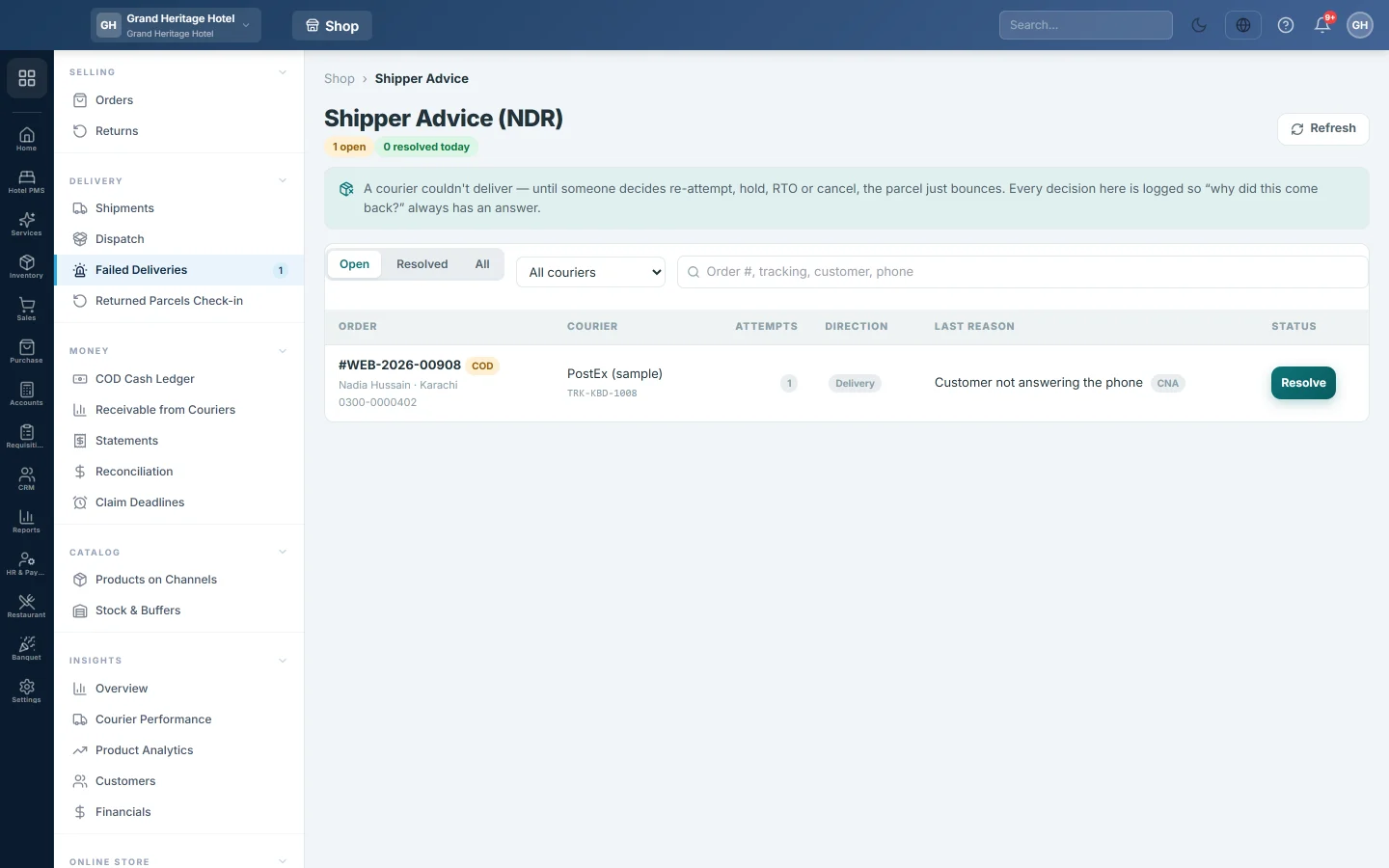
Open Online shop → Delivery → Failed Deliveries. The page heading reads Shipper Advice (NDR).
Read the list
The header counts the open parcels, those with several attempts (multi-attempt), those already on return and those resolved today.
| Column | What it shows |
|---|---|
| Order | The order number, COD or prepaid, the customer, city and phone. |
| Courier | The courier and the CN. |
| Attempts | How many times delivery failed. Two is amber, three or more is red. |
| Direction | Delivery on the way out, Return on the way back. |
| Last reason | The courier's reason, such as customer not available. |
| Status | Resolve while open, or the decision taken. |
Use Open, Resolved and All to switch lists, All couriers to pick one courier, and the search box for order number, CN, customer or phone.
Decide on a parcel
- Call the customer if you can.
- Click Resolve on the row.
- Pick a Decision:
- Re-attempt: ask the courier to try again.
- Update address: try again at a corrected address. Type the new address in Note.
- Hold: park the order and decide later. It moves to On Hold on Dispatch.
- RTO: return the parcel to you.
- Cancel: cancel the order.
- Add a Note if useful.
- Click Apply decision.
For Re-attempt, Update address and RTO, EloERP sends the advice to the courier when the courier supports it. Otherwise the row says to give the advice in the courier's own portal, and you do that by hand.
Common questions
The list is empty but I know a delivery failed. The courier may not report attempts. Log it from the order with Log NDR outcome, or refresh the parcel on Shipments.
Can I change a decision? No. A resolved row keeps its decision. Take the next step from the order, for example Release hold.
The decision shows a courier error. The decision is saved, but the courier did not accept it. Give the advice in the courier's portal.
Which couriers fail most? See Courier Performance.
Teşekkür ederiz. Hâlâ yardıma ihtiyacınız varsa info@eloerp.net adresine yazın.