Tax Summary
Sales tax you charged on sales against sales tax you paid on purchases for a period, after returns, and the net amount payable or refundable.
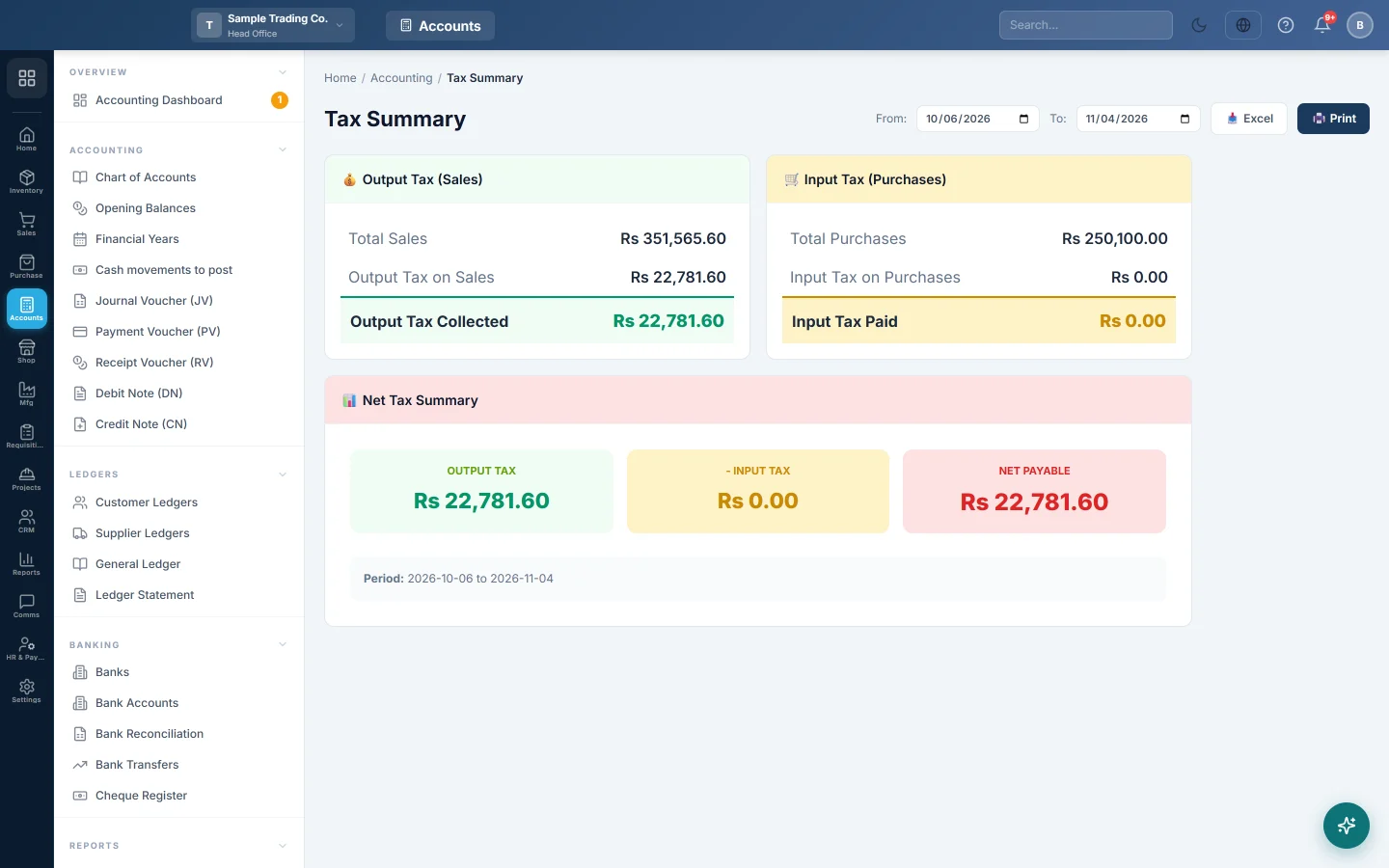
The Tax Summary adds up the sales tax on your sales (output tax) and on your purchases (input tax) for a period. The difference is roughly what you owe the tax office, or what you can claim back, before you prepare your tax return.
Before you begin
- Set up your tax rates so sales and purchases carry tax. See Tax Config.
- Your role needs permission to view the Tax Summary. Your administrator sets this in Users & Roles.
Where to find it
Open Accounting → Reports → Tax Summary.
Run the report
The report loads for the company's default date range, set under Settings → Company → Default Report Date Range.
- Set From: to the first day of your tax period.
- Set To: to the last day.
The report reloads as soon as you change a date. Use Excel or Print to keep a copy.
The report covers the branch shown in the top bar.
Read the report
Output Tax (Sales)
| Line | What it shows |
|---|---|
| Total Sales | The total of your sale invoices in the period, tax included. |
| Output Tax on Sales | The sales tax charged on those invoices. |
| Less: Tax on Sale Returns | The tax on goods customers returned in the period. Shown only when there is some. |
| Output Tax Collected | Output tax after returns. |
Input Tax (Purchases)
| Line | What it shows |
|---|---|
| Total Purchases | The total of your purchase invoices in the period, tax included. |
| Input Tax on Purchases | The sales tax you paid on those invoices. |
| Less: Tax on Purchase Returns | The tax on goods you sent back to suppliers. Shown only when there is some. |
| Input Tax Paid | Input tax after returns. |
Net Tax Summary takes Input Tax away from Output Tax:
- Net Payable (red) means you charged more tax than you paid.
- Net Refundable (green) means you paid more tax than you charged.
- Balanced means the two are equal.
A worked example for one month:
| Amount | |
|---|---|
| Output Tax on Sales | Rs 180,000 |
| Less: Tax on Sale Returns | Rs 9,000 |
| Output Tax Collected | Rs 171,000 |
| Input Tax on Purchases | Rs 120,000 |
| Less: Tax on Purchase Returns | Rs 4,000 |
| Input Tax Paid | Rs 116,000 |
| Net Payable | Rs 55,000 |
Why figures can look wrong
- It reads documents, not the ledger. Tax entered by hand in a journal or payment voucher, such as tax on a utility bill, is not included. Check those in the Ledger Statement of your tax account.
- Draft and cancelled documents are left out. Confirmed, paid and part-paid invoices are all counted, by invoice date.
- Returns count in the month of the return, not the month of the original sale or purchase.
- Only your branch. The report shows the branch in the top bar. If your branches file one return together, add up each branch's figures.
- Foreign-currency invoices are converted to your base currency at the exchange rate saved on each document.
Common questions
Is this my tax return? No. It is a summary to check your figures. Your tax return may need more detail, such as invoice-wise lists and withholding tax, which this report does not show.
Why is Input Tax zero? Your purchase invoices were entered without tax. Check the tax on your purchase lines. See Purchase Invoices.
Does it include tax on POS sales? Yes. Till sales are saved as sale invoices, so their tax is counted in the branch where the till is.
Where do I set which tax authority my invoices report to? See Tax Authorities.
Obrigado. Se ainda precisar de ajuda, escreva para info@eloerp.net.