Account Budgets
Enter a monthly budget for each income and expense account, and copy a month forward to fill the rest of the year.
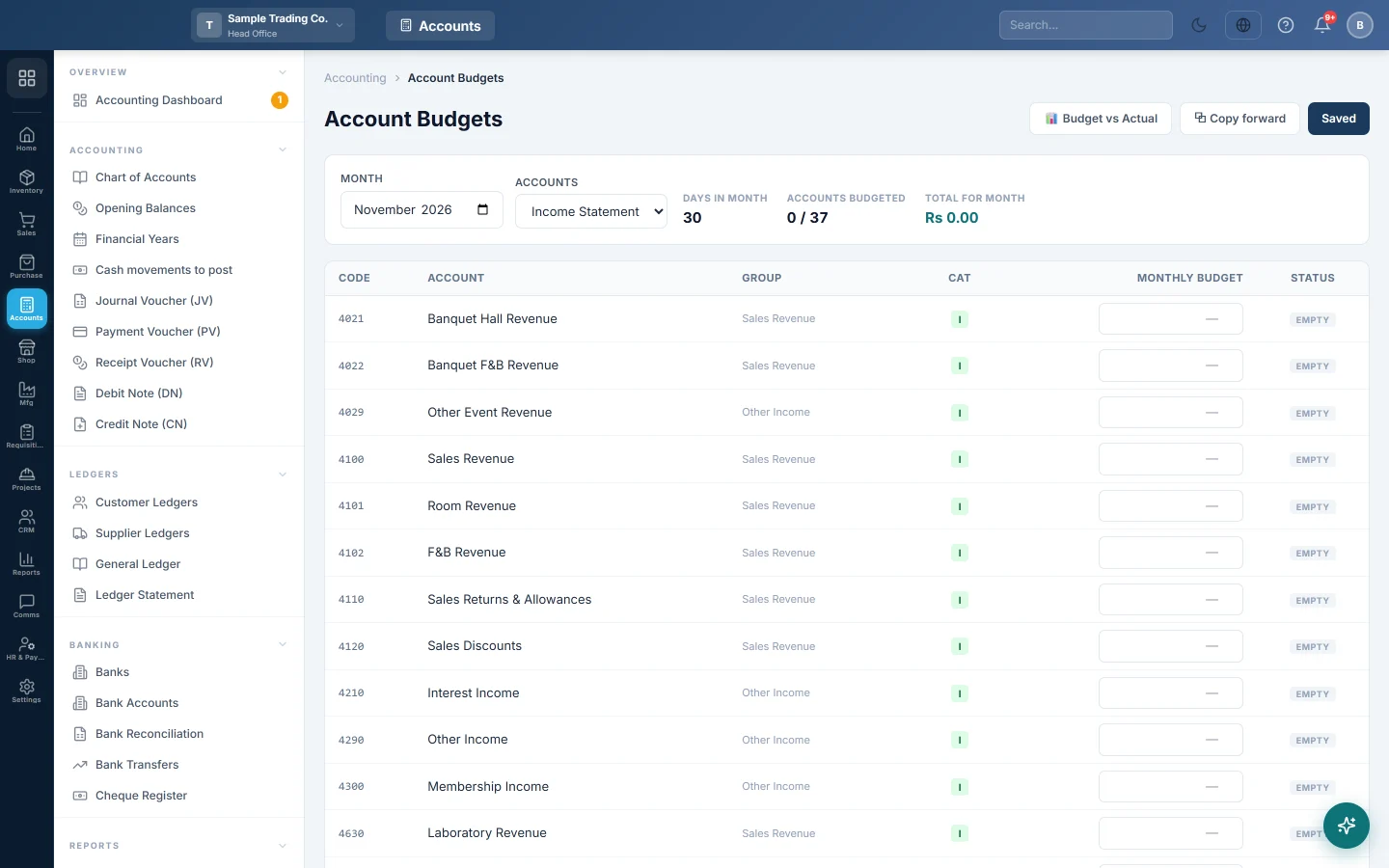
Account Budgets is where you type how much you plan to earn or spend on each account in a month. Budget vs Actual then compares these figures with your books.
Before you begin
- Your plan must include the financial statements (Balance Sheet). If the screen is missing from the menu, see Billing.
- The accounts must exist and be active in the Chart of Accounts. Inactive accounts are not listed.
- To save budgets, your role needs permission to edit the Chart of Accounts or Financial Years. Your administrator sets this in Users & Roles.
Where to find it
Open Accounting → Reports → Account Budgets, or click Set budgets on Budget vs Actual.
Set a month's budget
- In Month, pick the month.
- In Accounts, pick Income Statement (income and expense accounts), Balance Sheet or All accounts.
- In Monthly budget, type the amount for each account you want to budget.
- Leave the box empty for accounts you do not budget.
- Click Save changes.
The button reads Saved when nothing is waiting. The Status column shows SET for budgeted rows and EMPTY for the rest. Above the grid, Accounts budgeted counts the set rows and Total for month adds them.
Empty is not the same as zero
- An empty box means no budget. Budget vs Actual shows not set for that account.
- 0 means you budgeted nothing. Budget vs Actual shows Rs 0.00, so any spending shows as over budget.
To remove a budget, clear the box and click Save changes.
Copy a month forward
Fill one month, then copy it to the months after it instead of typing them again.
- Pick the month you have filled in Month.
- Click Copy forward.
- In Copy up to, pick the last month to fill.
- Tick Overwrite months that already have budgets only if you want to replace months you already budgeted.
- Click Copy forward.
A message says how many budget rows were written and how many were left alone. Without the tick, a month that already has a budget for an account is never changed.
Copy forward is greyed out until the month on screen has at least one budget.
Common questions
Can I set different budgets for each branch? Budgets are saved for the branch you work in. A branch user's budgets belong to their branch. A head office user's budgets belong to the company-wide view, which Budget vs Actual shows under All Branches (Consolidated).
How is a budget used for part of a month? Budget vs Actual shares the month's budget by days. Ten days of a 30-day month get a third of it.
Why is an account missing from the grid? Only active accounts are listed, and only those of the type you picked in Accounts. Check the account in the Chart of Accounts.
I copied forward and some months did not change. Those months already had budgets and Overwrite months that already have budgets was unticked. Run it again with the box ticked, or edit those months by hand.
Does a budget post anything to the books? No. Budgets are only used for comparison. They never change a ledger or any report other than Budget vs Actual.
Terima kasih. Jika masih butuh bantuan, kirim email ke info@eloerp.net.