Supplier Ledgers
Every supplier's balance from the books in one list, and each supplier's statement (khata) of bills, returns and payments.
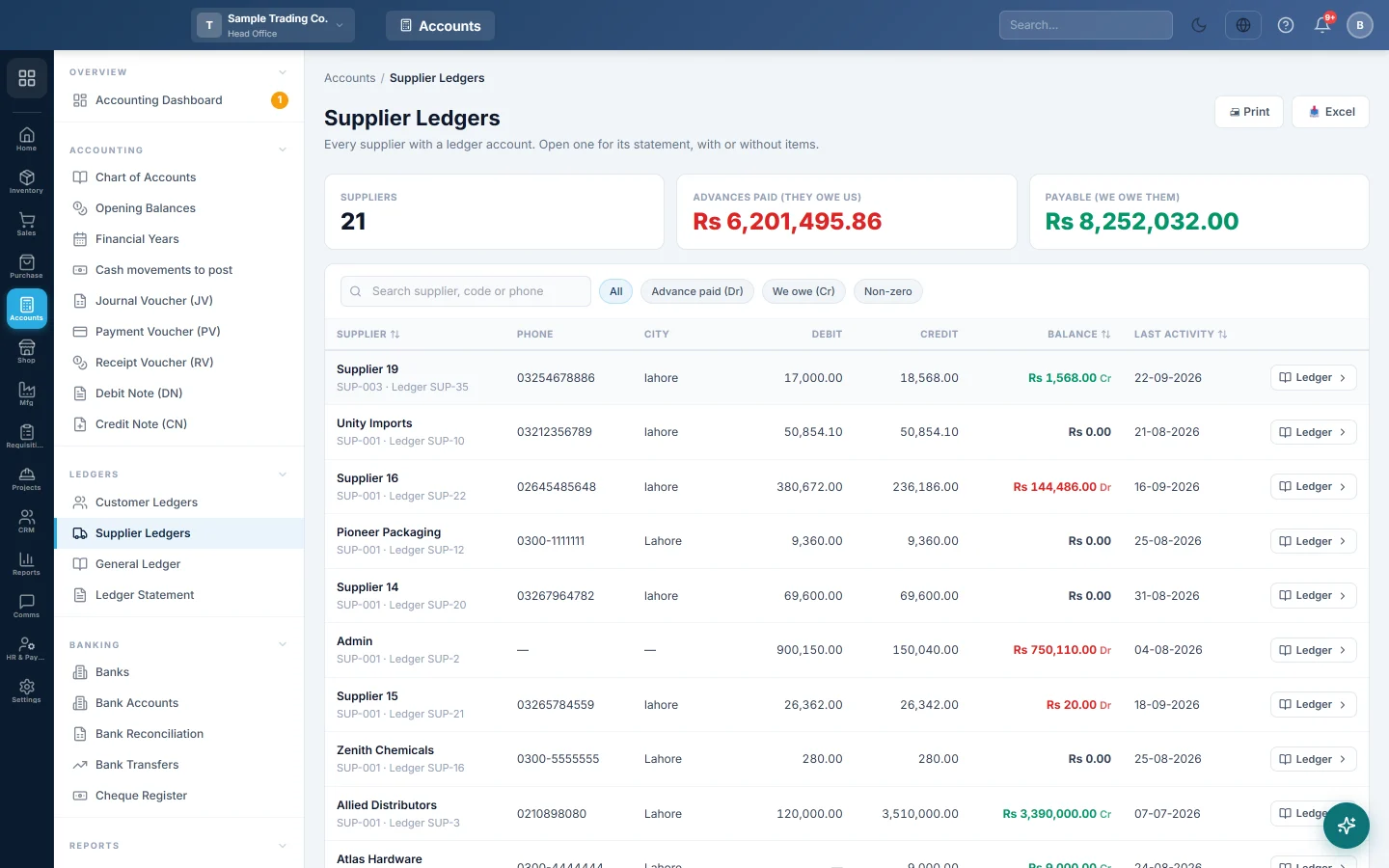
Supplier Ledgers lists every supplier that has a ledger account, with what you owe them according to the books. Open a supplier to see their statement (khata): every purchase bill, return, payment and journal, with a running balance.
Before you begin
- Your role needs permission to view suppliers or the supplier ledger. Ask your administrator under Users & Roles.
- A supplier appears here only once it has a ledger account. A supplier saved in All Suppliers gets one automatically.
- If your role is limited to certain account groups, you only see the suppliers whose ledgers are in those groups.
Where to find it
Open Accounting → Ledgers → Supplier Ledgers.
The older address under Purchases forwards here when your company has the Accounting module. Without it, use Supplier Ledgers in Purchases.
Find a supplier's balance
- Type part of the name, supplier code or phone number in Search supplier, code or phone.
- Click a filter to narrow the list:
- We owe (Cr): suppliers you still have to pay.
- Advance paid (Dr): suppliers you paid ahead of their bills.
- Non-zero: everyone whose balance is not zero.
- All: the whole list again.
- Click the Supplier, Balance or Last activity heading to sort by it. Click again to reverse the order.
The cards at the top cover the whole filtered list: Suppliers, Advances paid (they owe us) and Payable (we owe them).
Open a supplier's statement
- Click the supplier's row, or its Ledger button.
- The statement opens in your company's default report range, with the balance from before the From date on the first line.
- Change From and To and click Apply. Click Clear to see the whole history.
- Choose Summary for one line per document, or Detailed (items) to list the items under each bill and return.
- Click a Reference to open the bill, payment or journal behind that line.
The statement shows the supplier's phone, email and status on the left, and three totals: Total Purchases, Total Paid and Outstanding Balance. The Outstanding Balance says Payable to supplier, Supplier owes us or Settled.
The columns are Date, Type, Reference, Description, Debit (Payment/Return), Credit (Purchase) and Balance. At head office a Branch column shows where each entry was made.
Use Print, Excel or WhatsApp to send the statement. WhatsApp shows only when sharing is switched on in Print Settings.
How to read the balance
A supplier's ledger is a liability account: what you owe them is a credit.
| Entry | Debit (Payment/Return) | Credit (Purchase) | Balance |
|---|---|---|---|
| Purchase bill | 40,000 | 40,000 Cr | |
| Payment | 25,000 | 15,000 Cr | |
| Purchase Return | 3,000 | 12,000 Cr |
Here you owe the supplier Rs 12,000. A balance marked Dr means you have paid more than they billed, so the supplier owes you.
The balance is read from the journal, so it matches the supplier's ledger in the Ledger Statement, the Trial Balance and Account Payable (AP).
Common questions
A supplier is missing from the list. The supplier has no ledger account yet, or your role cannot see its account group. Open the supplier in All Suppliers and save it once.
I paid a bill but the balance did not move. Check that the Payment Voucher (PV) is posted to this supplier and not held for approval. A voucher waiting for approval is not in the books until someone approves it in the Voucher Register.
The supplier is also my customer. A Combined statement banner appears. Purchases, payments, sales and receipts all post to one account, so the balance is the net. Use Set off invoices against bills to settle one against the other.
Debit and Credit do not add up to the Balance in the list. An opening balance typed on an old ledger without an opening voucher counts in the balance but not in those two columns.
How do I record a supplier's claim or a rebate? Use a Debit Note (DN). It reduces what you owe and shows on the statement as Debit Note.
Obrigado. Se ainda precisar de ajuda, escreva para info@eloerp.net.