Credit Note (CN)
Reduce what a customer owes you for a discount, an allowance, an overcharge or a goodwill credit, and optionally take it off one sale invoice.
A credit note reduces what a customer owes you without any money changing hands: a discount after the sale, an allowance for damaged goods the customer kept, or a correction of an overcharge. You enter it as a balanced debit and credit entry, and can take it off one sale invoice.
Before you begin
- Your role needs permission to create vouchers. See Users & Roles.
- The customer's account and the account for the other side must exist in the Chart of Accounts, for example Discount Allowed or Sales Returns.
- The date must fall in an open financial year. See Financial Years.
- If goods physically came back, use a Sales Return instead. A credit note does not move stock.
Where to find it
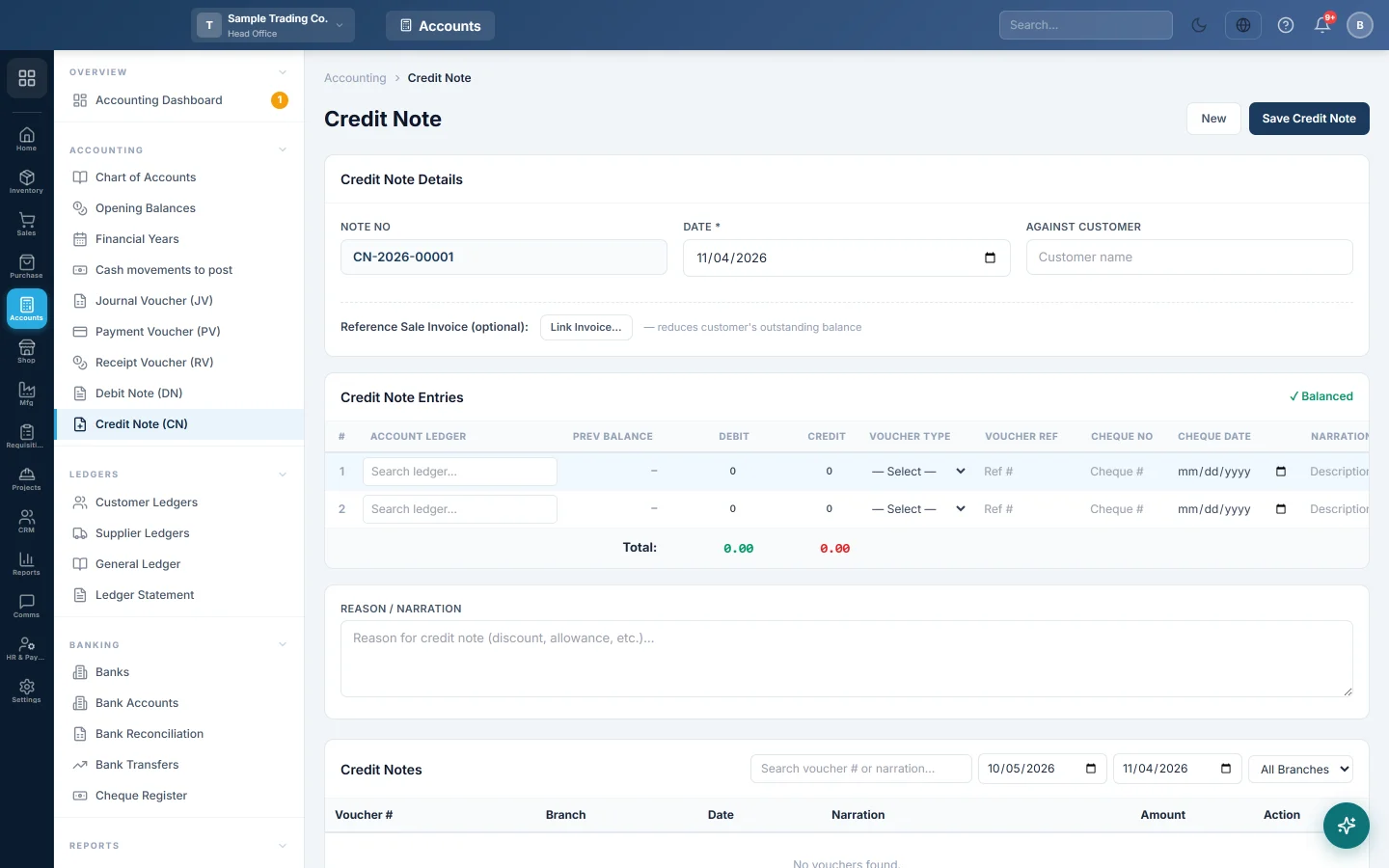
Open Accounting → Accounting → Credit Note (CN). The quick action New CN opens the same screen.
Enter a credit note
- Check the Note No. It is filled in for you and runs per branch (for example CN-2026-00009).
- Set the Date.
- Type the customer's name in Against Customer. This is a note for the printout only; it does not choose the account.
- In Credit Note Entries, on the first row pick the other account, for example Discount Allowed, in Account Ledger and enter the amount in Debit.
- On the second row pick the customer's account and enter the same amount in Credit.
- Check that the badge above the grid shows Balanced.
- Type the Reason / Narration, for example "Late delivery allowance".
- Click Save Credit Note.
Take the note off a sale invoice
- Next to Reference Sale Invoice (optional):, click Link Invoice….
- Pick the invoice. Only unpaid and part-paid invoices are listed, with their balance.
- Enter the lines and save. The invoice's paid amount and balance update, so the customer has less to pay.
The note cannot be more than the invoice still owes, and the invoice cannot be a draft or cancelled.
Find, print, edit or delete a credit note
The Credit Notes list shows the last 30 days. Change the dates, pick a branch, or search by number or narration.
- Print opens the note with signature lines, ready to give to the customer.
- Edit loads it into the form after you confirm. Click Update Credit Note. It keeps its number, and the old version is kept in the audit log.
- Delete opens Delete permanently, which shows the ledger changes and asks for a reason and your password. A linked invoice gets its balance back.
What happens in the books
The note posts the lines exactly as entered. The customer's account is credited, which lowers what they owe you.
Example: you allow Ali Traders Rs 2,000 off an invoice for late delivery.
| Account | Debit | Credit |
|---|---|---|
| Discount Allowed (expense) | Rs 2,000 | |
| Ali Traders (customer) | Rs 2,000 |
Ali Traders owes Rs 2,000 less, and the discount shows as a cost on your Profit & Loss. If you linked the invoice, its balance falls by Rs 2,000.
Common questions
What is the difference between a credit note and a sales return? A sales return takes goods back into stock and reduces the invoice. A credit note changes only the money, for discounts and allowances where no stock moves.
My note was saved as "pending approval". Credit notes at or above the limit in Settings → Accounting Preferences → Approval Workflow wait for approval in the Voucher Register. Until then nothing is posted.
The customer has no open invoice. Can I still give a credit? Yes. Leave the invoice unlinked. The credit stays on the customer's account and reduces what they owe next.
The customer's balance did not change. Check that the credit line is on the customer's own account. Against Customer alone does not post anything.
Where do I see the note on the customer's account? Open the customer in Customer Ledgers. The note shows with its CN number.
Thank you. If you still need help, write to info@eloerp.net.