Cash movements to post
Post the cash in and cash out recorded at the POS till and the hotel cashier to the ledgers, as payment, receipt or journal vouchers.
When a cashier takes cash out of the till for an expense, or puts float in, the drawer and the X / Z reports count it at once. The ledgers do not. This screen lists those movements so an accountant can post each one to the right account.
Before you begin
- Cash movements come from the cash in / cash out buttons at the POS Terminal and the hotel Cashier / Shift screen.
- Seeing the list needs the right to view vouchers; posting needs the right to create vouchers. See Users & Roles.
- The accounts you post to must exist in the Chart of Accounts, for example Shop Expenses or Owner's Drawings.
Where to find it
Open Accounting → Accounting → Cash movements to post.
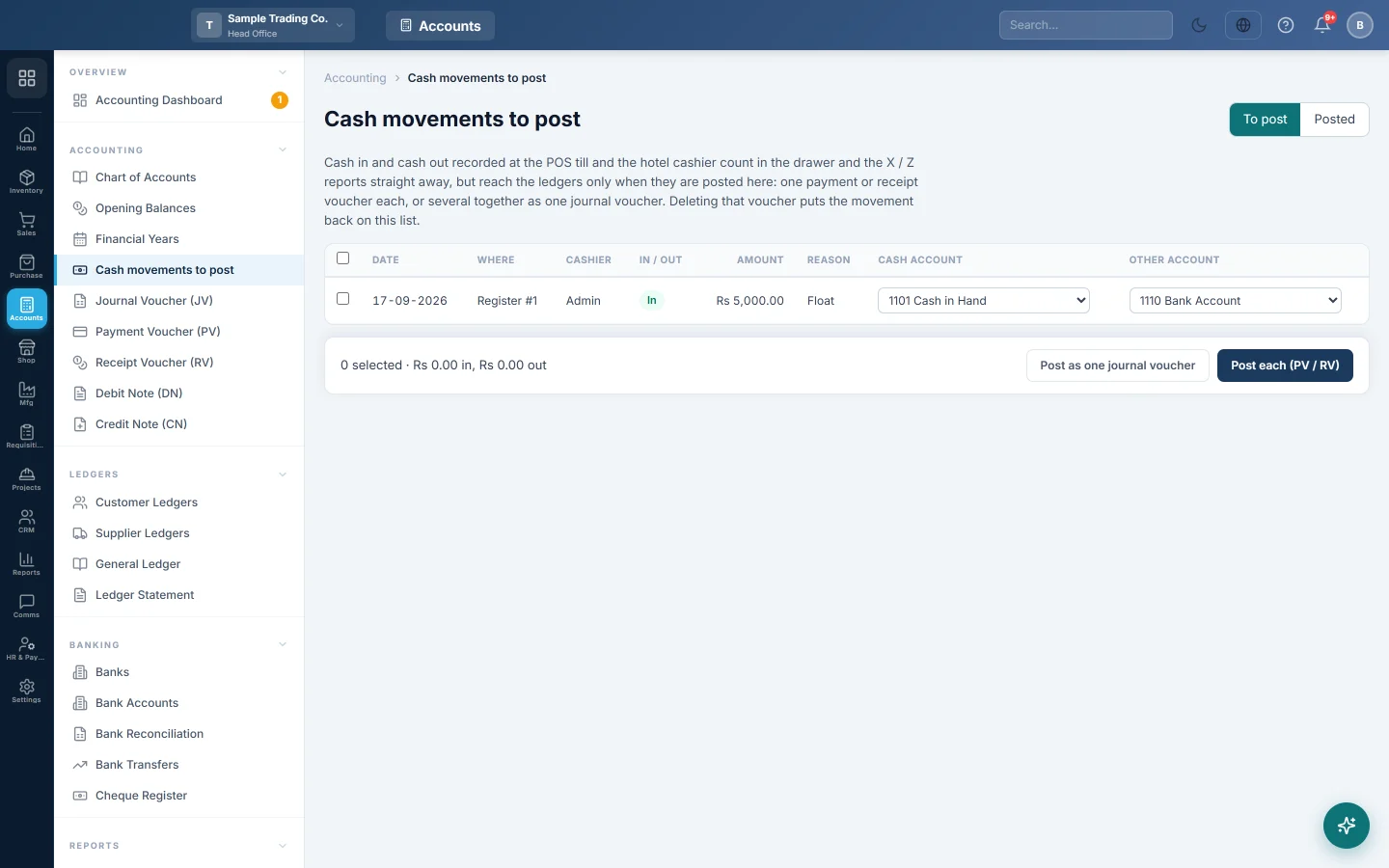
Two tabs sit at the top right: To post lists movements not yet in the ledgers, and Posted lists the ones already posted with their Voucher number.
Post cash movements
- Stay on To post. Each row shows the Date, Where (the register or hotel cashier shift), Cashier, In / Out, Amount and Reason.
- Check the Cash account. It starts on your cash in hand account; pick the drawer or bank the cash really moved through.
- Pick the Other account: the expense, drawings, bank or other account on the opposite side. An empty one is outlined in red.
- Tick the rows you want to post, or tick the box in the header to select all.
- Check the bar at the bottom: how many you selected and the totals in and out.
- Click Post each (PV / RV) for one voucher per movement, or Post as one journal voucher to post them together.
The message lists the voucher numbers. The rows move to the Posted tab.
Undo a posting
Delete the voucher that was posted, from the Payment Voucher, Receipt Voucher or Journal Voucher screen. The movement goes back to the To post tab, ready to post again.
What happens in the books
A cash out is posted as a payment voucher (PV): the other account is debited and the cash account credited. A cash in is posted as a receipt voucher (RV): the cash account is debited and the other account credited.
| Movement | Debit | Credit |
|---|---|---|
| Cash out Rs 1,500, "Tea and snacks" | Staff Welfare Rs 1,500 | Cash in Hand Rs 1,500 |
| Cash in Rs 5,000, "Float top-up" | Cash in Hand Rs 5,000 | Bank Rs 5,000 |
With Post as one journal voucher, the same lines go into one journal voucher (JV) instead.
Common questions
Why does the till show the cash out, but the expense is not in my P&L? Cash movements reach the ledgers only when you post them here. Until then they count in the drawer and the X / Z reports only.
It says "Pick both accounts". One of the selected rows has no cash account or no other account. Pick both for every ticked row.
Can the cash account and the other account be the same? No. EloERP refuses it, because the voucher would move nothing.
I posted a movement to the wrong account. Delete the voucher it created. The movement returns to To post, and you can post it again with the right account.
Which branch is the voucher in? A till movement is posted in the branch of its register. A journal voucher for several movements takes the branch of the first one, so post each branch's movements separately.
Obrigado. Se ainda precisar de ajuda, escreva para info@eloerp.net.