Pending Approvals
One queue of purchase documents over your approval threshold that are waiting for you to approve them.
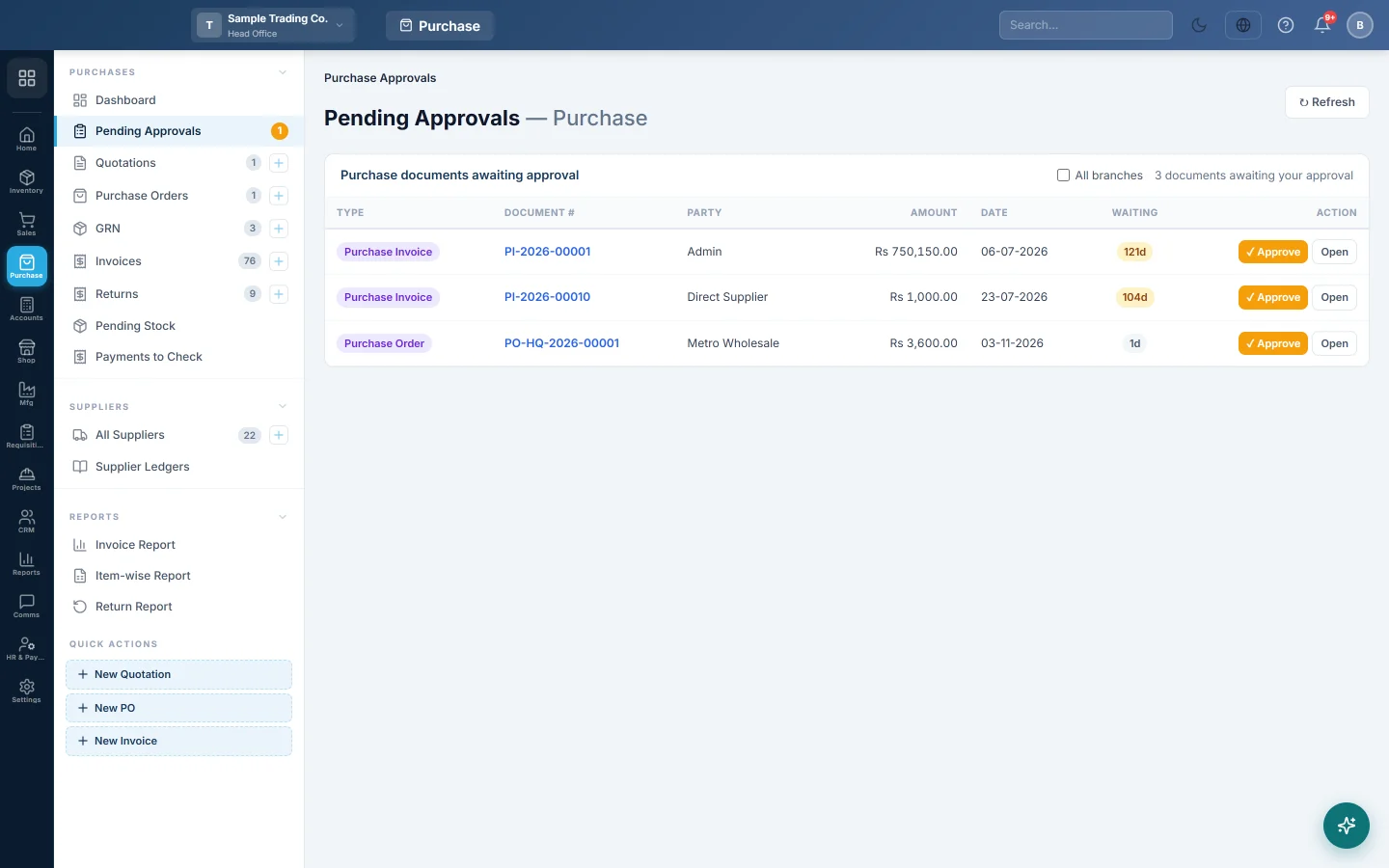
Pending Approvals collects the purchase documents waiting for an approver: quotations, orders, GRNs, invoices and returns at or above your approval threshold. You can approve them here without opening each one.
Before you begin
- Approval thresholds are set per document type in Purchase Preferences, under Approval Workflow. A threshold of 0 turns approval off for that type.
- You only see the types your role can approve, for example the purchase invoice approve permission. See Users & Roles.
- With Maker-checker on, you cannot approve a document you created yourself. Another approver must do it.
Where to find it
Open Purchases → Purchases → Pending Approvals.
Approve a document
- Look at the Type, Party, Amount and how long it has been Waiting.
- To check the details first, click the document number or Open.
- Click ✓ Approve on the row.
The row leaves the queue. The person who entered it can now carry on: confirm the invoice or GRN, accept the quotation, or receive and bill the order.
To see documents from every branch, tick All branches. A Branch column appears. Click ↻ Refresh to reload the queue.
What approval does not do
Approving does not post anything. A purchase invoice, GRN or return still has to be confirmed, which is when stock and the books change. See Invoices and GRN.
Common questions
The queue is empty but a colleague says a bill is waiting. Its total may be below the threshold, it may be in another branch, or your role may not have that type's approve permission. Tick All branches and check again.
Approve shows an error about maker-checker. You created that document. Ask another approver.
How do I stop needing approval? Set that document type's threshold to 0 in Purchase Preferences.
Why is the Waiting count highlighted in amber? The document has waited three days or more.
Terima kasih. Jika masih butuh bantuan, kirim email ke info@eloerp.net.