Profitability Report
Profit on what you sold in a period, by item, invoice, customer or category, after returns and invoice discounts and against the cost of the goods.
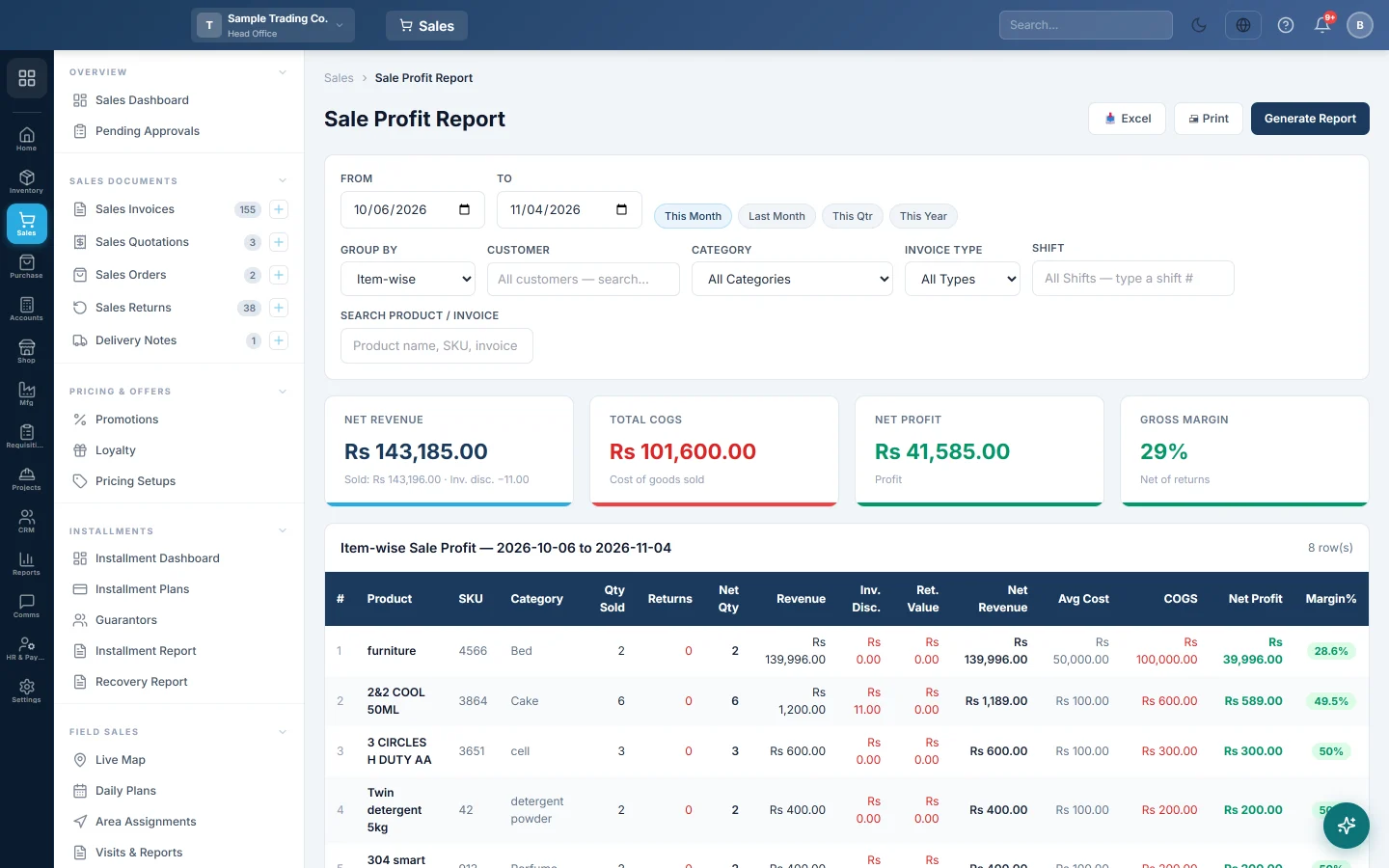
The Profitability Report shows how much you made on your sales: what you sold, less returns and discounts, less what the goods cost you. It opens as the Sale Profit Report, the same report that Accounting uses.
Before you begin
- Your plan must include the profitability report. If it is missing from the menu, see Billing.
- Your role needs View Profitability Report and View Sale Invoice Report. Your administrator sets these in Users & Roles.
- Products need a cost price, from purchases or set on the product. A product sold with no cost shows a 100% margin.
- The report covers the branch shown in the top bar. Switch branch to see another one.
Where to find it
Open Sales → Reports → Profitability Report. Accounting users reach the same report under Accounting → Reports → Sale Profit Report, see Sale Profit Report.
Run the report
The report loads for your company's default date range when you open it.
- Set From and To, or click This Month, Last Month, This Qtr or This Year.
- In Group By, pick Item-wise, Invoice-wise, Customer-wise or Category-wise.
- Narrow it if you need to: Customer, Category, Invoice Type, Shift, or Search Product / Invoice.
- Click Generate Report.
The quick-range buttons reload at once. After changing any other filter, including Group By, click Generate Report.
Read the summary cards
| Card | What it shows |
|---|---|
| Net Revenue | What you sold, less invoice discounts and returns. The small line shows Sold, Inv. disc. and Returns. |
| Total COGS | The cost of the goods sold, less the cost of goods that came back. |
| Net Profit | Net Revenue − Total COGS. Shown as Loss when below zero. |
| Gross Margin | Net Profit as a percentage of Net Revenue. |
How profit is worked out
For each sold line, the report takes:
- Revenue: the line amount on the invoice, after line discount, with the line's tax included.
- Inv. Disc.: a discount on the whole invoice, shared over its lines by value. The column shows only when some invoice had one.
- Ret. Value: what was refunded on returns dated inside the period.
- COGS: quantity in base units × the cost saved on the sale line when it was sold. When the line has no cost, the product's cost price is used.
Net Revenue = Revenue − Inv. Disc. − Ret. Value, and Net Profit = Net Revenue − COGS (after the cost of returned goods).
| Amount | |
|---|---|
| Revenue: 10 units at Rs 1,200 | Rs 12,000 |
| Less Ret. Value: 1 unit back | Rs 1,200 |
| Net Revenue | Rs 10,800 |
| COGS: 9 units at Rs 900 | Rs 8,100 |
| Net Profit | Rs 2,700 |
| Margin% | 25% |
The Margin% badge is green at 20% and above, amber from 10% and red below 10%.
Read the table
- Item-wise: each product, and the size or unit sold, with Qty Sold, Returns, Net Qty, Revenue, Ret. Value, Net Revenue, Avg Cost, COGS, Net Profit and Margin%.
- Invoice-wise: each invoice with its Customer, Salesperson (the user who entered it), Line Disc. and Tax, newest first.
- Customer-wise and Category-wise: totals per customer or category, with the number of Invoices or Products.
Click Excel or Print to keep a copy.
Common questions
Why is the margin very high on one item? It had no cost price when it was sold. Enter purchases before selling, or set a cost on the product.
Why is tax inside Revenue? Revenue is the line amount as saved on the invoice, which includes the line's tax. On taxed items, compare with Profit & Loss, which keeps tax out of sales.
A return shows "returned this period, sold earlier". The goods came back in this period but were sold before it. The return still reduces this period's revenue and cost.
Why does this differ from the Sale Invoice Report? That report shows invoice totals with freight and does not take off returns. This one is about goods sold, net of returns, against their cost. See the Sale Invoice Report.
Can head office see all branches together? No. The report shows the branch in the top bar.
Спасибо. Если помощь всё ещё нужна, напишите на info@eloerp.net.