Guarantors
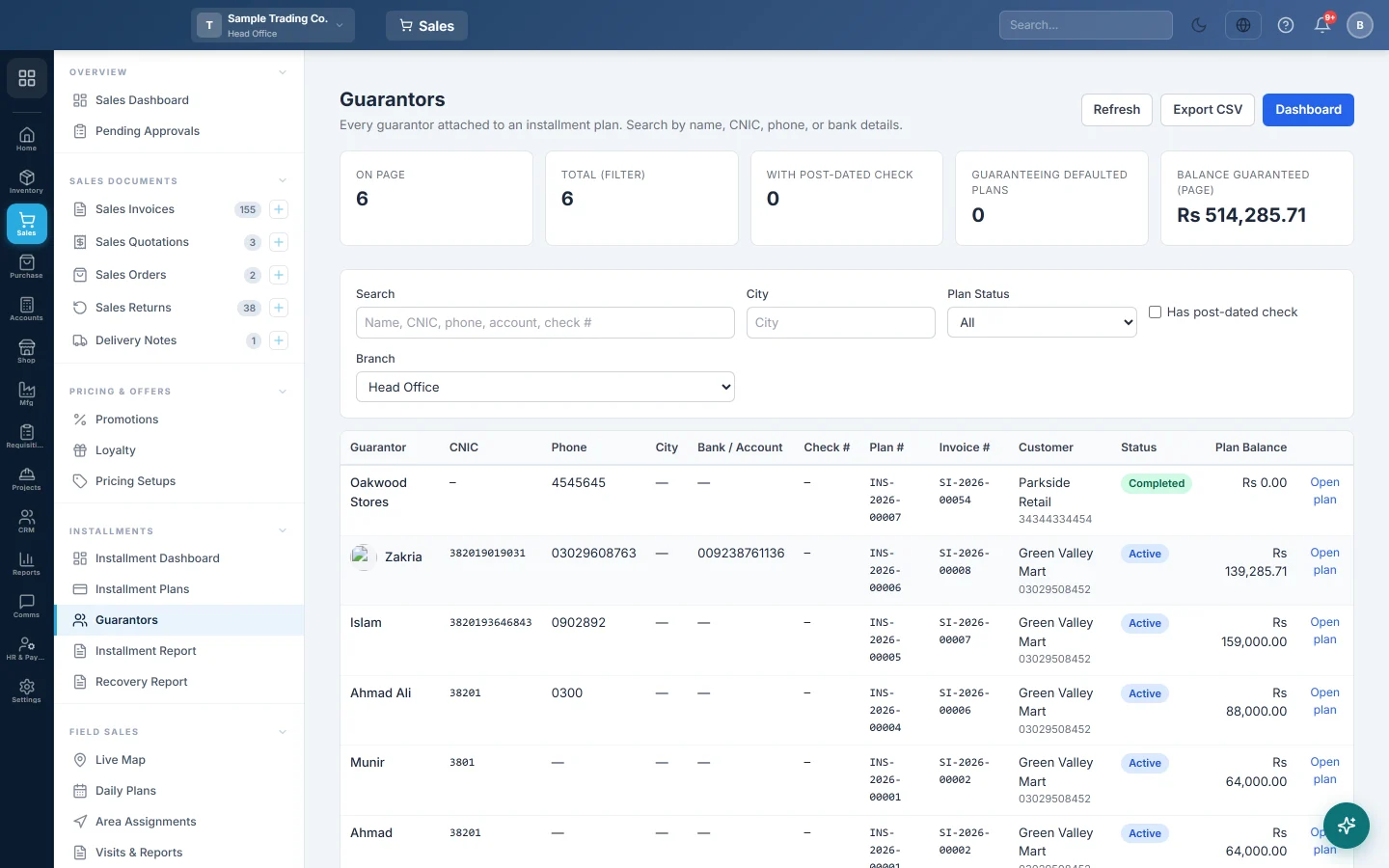
Every guarantor (zamin) attached to an installment plan in one searchable list, with their ID, phones, bank details and how much is still owed on the plan they back.
A guarantor (zamin) is the person who stands behind a customer's installment plan. The Guarantors page lists every guarantor on every plan, so you can find who to call when a customer stops paying.
Before you begin
- The Installment feature must be on for your branch, see Features & Add-ons.
- Your role needs permission to view guarantors and installments, see Users & Roles.
- Guarantors belong to installment plans, see Installment Plans.
Where to find it
Open Sales → Installments → Guarantors.
Add guarantors when you make the plan
The best time is when you make the plan on the sales invoice, because that form also takes their pictures.
- In Create Installment Plan, find Guarantors on the right.
- Click Add Guarantor.
- Fill in Full name *, CNIC / National ID no., Phone and Address, and the Bank (optional).
- Click Upload under Photo for their picture and under National ID for a copy of their ID card.
- Repeat for a second guarantor.
- Under Guaranteed Cheques, click Add Cheque for each security cheque: Bank name, Cheque no., Cheque amount, date and a Cheque copy.
Add or change a guarantor later
- Open Sales → Installments → Installment Plans.
- Click Guarantors on the plan. The Manage Guarantors window opens.
- To add one, fill in Full Name, which is required, and any of CNIC, Phone 1, Phone 2, Address, City, Bank Name, Bank Account No and Check No. Click Add.
- To change one, click Edit next to it under Existing Guarantors, change the fields and click Update.
- To remove one, click Delete and confirm.
Find a guarantor
- Type a name, CNIC, phone, bank account or cheque number in Search.
- Narrow the list with City, Plan Status or Has post-dated check.
- At head office, pick a Branch, or All Branches.
Click a Plan # or Open plan to go to the plan, or an Invoice # to open the sales invoice. Export CSV downloads the rows on the page.
The cards at the top count the guarantors on this page: With Post-dated Check, Guaranteeing Defaulted Plans and Balance Guaranteed (page). Total (Filter) counts every match.
Common questions
What does Plan Balance mean? The plan total less the down payment and the installment cash collected. It is what the guarantor is backing today.
A guarantor backs two customers. Do I enter them twice? Yes. A guarantor is saved per plan. Search by their CNIC to see every plan they back.
The Plans Without Guarantor card on the dashboard is high. Those active plans have no guarantor on record. Add one from Guarantors on each plan.
Can I find a customer by the guarantor's CNIC? Yes. Search by CNIC on Installment Plans matches both customers and guarantors.
Where are the security cheques? On the plan: click Pay and open Guarantors · Cheques to see the guarantors and cheque copies.
Teşekkür ederiz. Hâlâ yardıma ihtiyacınız varsa info@eloerp.net adresine yazın.