Sales Dashboard
The Sales home page, with what you sold and collected in a period, what customers still owe, and your best customers, products and salespeople.
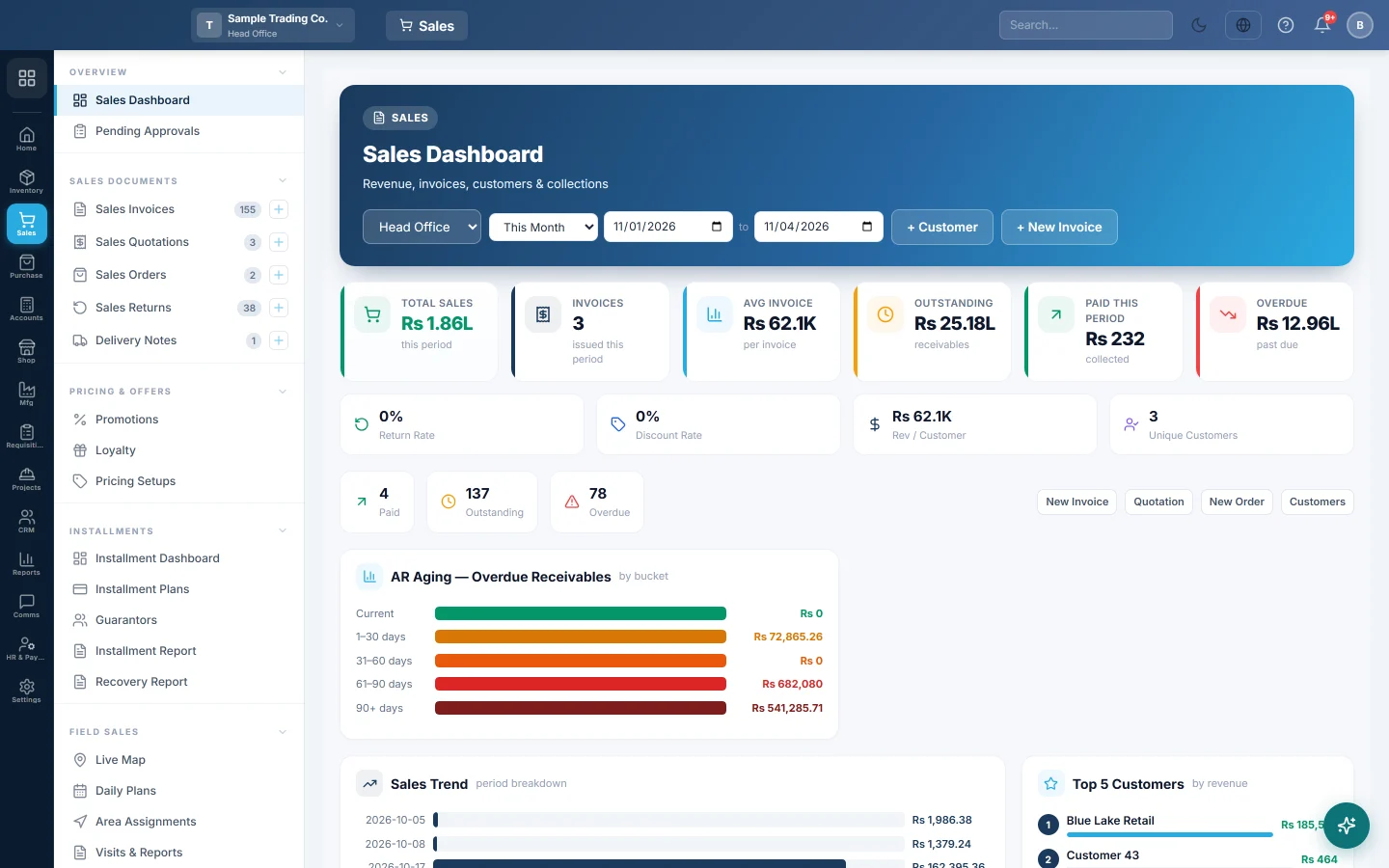
The Sales Dashboard is the first page of the Sales module. It shows what you sold and collected in a period, what customers still owe you, and who and what sells best.
Before you begin
- The figures come from confirmed sale invoices, including POS sales. Drafts and cancelled invoices are not counted.
- If you work in more than one branch, the dashboard opens on your current branch.
Where to find it
Open Sales → Overview → Sales Dashboard.
Choose the period and branch
- Use the date range at the top to pick the period, for example this month.
- If you have several branches, pick one in the branch box, or All Branches.
What the dashboard shows
| Part | What it tells you |
|---|---|
| Total Sales, Invoices and Avg Invoice | The value and number of confirmed invoices dated in the period, and the average invoice. |
| Outstanding | The unpaid balance on all confirmed invoices, whatever their date. This is your udhaar. |
| Paid This Period | What has been paid so far on the period's invoices. |
| Overdue | Unpaid balances past their due date. |
| Return Rate, Discount Rate, Rev / Customer and Unique Customers | Returns and discounts as a share of sales, the average spend per customer and how many customers bought. A return rate over 5% shows in red. |
| Paid, Outstanding and Overdue counts | How many invoices are in each state. |
| AR Aging — Overdue Receivables | Unpaid balances split into Current, 1–30 days, 31–60 days, 61–90 days and 90+ days past due. |
| Sales Trend | Sales per day over the last 30 days. |
| Top 5 Customers and Top 10 Products Sold | Who buys the most, and what sells the most, by value. |
| Sales by Channel | Sales split into POS, cash, credit and installment. |
| New vs Returning | How many of the period's customers bought for the first time. |
| Top Losing Products | Products sold below their cost in the period. It appears only when there are some. |
| Customer Concentration Risk | How much of the period's sales came from the top 5 customers. Above 60% means you depend on a handful of buyers. |
| Salesperson Leaderboard | Sales by the user who entered the invoices. |
| Recent Invoices | The last 10 invoices. Click one to open it, or View All for the full list. |
When a card has nothing in the chosen period, it may show the last 12 months instead, with a note such as Showing last 12 months.
Start a document
Use + New Invoice at the top for a new invoice, or + Customer to add a customer. The quick buttons also have Quotation, New Order and Customers.
Common questions
Outstanding differs from my customer balances. This card adds up unpaid invoices. Customer ledgers also include opening balances, advances and vouchers. See Customer Ledgers.
Why is a sale missing from Total Sales? It is still a draft, it was cancelled, or its date is outside the period. Confirm the draft on Sales Invoices.
Where do I see which customers are overdue? Open Receivables Aging (AR), or filter the invoice list by Non-Zero Balance (outstanding).
Why does the Salesperson Leaderboard show my cashier, not the salesman? It counts the user who entered each invoice, not the SALESMAN picked on it.
Teşekkür ederiz. Hâlâ yardıma ihtiyacınız varsa info@eloerp.net adresine yazın.