Progress
Record a daily progress report for the site, approve it, and see how much of the BOQ is done, billed and behind plan.
The Progress tab measures how much of the job is done. The site writes one daily progress report (DPR) a day, and approved reports move the BOQ's done quantities and the project's % Complete.
Before you begin
- The project has a BOQ. Quantities done are measured against its lines. See All Projects.
- To compare with the plan, give the phases dates on the Schedule tab, or give the project a start and expected end date.
- Your role needs View Daily Progress Reports to see the tab and Create Daily Progress Reports to write one. Approve Daily Progress Report lets you approve and reopen. See Users & Roles.
Where to find it
Open Projects → Projects → All Projects, click the project, then open the Progress tab.
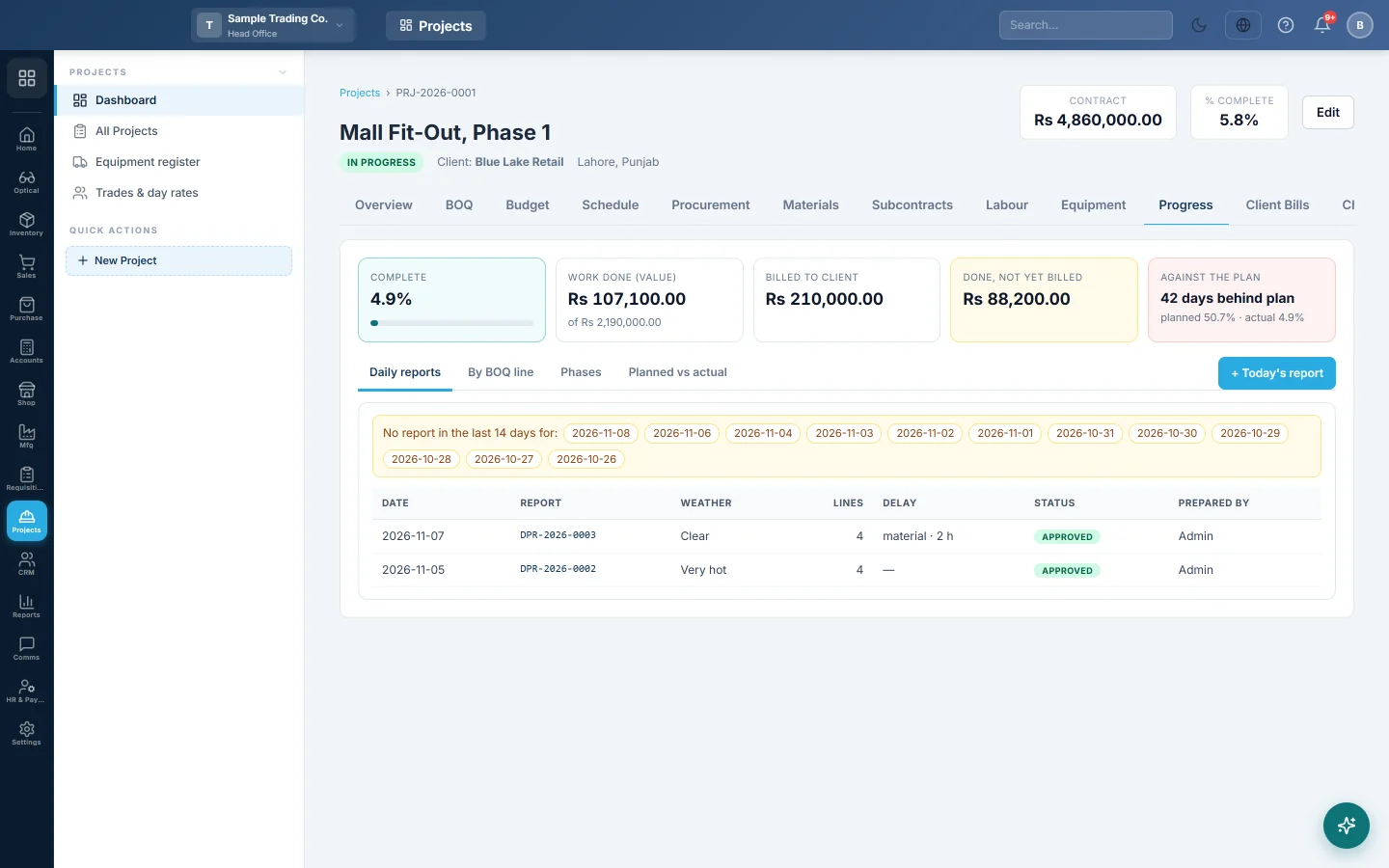
Read the progress strip
- Complete: the share of the BOQ value done, from approved reports.
- Work done (value): the value of the quantities done, out of the BOQ total.
- Billed to client: the value of quantities on certified client bills.
- Done, not yet billed: work done that the next client bill can claim.
- Against the plan: how many days behind plan the site is, or On or ahead of plan.
Write today's report
- Click + Today's report. If today's report exists, click Open today's report instead.
- Check the Date and pick the Weather. To report an earlier day, change the Date.
- Type a sentence or two in Work done today.
- Under Quantities done (against the BOQ), pick a Work line and type the Qty today.
- Optionally fill Where (grid, floor) and Remarks. Click + Add line for each other BOQ line worked on.
- Fill Hindrances, and pick Delay caused by and Hours lost if work stopped.
- Fill Visitors and inspections and Safety (incidents, near misses, toolbox talk).
- Click Save draft to finish later, or Submit to send it for approval.
Each line shows the BOQ quantity and what is done with this report. A line turns amber when it goes past the BOQ quantity.
Approve or reopen a report
- Click the report in the Daily reports list.
- Click Approve. The BOQ done quantities and % complete update at once.
- To correct an approved report, click Reopen. Its quantities stop counting until you approve it again.
A draft or submitted report can be deleted with Delete. Reopen an approved report before deleting it.
See labour, machines and photos for the day
An open report shows On site this day. It lists the headcount by trade from the day's labour sheet, and the machines and hours from the equipment log. Site photos dated that day show under Site photos this day. See Labour, Equipment and Documents.
Click Print or Share PDF to send the report to the client or head office.
Look at progress in other ways
- Daily reports: every report with its status. Days in the last 14 with no report show at the top.
- By BOQ line: BOQ qty, Done, Billed, % and Done, not billed for each line, by phase. Variation lines are marked.
- Phases: planned and actual start, Finished date and % for each phase. A phase past its planned end shows overdue.
- Planned vs actual: a weekly curve of planned % against actual %.
Common questions
Why does % Complete still show 0? Only approved reports count. Approve the submitted reports.
How is % complete worked out? It is the value done (quantity done × BOQ rate, up to the BOQ quantity) divided by the total BOQ value.
Does a progress report post anything to the books? No. Progress is measurement only. Money moves when you certify a client bill.
When is a phase marked finished? When every BOQ line in it is fully done. Its actual start is the date of its first approved quantity.
I did more than the BOQ quantity. What now? The extra is recorded. Raise a change order if the scope grew. See Change Orders.
Why does Against the plan ask for dates? The plan is each phase's BOQ value spread evenly between its planned dates. Without dates there is no plan to compare.
谢谢。 如果仍需帮助,请发邮件至 info@eloerp.net。