Optical prints
Print the prescription card, the spectacle job card with its customer slip, the sale invoice and the optical lists, all on your letterhead with your logo.
Every optical record prints on your letterhead: your logo, name, address and phone, taken from your company profile.
Before you begin
Upload your logo and fill in your address and phone in the company profile. See Company profile.
What you can print
| Record | Button | Where |
|---|---|---|
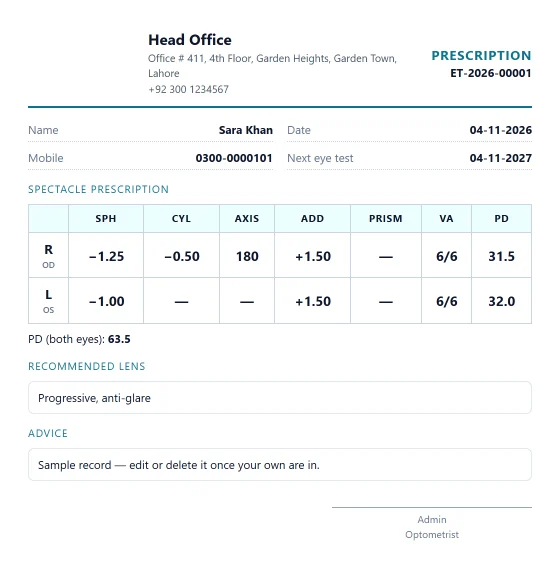
| Prescription card | Print prescription or Save & print | An eye test |
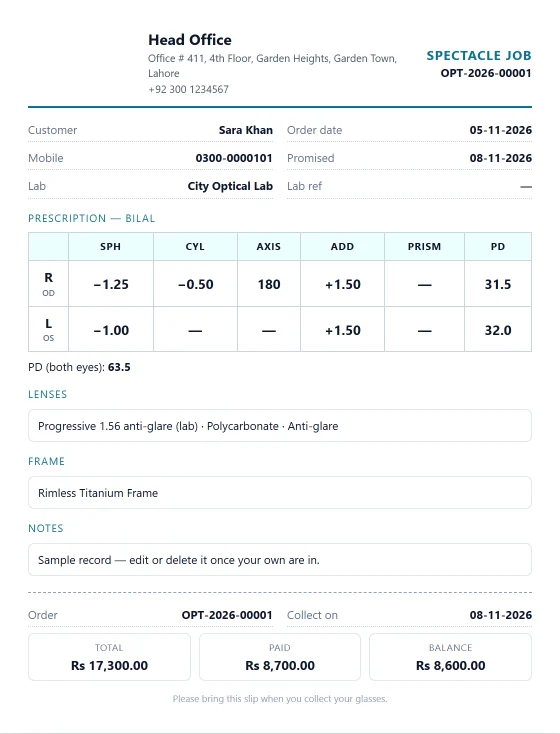
| Spectacle job card with a customer slip | Print job card | An order |
| Sale invoice with payments | Print invoice | An order's Payment, or the payment window |
| Eye tests list | Eye tests | |
| Spectacle orders list | Spectacle orders | |
| Reminders list | Eye test reminders |
The prescription card
It has the customer, date, next eye test and the prescription with VA and PD. Contact lens details, the recommended lens, advice and any referral appear when filled in, with the optometrist's name to sign.
The job card
The top half is for the lab: prescription, lenses, frame and notes. The tear-off slip at the bottom is for the customer: order number, collection date, total, paid and balance.
Common questions
My logo does not show. Upload it in the company profile. A branch with its own logo prints the branch logo.
What paper size do they use? The prescription and job card print on A5. Lists print on A4 landscape. Pick the paper in the print window.
谢谢。 如果仍需帮助,请发邮件至 info@eloerp.net。