Spectacle orders
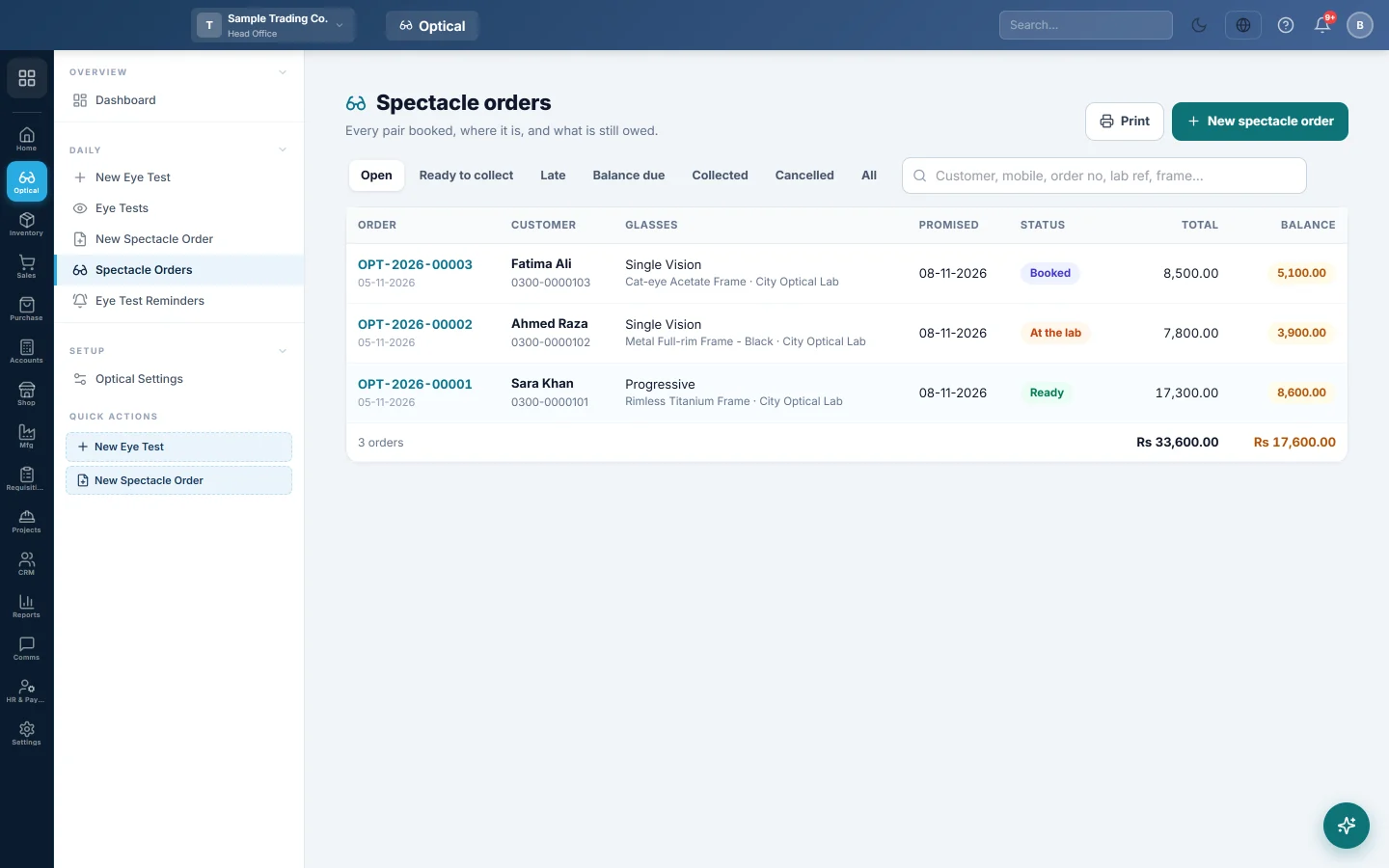
Every spectacle order with its stage, promised date, total and balance, filtered by open, ready, late, balance due, collected or cancelled.
Spectacle orders lists every pair booked, where it is and what is still owed.
Where to find it
Open Optical → Daily → Spectacle Orders.
Filter the list
Use the tabs at the top:
- Open: booked, at the lab or ready.
- Ready to collect: glasses waiting for the customer.
- Late: not ready by the promised date.
- Balance due: billed orders with money still owed.
- Collected, Cancelled or All.
Type a customer, mobile, order number, lab reference or frame in the search box. The footer adds up the total and the balance of the rows shown.
Read a row
- Status: Booked, At the lab, Ready, Collected or Cancelled.
- Balance: what is still owed. Paid means nothing is owed. Not billed means no invoice yet.
Click a row to open the order. See Track a spectacle order and hand it over.
Print the list
Click Print. The list prints on your letterhead with your logo, with the tab and search you chose.
Common questions
How do I see which customers owe money? Click Balance due. The footer shows the total owed.
Where are orders from an outside prescription? In the same list. The order page shows Outside prescription and who prescribed it.
Merci. Si vous avez encore besoin d’aide, écrivez à info@eloerp.net.